

Starting with the second beta of iOS 11.3, Apple has introduced a new "Battery Health" feature that's designed to provide you with more information about the state of your battery and whether or not it's impacting device performance.

If your iPhone has a degraded battery that is leading to throttling issues, the "Battery Health" section will let you know about it, and it will provide an option to turn off performance management to put a stop to any throttling that's going on.
There are, however, some nuances to this feature that you need to know about, which we'll outline below.
When Installing iOS 11.3
When you first install the iOS 11.3 update, all performance management features that might have been enabled are automatically disabled. So when you first install the beta, you don't need to do anything because performance management is turned off.
You will, however, need to watch out for an unexpected shutdown that turns your device off, because if this happens and you have a bad battery, performance management will be turned back on. More on this below.
Accessing Battery Health
You can check out the status of your battery in the new Battery Health section, which will tell you the maximum capacity of the battery in your iPhone and whether or not it's running at peak performance capacity. Here's how to get to it:
- Open up the Settings app.
- Scroll down to "Battery" and tap it.

- Tap on "Battery Health."
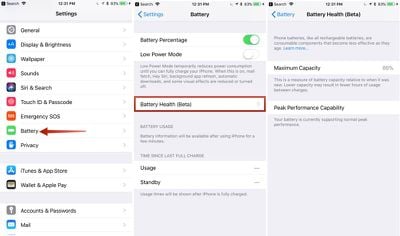
All the info you need to know about your battery is listed here. Maximum Capacity will let you know how your battery is performing overall, and it directly correlates to how long your iPhone will last on a single charge.
Peak Performance Capability will let you know if a degraded battery has resulted in performance slowdowns.
What it Looks Like When Your Device Running Normally
When your iPhone is running as normal, under the "Peak Performance Capability" section, it will say "Your battery is currently supporting normal peak performance."
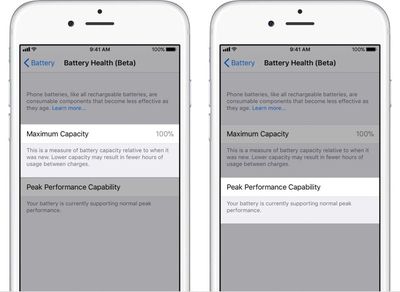
You may still have somewhat degraded Maximum Battery capacity as this number slowly declines after charging cycles, but throttling does not kick in until the battery becomes severely degraded and can no longer offer enough power to support spikes in processor usage.
What it Looks Like if You Have a Bad Battery
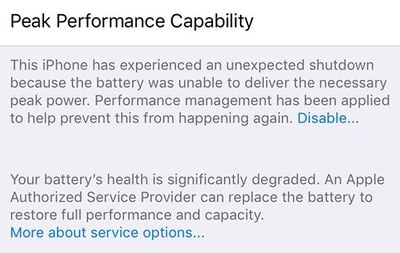
If you have a bad battery, it will say "Your battery's health is significantly degraded," and it will let you know that an Apple Authorized Service Provider can replace the battery to restore full performance.
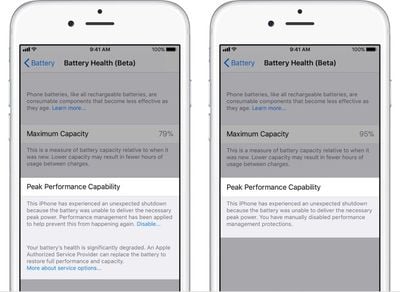
It will also tell you if performance management features have been turned on, and it will provide an option to turn them off.
What Happens When You Have an Unexpected Shutdown
As mentioned above, all performance management features are disabled automatically upon installing iOS 11.3. If your device has a bad battery and it shuts down because of it, performance management will be automatically enabled.
If this happens, you will see the following message under "Peak Performance Capability" in Battery Health.
"This iPhone has experienced an unexpected shutdown because the battery was unable to deliver the necessary peak power. Performance management has been applied to prevent this from happening again."
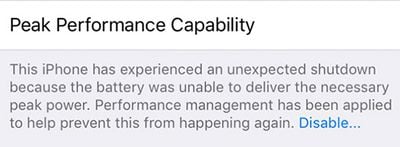
If you have an unexpected shutdown AND your battery capacity is significantly degraded, you'll see a slightly different message suggesting an immediate battery replacement.
How to Disable Performance Management if Your Battery is Bad
After experiencing an unexpected shutdown, performance management is turned on automatically on your iPhone. You will, however, see a small "Disable" option when this happens, and if you tap it, you'll be given the option to disable performance management.
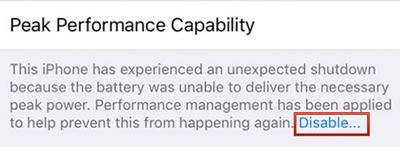
Disabling performance management will turn off any throttling that's been applied, but it will leave your device vulnerable to future unexpected shutdowns.
You will not see the option to disable performance management until your device has experienced at least one unexpected shutdown, and once you disable it, there is no option to turn it on again.
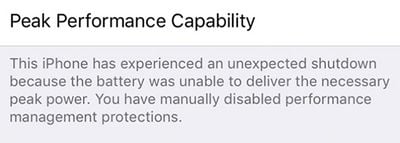
If your iPhone shuts down again while performance management is disabled, though, performance management will automatically turn it on again.
This means you will need to turn performance management off again each time your device experiences an unexpected shutdown, as Apple believes slower performance is preferable to sudden losses of power.
How to Permanently Disable Performance Management
If you have a device with a bad battery that is experiencing unexpected shutdowns and is subjected to Apple's performance management feature, the only permanent solution is to get a new battery.
Having your battery replaced will restore an older iPhone to full working order, with maximum capacity and performance capabilities.
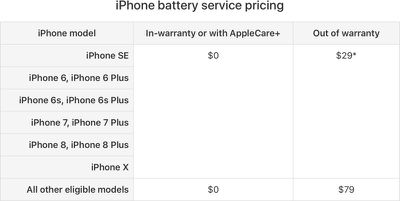
Apple is offering $29 battery replacements for the iPhone 6 and newer through the end of 2018. Your battery does not need to be experiencing shutdowns to be replaced - you can also get a replacement for a battery that's not operating at maximum capacity, no questions asked. You can get one $29 battery replacement per device.
Newer devices like the iPhone 8, iPhone 8 Plus, and iPhone X that have a high maximum capacity near 100% don't need replacement, but at levels below 90%, it could be worth getting a new battery while Apple is still offering them at a discounted price. To get a battery replacement, contact Apple Support.
If you have AppleCare+ or are under your one-year device warranty and have a battery that's below 80 percent, you won't even need to pay the $29 fee -- that's considered a defective battery and Apple will replace it for free.
Devices Impacted by Performance Management
Performance management features have been installed on the iPhone 6, 6 Plus, 6s Plus, 7, 7 Plus, and SE. On other iPhones, like the iPhone 8, 8 Plus, and X, you will be able to see readings for Maximum Capacity and Peak Performance Capability, but you won't need to worry about throttling or unexpected shutdowns.
























![Apple Pulls Keynote, Pages and Numbers From App Store [Update: Back]](https://images.macrumors.com/t/Okb7kitB_gNr6qe5Pex9nQIysD8=/112x112/article-new/2026/01/Apple-Creator-Studio-iWork-suite.jpg)






















Top Rated Comments
[doublepost=1517955873][/doublepost]Huh. Who would have thought that batteries wear out? Yeah it’s some Apple conspiracy to sell more phones because they are on the ropes financially, right? Come on.
Maybe I’ve just got a bad phone, but my battery health is 88%(info from Apple) and my iPhone 6s is throttled very often... To me, 88% shouldn’t warrant the kind of throttling that they are doing. It’s especially not “severely degraded.”
I get the optimal experience argument with the shut off issue, but it seems like the throttling is more prominent than they say it is and sugar coating their power issues is just letting them get away with it.
The OS will always have some features to maximise battery life if it’s on standby or not running intensive apps. Similarly, if you’re experiencing performance issues such as UI lag on a newer OS then this may not necessarily be remedied by higher CPU clockspeed: the bottleneck could be RAM, graphics, or simply the age of the hardware on a more resource-intensive OS.
Don’t take this as an apologist remark. It’s just a gentle reminder that clockspeed below the max frequency when using your phone doesn’t immediately mean it’s throttled. Think the max quoted frequency as Intel’s “turbo boost”. It’ll rarely hit that with normal usage.