
What You Need to Know About HEIF in macOS - MacRumors
Skip to Content

What You Need to Know About HEIF in macOS

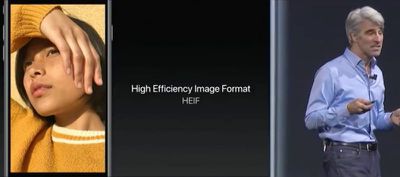
With the official release of iOS 11 and macOS High Sierra, Apple introduced support for a new image format called HEIF, which uses the file extension HEIC. Apple sees HEIF as a worthy successor to the JPEG format. So what makes it so good that it can replace an industry standard that's been in use for almost 25 years?
HEIF

What is HEIF?

HEIF stands for High Efficiency Image Format and can be considered the still-image version of the HEVC video codec that Apple's ecosystem now officially supports. (You can learn more about HEVC here.) The HEIF standard wasn't made by Apple – it was developed in 2015 by the MPEG group, which also invented the AAC audio format used in iTunes.

Benefits of HEIF Over JPEG

As the name implies, HEIF is a more streamlined method of storing image data and offers better quality than the traditional JPEG format. For example, HEIF supports image transparency and can capture a more extended color range than JPEG (16-bit versus 8-bit), which should increase the accuracy of photos taken on Apple's latest iPhones. At the same time, a HEIF-encoded image should be around half the file size of an equivalent-quality JPEG, so users will be able to keep twice the number of shots on their Apple devices (or in iCloud) before they max out their storage capacity.

In addition, HEIF files include a 320x240 embedded thumbnail that's four times the resolution but only twice the file size of a standard JPEG thumbnail. HEIF images can also be rotated and cropped without altering the image or re-saving them, all of which makes working with HEIF files that much faster than JPEG on both Mac and iOS devices.
ios11livephotos
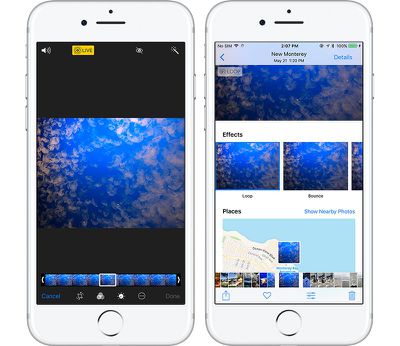
HEIF also brings other benefits that JPEG doesn't offer because it's unlike your typical image format. That's because it's also capable of acting as a container for multiple files. This should be a boon for anyone who takes bursts of photos or lots of Live Photos – which can be edited in multiple new ways in iOS 11 – but it also means HEIF could become a wholesale replacement for GIF.

HEIF Compatibility and Image Sharing

Currently, Apple only supports HEIF image encoding on iOS devices with a minimum A10 Fusion processor, so that includes the 2017 10.5-inch and 12.9-inch iPad Pro, the iPhone 7 and iPhone 7 Plus, and of course Apple's new 2017 range of iPhones. Owners of these devices can check their camera is encoding photos in HEIF by going to Settings -> Camera -> Formats, and ensuring the "High Efficiency" option is selected. The "Most Compatible" option means photos will be encoded in JPEG format.
highsierraphotoscurves
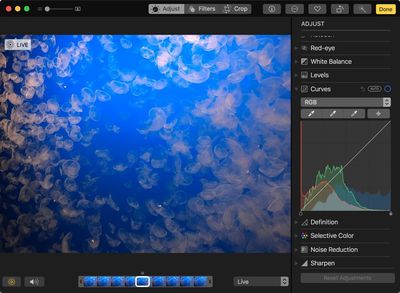
HEIF is supported on all Macs capable of running macOS High Sierra, and many macOS applications work natively with HEIF, including Photos, Preview, and Quick Look. This means macOS users might consider converting their JPEG image files to HEIF for greater storage or network benefits.

The transition to HEIF within the Apple ecosystem should be mostly transparent, but if users need to move HEIF content outside of that ecosystem, it's worth looking into transcoding options (JPEG, for example) to provide the best backwards compatibility for other users. Happily, iOS 11 will auto-convert HEIF images to JPEG when they are shared to devices running earlier versions of iOS, non-Apple devices, and popular social media sites, or when they are passed over to apps that don't yet support the standard.


Tag: HEIF
Related Forums: iOS 11, macOS High Sierra

Popular Stories

iPhone Duo Trio

Here's What Apple's Apps Look Like on the iPhone Duo

Tuesday October 20, 2026 11:12 am PDT by
With just three days to go until the iPhone Duo is released, Apple is getting ready for the launch. Behind the scenes, the App Store now has screenshots of Apple's built-in apps running on the Duo. We've seen some apps in marketing materials, but images of the ones we haven't seen give us an idea of what it will be like using the iPhone Duo day to day. Many apps are shown in landscape...
Apple Creator Studio iWork suite

Apple Pulls Keynote, Pages and Numbers From App Store [Update: Back]

Thursday October 22, 2026 11:01 am PDT by
Apple has temporarily removed Keynote, Pages, and Numbers from the App Store, just after releasing an update that added iPhone Duo support and a new Intelligent Assistant. It is not clear if the apps were removed intentionally, or if it is a bug. Apple has not said when the apps will be reinstated, but if it was in error, they should return soon. Update: The Mac versions are back without...
M5 MacBook Pro

RIP, MacBook Ultra

Monday October 19, 2026 9:37 am PDT by
Apple today sent out invites for an experience in Los Angeles on Wednesday, October 28, and the "Pro and tell" tagline on the invitation likely means that the rumored MacBook models with touch-enabled OLED displays will stick with MacBook Pro branding instead of the once-rumored "MacBook Ultra" name. The long-rumored "iPhone Ultra" ended up being named iPhone Duo, so speculation that Apple...

Top Rated Comments

katanna Avatar
118 months ago
This means macOS users might consider converting their JPEG image files to HEIF for greater storage or network benefits.
Is there an option inside of Photos to batch-convert your entire library to HEIF?
Score: 7 Votes (Like | Disagree)
zorinlynx Avatar
118 months ago
This means macOS users might consider converting their JPEG image files to HEIF for greater storage or network benefits.
Does this mean that JPG -> HEIF conversion is completely lossless? Because if it's not, NO, macOS users shouldn't convert their images.
Score: 6 Votes (Like | Disagree)
Superhai Avatar
118 months ago
I have used HEIF for some time and the short version of what you want to know is this:

Encoding and decoding is processor intensive. On my MacBook Pro without hardware acceleration, photos are not displayed instantly as with jpeg, but could take seconds. This is noticeably if you have lots of photos to go through. Consider this if you want others to view your photos as well.

The quality is much higher than jpeg. Especially skies and surfaces with little color change are much less blocky even with 8-bit sources. And it support higher bits per color without needing a different format. And like jpeg you decide how much or little compression you require.

Avoid converting jpeg to HEIF. Unless you have stored the jpeg at near lossless quality, you will loose even more detail. And storing jpeg artifacts require more space.

Apple Photos does not convert your master files to HEIF automatically. Only if you transfer to a device without HEIF support will macOS or iOS convert HEIF to jpeg. Not the other way round. It should make sense as Photos neither did this before with TIFF, PNG, camera RAW or any other file format it supports.

A HEIF photo is basically a one frame HEVC video. Interestingly you can use ffmpeg or other video software to create a HEIF image, but you still need to put it in the right container by some other software. Also knowledge of HEVC compression settings are directly transferable to HEIF.
Score: 5 Votes (Like | Disagree)
rishiomedia Avatar
118 months ago
I’m also interested in knowing if it’s possible to convert an existing library of jpeg and Raws into HEIF on the Mac.
Score: 5 Votes (Like | Disagree)
118 months ago
Are older pictures automatically converted in the HEIF format?
This is my question too.

Also - can you do other non-destructive editing (aside from cropping/resizing) on them similar to RAW.
Score: 4 Votes (Like | Disagree)
118 months ago
Are older pictures automatically converted in the HEIF format?
Score: 4 Votes (Like | Disagree)
Latest Stories
iPhone Duo Launch Begins as First Orders Reach Customers
6 hours ago
1Password for Agents Keeps Your Passwords Hidden From AI
7 hours ago
iPhone Duo 24 Hours Later: Your Questions Answered
7 hours ago
Apple's iWork Apps Get 'Intelligent Assistant' and iPhone Duo Support
8 hours ago
Apple is Apparently Considering a Slightly Larger iPhone Duo
8 hours ago
Giant iPhone Duo Displays Coming to Four Apple Stores
9 hours ago
Apple Pulls Keynote, Pages and Numbers From App Store [Update: Back]
10 hours ago
Apple Updates More Apps With iPhone Duo Support
10 hours ago
Apple Will Label Apps 'Made for iPhone Duo' in App Store
13 hours ago
Amazon Takes $49 Off iPad With Prices Starting at $399.99
14 hours ago
F1 on Apple TV Now Available in Dolby Atmos
14 hours ago
Apple Reveals More Than 50 Apps That Will Be Updated for iPhone Duo
15 hours ago
Apple Blocks Certificates That Could Help Attackers Fake Websites
16 hours ago
Giant iPhone Duo Installations Spotted at Apple Fifth Avenue
17 hours ago
iPhone Duo 2 Prototypes Include Under-Display Face ID
17 hours ago
Tesla App Gains iPad and iPhone Duo Support
21 hours ago
Apple Reportedly Boosts iPhone Duo Orders by 44%
22 hours ago
Fortnite Returning to Australian App Store After Court Ruling
22 hours ago
Apple Ordered to Open iPhone to Rival App Stores in Australia
22 hours ago
Apple Suppliers Face Hurdles Cutting Circuit Board Emissions
23 hours ago
Things Updated for iPhone Duo With Adaptive Layout
23 hours ago
Simplicity and Siri AI Are HomeView's Killer Features, Apple Says
1 day ago
iPhone Duo Reviewers Really Miss Face ID
1 day ago
Does the iPhone Duo Run Hot? Here's What Reviews Found
1 day ago
Apple Music's New Look is Now Live on Apple's Website
1 day ago
Anthropic Launches Claude Duet, a Proactive AI Agent
1 day ago
What 32,000 Folds Did to the iPhone Duo's Hinge
1 day ago
iPhone Duo's Hidden FaceTime Camera Takes 'Trash' Photos
1 day ago
iPhone Duo Has 'Edge Light' Feature That Debuted on Macs Last Year
1 day ago
Apple Support App Updated for iPhone Duo's Larger Display
1 day ago









































