
iOS 14's New AirPods Features: Spatial Audio, Better Automatic Device Switching, Battery Notifications and More - GeekWebGuides
Skip to Content

iOS 14's New AirPods Features: Spatial Audio, Better Automatic Device Switching, Battery Notifications and More

Apple designed iOS 14 with several new features that improve how the AirPods and the AirPods Pro work with iPhones and iPads, including spatial audio, better device switching, battery notifications, and Headphone Accommodations for those who need help with sounds and frequencies.


This guide covers all of the new features that Apple added for the AirPods in iOS 14.

Spatial Audio (AirPods Pro Only)

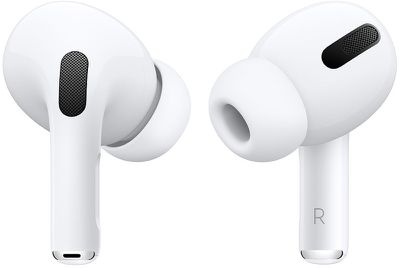
When Apple announced spatial audio during the Worldwide Developers Conference, it was a feature that was a major surprise and one that sounded like something out of a science fiction movie. Spatial audio makes audio sound like it's coming right from your device rather than coming from headphones, providing a unique listening experience.
airpodsprodesign
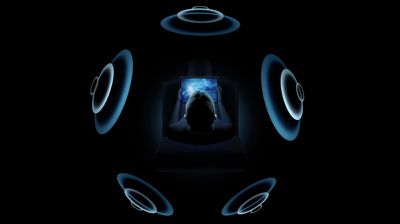
With spatial audio, Apple uses dynamic head tracking and iPhone positioning to bring a movie theater surround sound experience to the AirPods Pro. Using directional audio filters and subtle adjustments to the frequencies that each ear receives, spatial audio is able to put sounds anywhere in space for a more immersive audio experience when watching TV shows and movies.

Spatial audio is able to take advantage of the gyroscope and accelerometer in the AirPods Pro and iPhone to track head movement and device location, comparing motion data and remapping the sound field on the fly so it stays anchored to the iPhone even as your head moves around.
airpods surround sound
Spatial audio was enabled through a firmware update that was released in September, and using the feature requires the firmware update along with the iOS or iPadOS 14 update. On iPhone, spatial audio works with the iPhone 7 and later.

On iPad, spatial audio works with the iPad Pro 12.9‑inch (3rd generation) and later, the ‌iPad Pro‌ 11‑inch, the iPad Air (3rd generation), the ‌iPad‌ (6th generation) and later, and the iPad mini (5th generation).

Automatic Device Switching

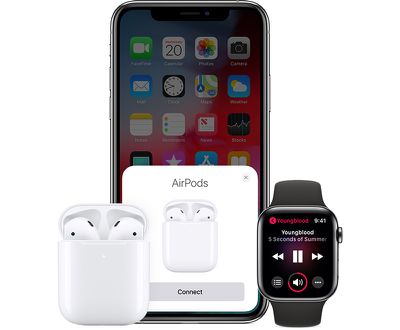
AirPods and AirPods Pro already feature quick and easy device switching for devices where you're signed in with your iCloud account, but iOS 14, iPadOS 14, tvOS 14, watchOS 7, and macOS Big Sur make device switching even easier.
airpodsapplewatchiphone
With the updates installed, AirPods and AirPods Pro automatically switch between your devices that are paired to the same ‌iCloud‌ account. So if you're listening to music on your iPhone but switch over to watching a video on your Mac, your AirPods will seamlessly connect to the Mac.

Right now, you can swap quickly, but on most devices it requires accessing the Bluetooth settings for your secondary device if the AirPods are already paired to a primary device.

Automatic device switching requires an ‌iCloud‌ account and it works on iPhone, ‌iPad‌, iPod touch, Mac, and Apple Watch with the latest software versions installed. Automatic switching works with the AirPods Pro and the second-generation AirPods, and it is not compatible with the original AirPods. It also works with Powerbeats, Powerbeats Pro, and Beats Solo Pro.

Battery Notifications

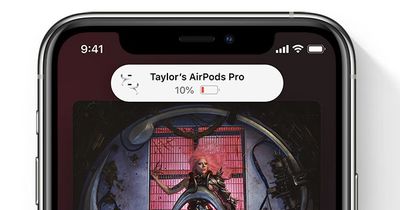
If your AirPods are getting low on battery and need to be charged, your iPhone or ‌iPad‌ will let you know with a notification so you can charge them up before they die completely.
airpodscharging

Optimized Charging

To maximize the longevity of the AirPods, Apple added a new Optimized Battery Charging feature in iOS 14. Optimized Battery Charging lets the AirPods learn your daily charging routine and will wait to finish charging past 80 percent until they're needed.

Apple uses a similar battery optimization feature for iPhones and Macs to extend the total battery life of the devices. Avoiding having a lithium ion battery at max charge continually can better preserve battery health over time.
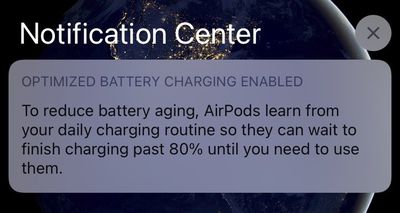
airpodsoptimizedcharging

Headphones Accommodations

Headphones Accommodations is an Accessibility feature for those who are hard of hearing, and it's able to amplify soft sounds and adjust frequencies to make music, movies, calls, and more sound more crisp and clear.
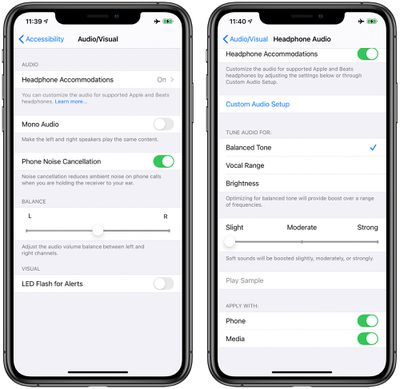
headphonesaccommodations1
You can get to the Headphones Accommodations functionality in the Accessibility section of the Settings app by tapping on AirPods > Audio Accessibility Settings > Headphone Accommodations.

From there, you can get access to all of the different options available such as tuning audio for Balanced Tone, Vocal Range, or Brightness or adjusting the volume of soft sounds to be louder.

There's also a Custom Audio Setup that walks through a test with soft speaking and different music to determine whether you have specific audio preferences that should be compensated for with the Headphone Accommodations feature.
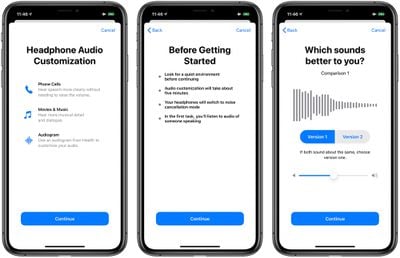
headphoneaccommodations
Headphone Accommodations works with the Transparency mode on AirPods Pro too, making quiet voices louder and tuning the sounds of the environment around you to meet your audio needs.

Hearing Health

Apple expanded Hearing Health protections in iOS 14 and watchOS 7 and the iPhone now sends notifications to the Apple Watch when you're listening to music too loud and can reduce your headphones volume to a safe level once you've hit the World Health Organization's recommended safe weekly listening dose.
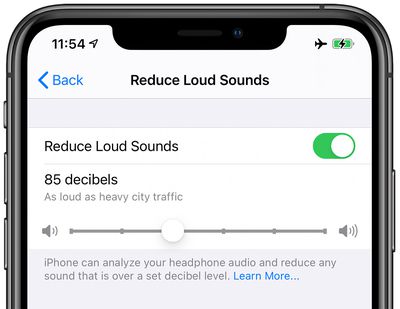
reduceloudsounds
Reduce Loud Sounds, a new feature under Sounds & Haptics, can be enabled to analyze headphone audio and reduce any sound that is over a certain decibel level, which you can set yourself. These features work with the AirPods and AirPods Pro, along with other headphone options.

Control Center Volume Monitor

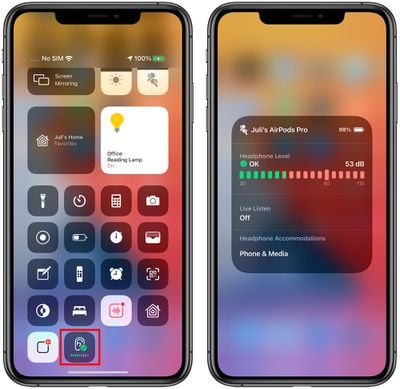
If you have the "Hearing" feature added to Control Center when you listen to music with the AirPods or other headphones, you can see a live meter of the volume level to make sure the decibel level is safe.
controlcenterhearingios14
Just swipe down from Control Center and tap on the ear icon (after it's been added to Control Center) to see the live reading.

AirPods Pro Motion API

Apple designed a Motion API for the AirPods Pro that developers can take advantage of. The Motion API lets developers access orientation, user acceleration, and rotational rates, which is useful for fitness apps and games.

Developers can build the API into apps that AirPods Pro owners will be able to download.

Guide Feedback

Have questions about the new iOS 14 AirPods capabilities, know of a feature we left out, or or want to offer feedback on this guide? Send us an email here.


Popular Stories

iPhone Duo Trio

Here's What Apple's Apps Look Like on the iPhone Duo

Tuesday October 20, 2026 11:12 am PDT by
With just three days to go until the iPhone Duo is released, Apple is getting ready for the launch. Behind the scenes, the App Store now has screenshots of Apple's built-in apps running on the Duo. We've seen some apps in marketing materials, but images of the ones we haven't seen give us an idea of what it will be like using the iPhone Duo day to day. Many apps are shown in landscape...
Apple Creator Studio iWork suite

Apple Pulls Keynote, Pages and Numbers From App Store [Update: Back]

Thursday October 22, 2026 11:01 am PDT by
Apple has temporarily removed Keynote, Pages, and Numbers from the App Store, just after releasing an update that added iPhone Duo support and a new Intelligent Assistant. It is not clear if the apps were removed intentionally, or if it is a bug. Apple has not said when the apps will be reinstated, but if it was in error, they should return soon. Update: The Mac versions are back without...
M5 MacBook Pro

RIP, MacBook Ultra

Monday October 19, 2026 9:37 am PDT by
Apple today sent out invites for an experience in Los Angeles on Wednesday, October 28, and the "Pro and tell" tagline on the invitation likely means that the rumored MacBook models with touch-enabled OLED displays will stick with MacBook Pro branding instead of the once-rumored "MacBook Ultra" name. The long-rumored "iPhone Ultra" ended up being named iPhone Duo, so speculation that Apple...

Top Rated Comments

jclo Avatar
82 months ago

It should be noted that the Announce Messages with Siri Control Center toggle already exists in iOS 13 (I've had it for months now).
And now you've discovered that none of us at GeekWebGuides have apparently ever used this feature. Taking it out of the article, thanks for the heads up :)
Score: 5 Votes (Like | Disagree)
Superman730 Avatar
82 months ago
I'm weary of the automatic switching. I think its a feature I like a lot, however, I need to somehow have some control over it. If I'm watching something on my iPad and my phone rings, I have the option of answering on my airpods or not at all, I don't want it to switch automatically before I choose what I want. In addition, I don't want it to auto-switch to one of the devices due to some auto-playing ad or Facebook video.
And since the feature won't be available until the fall, no one can even test it yet to detail how it works
Score: 4 Votes (Like | Disagree)
82 months ago

Spatial audio has been around for a couple of decades now. I have a set of SonyMDR-IF800's headphones that work with Sony's DP-IF8000 surround sound processor. Bought them 2nd hand on EBay at the turn of the millennium.
Frankly I'm surprised it's taken this long to get them working on something smaller.
do they also readjust as you turn your head?
Score: 3 Votes (Like | Disagree)
82 months ago
It should be noted that the Announce Messages with Siri Control Center toggle already exists in iOS 13 (I've had it for months now).
Score: 3 Votes (Like | Disagree)
Treble Avatar
82 months ago
this is all well and good but when can we try it i want it yesterday
Score: 2 Votes (Like | Disagree)
Jimmy James Avatar
82 months ago
Excited about optimized charging. I dislike accelerated, non-replaceable battery decline. This helps.
Score: 2 Votes (Like | Disagree)
Latest Stories
iPhone Duo Demand Reportedly Exceeds Apple's Expectations
16 minutes ago
iPhone Duo Launch Begins as First Orders Reach Customers
6 hours ago
1Password for Agents Keeps Your Passwords Hidden From AI
7 hours ago
iPhone Duo 24 Hours Later: Your Questions Answered
8 hours ago
Apple's iWork Apps Get 'Intelligent Assistant' and iPhone Duo Support
9 hours ago
Apple is Apparently Considering a Slightly Larger iPhone Duo
9 hours ago
Giant iPhone Duo Displays Coming to Four Apple Stores
10 hours ago
Apple Pulls Keynote, Pages and Numbers From App Store [Update: Back]
11 hours ago
Apple Updates More Apps With iPhone Duo Support
11 hours ago
Apple Will Label Apps 'Made for iPhone Duo' in App Store
14 hours ago
Amazon Takes $49 Off iPad With Prices Starting at $399.99
15 hours ago
F1 on Apple TV Now Available in Dolby Atmos
15 hours ago
Apple Reveals More Than 50 Apps That Will Be Updated for iPhone Duo
16 hours ago
Apple Blocks Certificates That Could Help Attackers Fake Websites
17 hours ago
Giant iPhone Duo Installations Spotted at Apple Fifth Avenue
18 hours ago
iPhone Duo 2 Prototypes Include Under-Display Face ID
18 hours ago
Tesla App Gains iPad and iPhone Duo Support
22 hours ago
Apple Reportedly Boosts iPhone Duo Orders by 44%
22 hours ago
Fortnite Returning to Australian App Store After Court Ruling
23 hours ago
Apple Ordered to Open iPhone to Rival App Stores in Australia
23 hours ago
Apple Suppliers Face Hurdles Cutting Circuit Board Emissions
23 hours ago
Things Updated for iPhone Duo With Adaptive Layout
1 day ago
Simplicity and Siri AI Are HomeView's Killer Features, Apple Says
1 day ago
iPhone Duo Reviewers Really Miss Face ID
1 day ago
Does the iPhone Duo Run Hot? Here's What Reviews Found
1 day ago
Apple Music's New Look is Now Live on Apple's Website
1 day ago
Anthropic Launches Claude Duet, a Proactive AI Agent
1 day ago
What 32,000 Folds Did to the iPhone Duo's Hinge
1 day ago
iPhone Duo's Hidden FaceTime Camera Takes 'Trash' Photos
1 day ago
iPhone Duo Has 'Edge Light' Feature That Debuted on Macs Last Year
1 day ago








































