

Since introducing the unified Find My app, Apple has been working to improve the Find My experience. iOS 15 brings some major new features to Find My, including features like live locations and the ability to track an iPhone even after it's been erased or powered off.
This guide covers everything that Apple added to the Find My app in iOS 15.
Live Locations
When you track a friend or a family member using the Find My app, it now shows continuous streaming updates on their location rather than updating with a new location every few minutes.
Apple says that this feature is designed to provide an immediate sense of speed, direction, and progress when you're looking at someone's location.
Locate Lost Devices That Are Off
Devices that have been turned off can still be tracked by the Find My network in iOS 15. If a device was low on battery power or turned off by a thief, it can still be found when it's close to another Apple device.
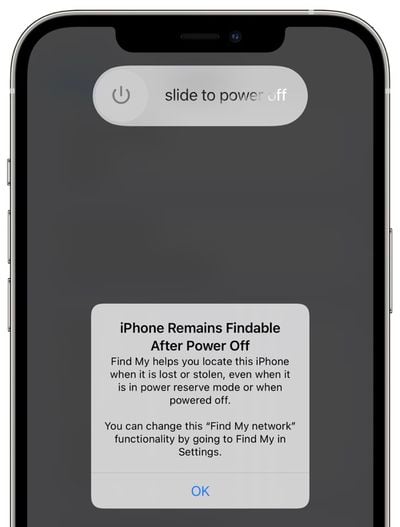
The Find My network is a feature that Apple introduced with iOS 13, and it enabled Apple devices to be located even without a WiFi or cellular connection by leveraging other nearby iPhones, iPads, and Macs.
In iOS 15, Apple has extended the Find My network to work with devices that are turned off as well. Apple has not outlined just how this feature works, but either the U1 chip, Bluetooth, or NFC continues to be powered in the background even when your device is off or out of battery, though in the case of battery, tracking may last a limited number of hours.
Apple has a similar feature for Car Keys that uses NFC, and it lasts for about five hours after an iPhone's battery dies. In this case, it lets you continue to unlock your car if your iPhone is dead.
For this feature to work, the Find My network feature must be enabled. It's on by default, but you can double check by going to your profile, tapping on Find My, selecting Find My iPhone, and then making sure "Find My network" is toggled on.
- How to Help Return Lost Find My Items
- iOS 15.2 Beta: How to Use Find My to Locate Items That Can Track You
Locate Lost Devices That Have Been Erased
If someone steals your iPhone and then erases it, in iOS 15, it's still going to show up in the Find My app, and it will be trackable even after it's been wiped.
The feature is tied to Activation Lock, which prevents someone from using your iPhone without your Apple ID and password. In iOS 14 and prior iOS updates, erasing a device would leave Activation Lock on so no one could use your iPhone without your password, but erasing a device did prevent Find My from functioning.
A wiped iPhone would not show up in the Find My app, but now, erasing an iPhone no longer works that way. If Activation Lock is on (i.e., it wasn't wiped using your username and password to disable Activation Lock), it's tied to your account and locatable using Find My.
Combined with the feature for tracking a device that's turned off, the Find My app serves as a much stronger theft deterrent.
To prevent someone from being tricked into purchasing a device that's tied to your account, the Hello screen will make it clear that the device is locked, locatable using Find My, and the property of someone else.
Separation Alerts
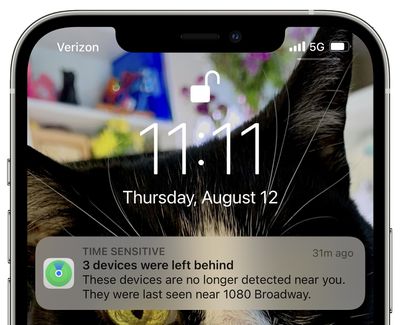
With Separation Alerts, the Find My app can let you know if an iPhone or iPad is left behind by alerting you on one of the other devices with you.
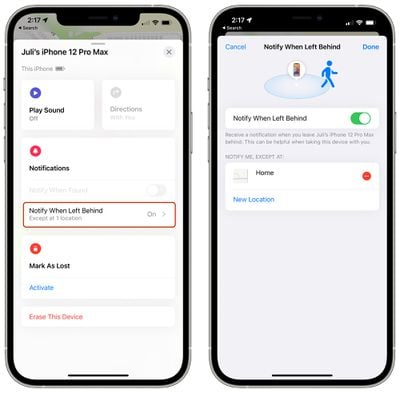
Separation Alerts work for AirTags and for third-party accessories that integrate with the Find My network, so if you leave a wallet or a MacBook behind at a cafe after you walk out with your iPhone, your iPhone will let you know.
Separation Alerts can be toggled on in the Find My app and need to be turned on for each individual item that you own. You can also set exceptions, so if you leave something behind at home on purpose, you won't get an alert.
Find My for AirPods
For AirPods Max and AirPods Pro, the Find My network is able to deliver an approximate location if these items become lost.
AirPods have always shown up in the Find My app, but until now, functionality has been limited. In iOS 14 and earlier versions of iOS, AirPods Pro and Max show up in Find My, but if they're out of Bluetooth range of your own devices, you only see their last known location.
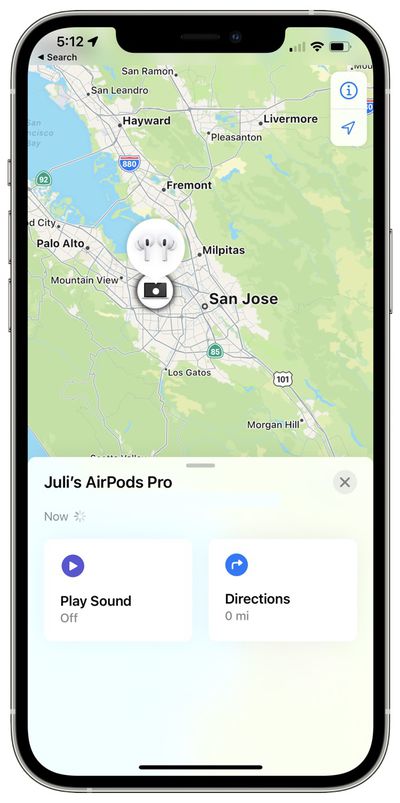
With the Find My network, AirPods Pro and AirPods Max can communicate with the Apple devices of others, which lets you track them even when they're out of range of your own devices.
You can get an approximate location using this method, and Apple says it is designed to help you get within Bluetooth range so you can activate the Play a Sound feature to track them down. According to Apple, this feature will be coming in an update to iOS 15 that will be released later in the year.
Find My Widget
There's now a Find My widget that you can add to the Home screen or the Today View to track items at a glance without having to open up the Find My app.
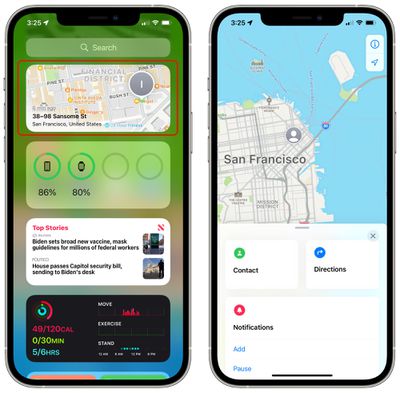
Widgets come in two sizes, small and medium, and can be used to track People or Items. The People feature tracks your friends and family members who have location sharing enabled, and the Items widget tracks your AirTag items and third-party accessories that use the Find My network.
Tapping on either Find My widget opens up the full Find My app.
Find My on iPad and Mac
The changes in this guide are applicable to the iPhone, but on the iPad, there's support for Separation Alerts, the Find My Widget, and live locations for family and friends.
Macs with macOS Monterey support the Find My widget and for live locations for family and friends. Offline tracking and tracking for erased devices are features limited to iPhone.
Guide Feedback
Have questions about Find My in iOS 15, know of a feature we left out, or want to offer feedback on this guide? Send us an email here.





















