Apple's FaceTime app was the main focus for many of the iOS 15 updates that were introduced, but the Messages app wasn't entirely forgotten. Apple introduced a new Shared with You feature and streamlined several interface elements to make the Messages experience more pleasant.

This guide outlines all of the new features that Apple added to the Messages app in iOS 15 and iPadOS 15.
Shared with You
The main new feature in the iOS 15 Messages app is Shared with You, which aggregates content that people share with you in Messages into the proper apps. So if someone sends a photo, it shows up in a Shared with You section in the Photos app.
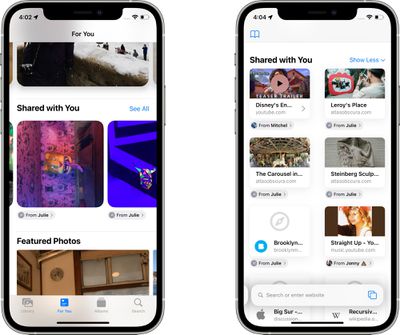
This isn't strictly a Messages addition because it's actually other apps that have this new section, but it does make Messages content much more accessible and less likely to be forgotten. There are multiple Shared with You integrations, as outlined below.
- Photos - When someone sends you a photo in Messages, it automatically appears in the Shared with You section of the Photos app, which is located in "For You." Tapping on an image lets you save it to the photo library, and it has a record of who sent it. If you tap on the name of the person that sent it, it automatically opens up the Messages app so you can have a conversation.
- Safari - Any link sent to you in Safari is stored in the Shared with You section of the main start page that's opened when you open up a new tab. Safari shows a preview of the link so you can see what it's about, and tapping the link opens up the website.
- Apple News - A link to an Apple News story that's sent to you will be stored in the Shared with You section that's located in the Today and Following tabs in Apple News. Stories that are found in News and Safari show up in Shared with You in both apps.
- Apple Music - Music links sent in Messages are shown in the Shared with You section of Apple Music, which is located under Listen Now.
- Apple Podcasts - If you're sent an episode of a Podcast or a link to a show, it's listed in the Shared with You section of Listen Now in the Apple Podcasts app.
- Apple TV App - When a friend sends a movie or a TV show link over Messages, the TV show or movie will appear in the Shared with You section of Watch Now so you can find it quickly.
Shared With You is an optional feature and for those who do not want to use it, it can be disabled. Just go to Settings > Messages and tap on "Shared With You." From there, you can turn off Shared With You entirely or choose the specific categories where you want to see Shared With You content. Options include Music, TV, Safari, Photos, Podcasts, and News. Any category toggled off will prevent the accompanying app from featuring a Shared With You section that includes content from the Messages app.
Shared With You - Continue Conversations
In all apps that have a Shared with You section, content in these sections makes it clear who sent it to you. There are name labels that you can tap to go right to the Messages app so you can have a conversation about what was shared. Tapping the name label on an item shared with you also opens right up to the associated message so you can see the original conversation.
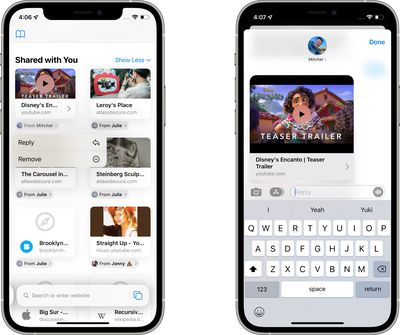
Shared With You - Pinning Content
If someone shares something with you that you definitely don't want to forget about, such as a photo or a link, you can long press on it and choose the "Pin" option. Pinned items are shown first in Shared with You, in Messages search, and the Details view of a Messages conversation.
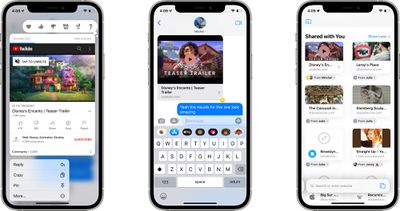
- iOS 15: How to See All the Photos People Have Shared With You in Messages
- iOS 15: How to See All the Web Links Shared With You in Messages
Photo Collages
Multiple images sent in the Messages app now show up as a little photo collage of images stacked on top of one another. You can tap the collage and swipe through it to see each image in the stack. At the top left of the full screen interface, you can tap to see all of the images in a grid view, and there are also quick access tools for replying, adding a tapback response, downloading an image, or sharing it.
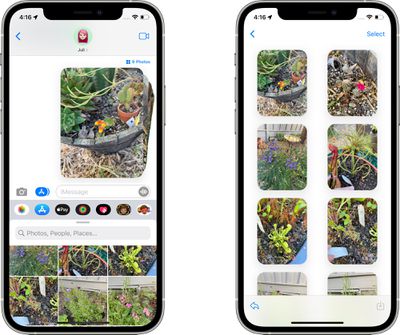
Improved Photo Saving
All images you're sent in the Messages app have a little download icon next to them that can be tapped to save them, which makes it much easier to save a photo that you're sent to the photo library on your device.
Updated Photos Image Picker
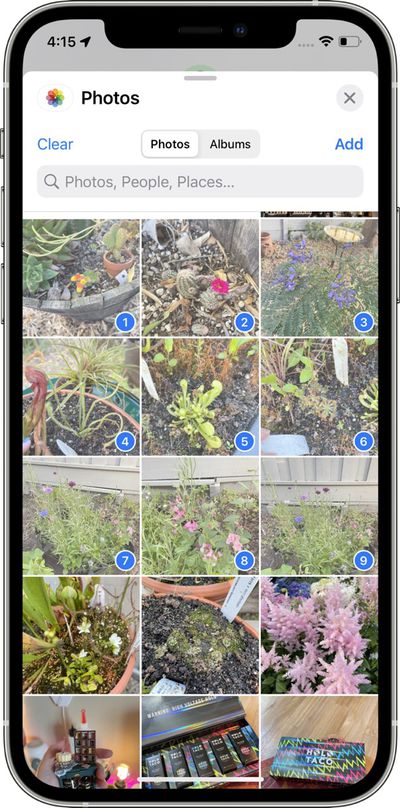
The Photos image picker, including in the Messages app, now allows you to select photos in a specific order for sharing.
International Updates
Apple added a few country specific features to address issues with spam. In Brazil, on-device intelligence filters out unwanted SMS messages and organizes them into Promotional, Transactional, and Junk folders to keep clutter out of the main Messages inbox.
In India and China, there are options to turn notifications on or off for unknown senders, transactions, and promotions so users have more control over which types of messages are able to send notifications.
New Memoji and Memoji Stickers
Memoji, which are used in the Messages and FaceTime app, have been updated in iOS 15 with 40 new outfit choices, an option to choose two different eye colors, new glasses options, new headwear options, and new accessibility options that include cochlear implants, oxygen tubes, and soft helmet.
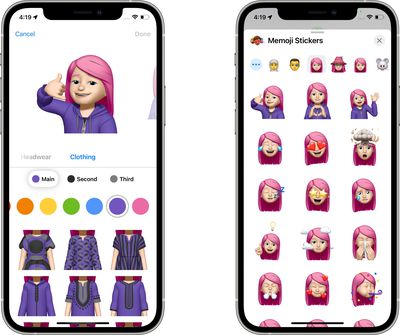
Apple has also added nine new Memoji stickers like hand wave and lightbulb moment, heart hands, and more.
Other Messages Tweaks
- Group Message Access in FaceTime - In FaceTime, there's an option to access a group Messages thread with the people you're chatting with.
- Focus Message Status - If you have Focus mode on and someone tries to send you an iMessage, they'll see a status update letting them know that you're in Focus mode. Friends and family can break through the Focus mode message with an urgent message.
- Messages Photo Search - If you do a search with a contact name included, you can use Spotlight to find photos that person has sent you.
- Announce Messages in CarPlay - Siri can now announce your incoming messages in CarPlay.
Guide Feedback
Have questions about Messages in iOS 15, know of a feature we left out, or want to offer feedback on this guide? Send us an email here.