

Apple is working on a new iOS 17.4 update that brings some major changes to the iPhone (and the iPad) in Europe. Some of the biggest updates are only going to update people in the European Union, but there are also plenty of features in iOS 17.4 that are available worldwide.
In this article, we've rounded up everything new so far in iOS 17.4.
EU Changes
Apple implemented notable changes to the way the App Store and apps operate in the European Union in order to comply with the Digital Markets Act. These changes are included in iOS 17.4, but are limited to countries that are in the European Union.
Alternative App Stores and New App Store Terms
App developers in the EU can opt to offer alternative app stores or install their apps through alternative stores, and Apple has a whole new fee structure that goes along with this change. There's a new business structure that developers can opt in to, which applies to both apps distributed in the App Store and apps that are distributed through alternative means.
App developers using the new system will need to pay a standard fee of 0.50 euros per user per year, with the first million installs offered for free. Apps distributed through alternative app stores will have no commission. Apps distributed through the App Store will pay a reduced 17 percent commission, or 10 percent for those in the small business program or for user subscriptions older than a year.
Developers can choose not to opt in to the new system and can use the existing system with the same 15/30 percent commission that's available elsewhere in the world. Apple has a fee calculator to help developers determine what they'll pay with the existing setup, with the new setup, with the new setup using alternative app stores, and with the new setup using the App Store.
Users are able to set their preferred alternative app store as the default app store on their device if desired. EU users will see an option for this in the Settings app.
There are a huge number of behind-the-scene changes that are enabling this feature in the EU, with updates to all kinds of system messaging. Users in the EU will, for example, get a pop up warning when an app from an alternative app store contains malware, and there are new screens for verifying the information from an alternative app.
A Screen Time setting will allow parents to decide whether their children's devices are able to install apps from alternative app marketplaces.
Alternative Payment Options
Apple is also allowing apps to use alternative payment options in their apps, and there is no longer a requirement to use in-app purchase. Developers who distribute apps through the App Store and use an alternative payment option will see a three percent discount in their App Store fees.
Developers who distribute through alternative apps and also use an alternative payment option will pay Apple no fees beyond the set 0.50 euro fee per user.
With alternative payments, purchases for digital goods and services can be made directly in an app or a developer can choose to link to their website to have a user make a payment. Apple is requiring developers to use a known, secure payment provider.
Third-Party Browser Updates
After updating to iOS 17.4, EU users that open Safari will see a pop up that allows them to choose a new default browser option from a list of the most popular browsers on iOS.
Apple is also allowing alternative browser engines, and will not limit browsers like Chrome to the WebKit engine.
NFC Access
Third-party payment apps and banks have access to the NFC chip in the iPhone in iOS 17.4, and can offer contactless payments directly on the iPhone without using Apple Pay or the Wallet app in the European Economic Area. Users can set a default contactless payment provider that activates at tap-to-pay terminals or when the Side button on the iPhone is pressed twice.
The option for setting a default contactless payment provider is available in the Settings app in the EU, and this section will also provide details on all apps that have requested and been granted contactless payment access.
EU users can also change the default Wallet app on the iPhone.
Web Apps
Apple has restricted the functionality of Progressive Web Apps (PWAs) in the European Union in iOS 17.4. PWAs have no dedicated windowing, notifications, or long-term local storage. According to Apple, web apps have been removed because of the DMA requirement for alternative browser engines and the work required to implement a more secure solution.
Apple says that malicious web apps from other browser engines could read data from other web apps and gain access to a user's camera, microphone, and location without user consent. Apple would need to build a new integration architecture to fix these problems, but this is not practical because of other DMA requirements and because Home Screen web apps aren't widely used.
Gaming App Changes
Streaming game apps are now allowed on the App Store worldwide, which means services like Xbox Cloud Gaming and Nvidia GeForce NOW can be offered as standalone iPhone and iPad apps.
Apple previously only allowed cloud gaming services to be offered via the web, but dedicated apps that let users stream games from servers are now permitted.
Mini-app, mini-games, chatbots, and plug-ins are also now able to use the in-app purchase system.
New Emoji
The iOS 17.4 beta adds new emoji characters that include lime, an edible brown mushroom, a phoenix, a broken chain, shaking head vertically (as in a "yes" nod), and shaking head horizontally (a "no" head shake).

These emoji are part of the Unicode 15.1 update that was approved in September 2023.
Messaging with Siri
The Automatically Send Messages setting under Siri & Search has been renamed "Messaging with Siri," and there is an option to set Siri to read incoming messages in a specific language like Spanish, French, German, Chinese, and many more.
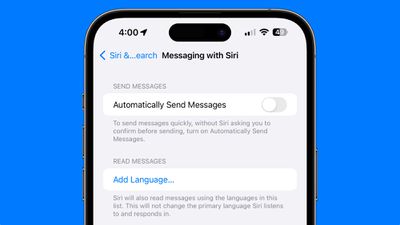
The change does not update the primary language that Siri listens in and responds to, but is limited to message playback.
Podcasts and Music
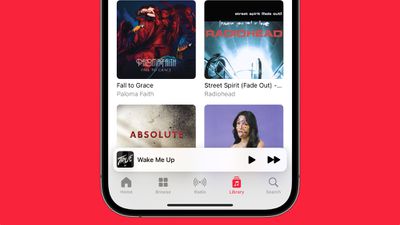
The "Listen Now" tabs in Apple Music and Podcasts have been renamed to "Home."
Podcast Transcripts
The Podcasts app now offers transcripts, similar to how lyrics work in the Apple Music app.
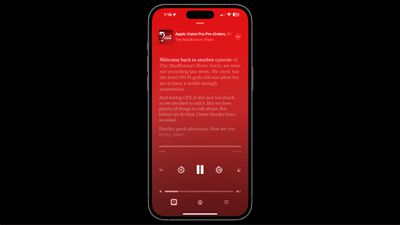
Podcasts also uses the Apple Music Now Playing bar when collapsed.
New iMessage Security Protocol
With iOS 17.4, iPadOS 17.4, macOS Sonoma 14.4, and watchOS 10.4, Apple is introducing a "state-of-the-art" post-quantum cryptographic protocol for iMessage called PQ3.
PQ3 protects against "Harvest Now, Decrypt Later" attacks where a malicious actor collects encrypted data with the hope of decrypting it with a quantum computer at some point in the future. Quantum computers are expected to eventually be able to make large-scale calculations that would allow them to decrypt content secured with traditional encryption methods, but that won't be possible with PQ3.
iPhone 15 Battery Health
Apple in iOS 17.4 changed the Battery interface in the Settings app on iPhone 15 models. These devices now show Battery Health with a readout such as "Normal," for a quick at-a-glance way to see the status of the iPhone's battery.
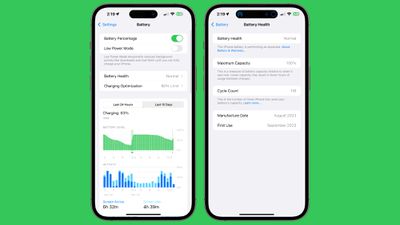
Tapping into the battery health readout shows the battery cycle count, manufacture date, and first use will be listed. This information was previously hidden in the General > About section of the Settings app.
Apple also updated the support information for the battery, as the company retested and found that the iPhone 15 battery can maintain 80 percent of its original capacity at 1,000 complete charge cycles.
Stolen Device Protection
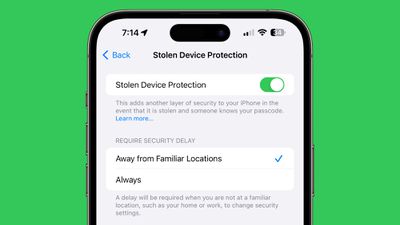
In the Stolen Device Protection section of the Settings app, there is now an option to require a security delay always or only when away from familiar locations.
Next-Generation CarPlay Support
Next-generation CarPlay is set to launch in the U.S. later in 2024, and code in iOS 17.4 references eight new CarPlay apps.
- Car Camera: This app will display the vehicle's rear-view camera feed.
- Charge: For electric vehicles, this app will display battery level, charging status, time remaining until the battery is fully charged, and more.
- Climate: This app will provide access to a vehicle's climate controls within CarPlay, allowing you to adjust the temperature of the A/C or heating system, fan speed, heated seats, heated steering wheel, and more.
- Closures: This app will display if any of the vehicle's doors are opened, and it might also display vehicle warning symbols.
- Media: This app will provide access to FM and AM radio station controls within CarPlay, along with other media options like SiriusXM. It is unclear if SiriusXM will offer satellite connectivity, or remain limited to internet streaming. Users will be able to select from a list of music genres, such as Top 40 and Rock.
- Tire Pressure: This app will display air pressure for each of the vehicle's tires, and provide low pressure, high pressure, and flat tire warnings.
- Trips: This app will provide a variety of driving-related data, including the vehicle's average speed, fuel efficiency or energy efficiency, the total time elapsed and distance traveled on a trip, and more.
An image in iOS 17.4 beta suggests that CarPlay will also likely display a "Goodbye" screen after the driver shuts off the vehicle.

SharePlay
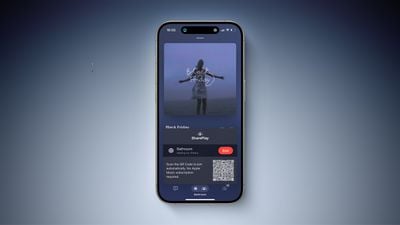
The first betas of iOS 17.4 and tvOS 17.4 brought SharePlay music control to the HomePod and Apple TV, but Apple removed the feature in iOS 17.4 and tvOS 17.4 beta 2, and it is not yet clear if the option will be re-added before the software updates launch. The feature let a user's family and friends control the music playing on a HomePod or an Apple TV, so long as the user had granted permission.
Stopwatch Live Activity
iOS 17.4 adds a Live Activity function for the Stopwatch feature on the iPhone. When activated through the Clock app, the Stopwatch now shows up in the Dynamic Island and on the Lock Screen.
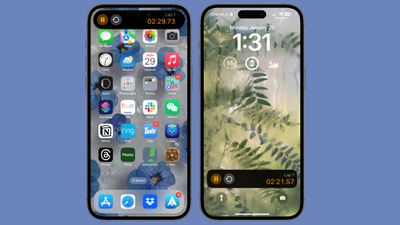
There are controls for pausing the Stopwatch, clearing it, and starting a new lap.
Apple TV App
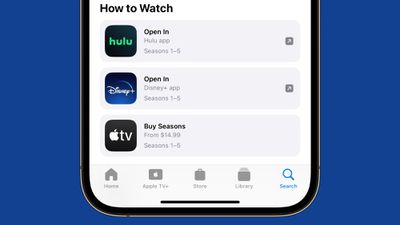
The "How to Watch" section in the Apple TV app that shows where a movie or TV show can be viewed now has a list interface rather than a card interface.
App Store
The App Store's Purchase feature now shows account-wide purchase history for an Apple ID. It includes TV and movie purchases, music purchases, subscriptions, and app purchases, and it is the same interface that is available when accessing the purchase information for any Apple ID.
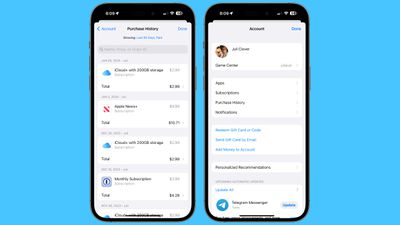
Apps are still listed, but under a new "Apps" section.
Clock Widget
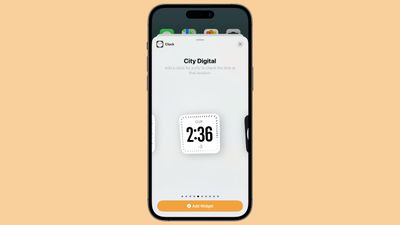
There's a new City Digital Clock widget that can be added to the Home Screen or Lock Screen.
Apple Cash Virtual Card Numbers
In the Wallet app, Apple Cash users can generate a virtual card number to make purchases when Apple Pay is not an option.

Hand Gesture Reactions in Video Apps
With iOS 17.4, there's a new API for developers that can be used to turn off hand gesture reactions in video calls. iOS 17 added a gesture reactions that are enabled by default in all video calling apps, leading to awkwardness when moving the hands in certain ways during serious calls.

Online therapists and other professionals have had to add disclaimers about the feature, as there was no way to turn it off on the provider's end Following iOS 17.4 and macOS Sonoma, developers can turn off the fireworks, confetti, and other options in their apps. Users were already able to turn off reactions on their iPhones, iPads, and Macs in the Settings app.
CarPlay Instrument Cluster Update
In supported CarPlay vehicles, there's now an Apple Maps option to show information about upcoming turn-by-turn maneuvers in the instrument cluster. CarPlay users will be able to swap the display type between the main and instrument cluster by tapping on the map configuration button located in the upper right of the main Maps screen.
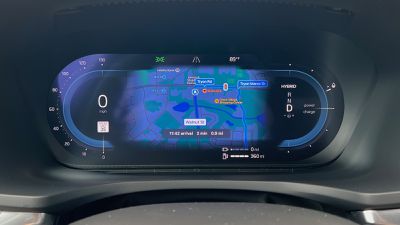
The option is available in vehicles that support the dual-screen Apple Maps CarPlay experience.
Hey Siri
With iOS 17.4, the option to say Siri instead of Hey Siri is now available for French, German, and Spanish speakers.
Release Date
Apple will release iOS 17.4 in March, likely during the first week of the month.




























![Apple Pulls Keynote, Pages and Numbers From App Store [Update: Back]](https://images.macrumors.com/t/Okb7kitB_gNr6qe5Pex9nQIysD8=/112x112/article-new/2026/01/Apple-Creator-Studio-iWork-suite.jpg)


















