

Apple in iOS 17 introduced a range of small features and tweaks that make using the iPhone a better, and more intuitive experience. There are minor but notable changes to the keyboard, which is a key part of the operating system.
This guide highlights everything new with the keyboard and keyboard-related features.
Autocorrect
The machine learning technology that Apple is using for autocorrect has been improved in iOS 17. Apple says it has adopted a "transformer language model," that will better personalize autocorrect to each user. It is able to learn your personal preferences and word choices to be more useful to you.
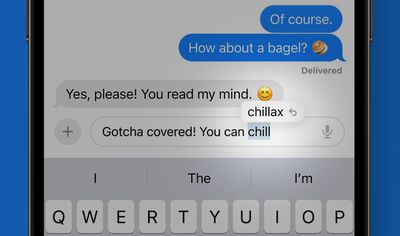
After using iOS 17 for a few weeks, most users will notice that the autocorrect suggestions are much better at predicting what you want to say and presenting words for you to tap to autofill. When you use acronyms, shortened words, slang words, and colloquialisms, autocorrect is not as aggressive with the automatic correcting, but it is still able to correct accidental typos.
On stage, Apple's Craig Federighi humorously said that the iPhone would no longer swap in "ducking" for a certain swear word that you actually meant to type. The new engine still makes mistakes, but most users should find that it is improved compared to iOS 16.
Correcting Autocorrect
When autocorrect changes a word, there is now a blue line underneath the corrected word that you can tap. Tapping the blue line shows the original word that you typed, and you can tap it to choose that instead. If there are other possible autocorrect options for what you typed, those will also be displayed.
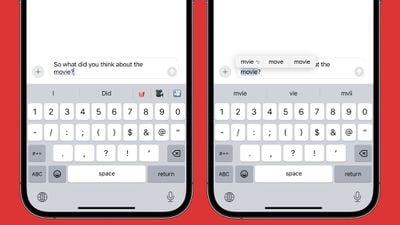
The functionality is useful for when autocorrect does correct something that you did not want fixed because it takes just a tap to revert rather than having to retype the word.
Word Autofill
Some word suggestions now pop up in line when you are typing, and you can tap on the space bar to insert them. If you start typing "Didn't" for example, the iPhone will offer 't as an autofill option after you type "didn," so that you can just tap on the space bar rather than continuing to spell out the word.
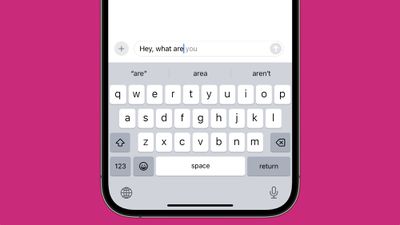
It makes for quicker typing, and this is a function that gets better as you use iOS 17 more often.
Sentence Autofill
The word autofill feature that makes suggestions inline also works for entire sentences in some cases, so you can type what you need with just a tap or two of the space bar.
Better Grammar Correction
After you finish typing a sentence, if you've used a word wrong or have another grammar error in what you've written, the iPhone will let you know by highlighting the mistake. You can tap on it to see suggested corrections.
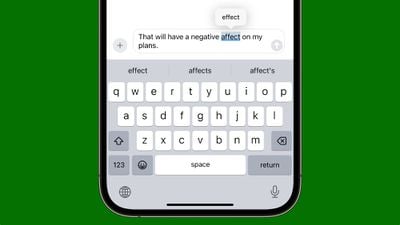
As an example, if you write a sentence and accidentally swap "affect" for "effect," the iPhone can tell and will suggest the word you should be using instead, or in some cases, just correct it. This is true for then/than, they're/their/there, two/to/too, your/you're, its/it's, and other common grammatical errors. iOS 16 corrected some of these issues, but iOS 17 does more.
Dictation
The Dictation feature built into the iPhone has been updated with the same transformer language model that Apple is using for text, so dictation should be able to better suss out what you're attempting to say when there are multiple word options.
Dictation is still far from perfect in our testing, and it does take some time to get better.
Stickers as Emoji
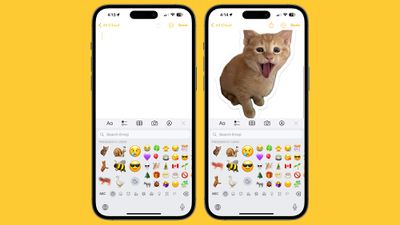
Emoji are an integral part of the keyboard, and in iOS 17, stickers and emoji have been merged. If you tap on the emoji icon on the keyboard, it will bring up emoji and also all of your stickers. The end result is that you can use stickers in more places across the operating system, and in the Messages app, emoji can be used like stickers and can be placed anywhere.
Read More
More information on all of the new features in the iOS 17 update can be found in our iOS 17 roundup.


























![Apple Pulls Keynote, Pages and Numbers From App Store [Update: Back]](https://images.macrumors.com/t/Okb7kitB_gNr6qe5Pex9nQIysD8=/112x112/article-new/2026/01/Apple-Creator-Studio-iWork-suite.jpg)





















