
Five New Features in the iOS 18 Phone App - GeekWebGuides
Skip to Content

Five New Features in the iOS 18 Phone App

The Phone app doesn't often get updated, but with iOS 18 and Apple Intelligence, it's getting a major overhaul that includes one of the best new features in the iOS 18 software.

iOS 18 Phone App Feature 2
This guide highlights everything new with the Phone app.

Record Phone Calls

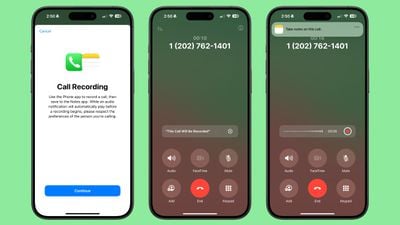
After placing or answering a call on an iPhone running iOS 18.1, you can initiate a recording that gives you an audio copy of the call.
ios 18 1 call recording 1

  1. Open the Phone app.
  2. Make a call.
  3. Tap on the record button in the top left corner to start a recording.

When you tap on the record button, everyone on the call is informed that the call is being recorded through an audible message. The message repeats for each person that is recording, so if two iPhone users are on a call and both record, the message will play twice.

There is no confirmation dialogue when a call is being recorded, so someone who does not want to be recorded would need to hang up the call as there is no opt out.

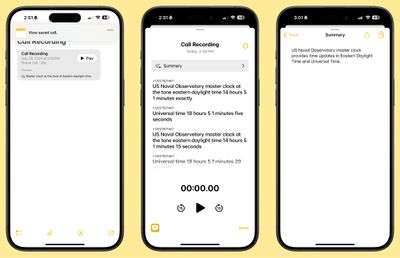
While the call is in progress, audio is recorded and saved to the Notes app for later access. When you open up the Notes app, you'll see a Call Recording labeled with the date and the time with an option to tap on Play to repeat the call or to tap into the note for more information.

Transcribe and Summarize Phone Calls

Calls that are saved in the Notes app are automatically transcribed, so you can see a full transcription of what was said on the call. You can get to a transcription by tapping into a Call Recording note.
ios 18 1 call recording 2
As you listen to the call, the transcript will update so you can read along with what's being said.

Transcriptions have a "Summary" button so you can get a quick summary of what was said in the call, plus there is a search option for searching for key words and phrases. Note that the Summary function requires an Apple Intelligence-compatible device, but recording and transcribing are general features available to everyone.

Transcripts can be added to a different note, or copied, and the audio can be saved to the Files app or shared.

Search Call History

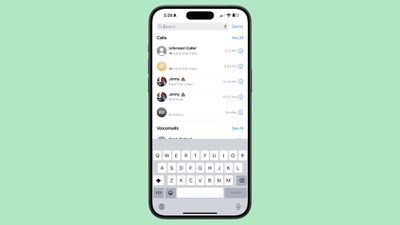
In iOS 18, Apple added a search feature for the Recents tab, which means you can now search through all of your incoming and outgoing calls and voicemails.
ios 18 phone app call history search

  1. Open up the Phone app.
  2. Tap on the Recents tab.
  3. Search for the person or number you're looking for with the search bar at the top of the interface.

You can type in phone numbers or names to see calls that have been placed, received, or missed, and contacts that have the name or phone number you're searching for.

Along with name or phone number, you can search for the date of a call, the type of call (such as FaceTime), or use multiple search parameters. If you wanted to see all calls from Eric in June, for example, you could type in "Eric" tap the name when it comes up to set the parameter, and then add in "June" to the search bar.

There are options to "See All" calls and voicemails when conducting a search to view more results.

Swap SIM cards

If you have two SIMs on your iPhone, such as for personal and work purposes, you can swap between them using a Control Center toggle. In prior versions of iOS, you had to change numbers using the Settings app.

To swap numbers, open up Control Center, navigate to the connectivity controls, and long press on Cellular Data.

Contact Suggestions

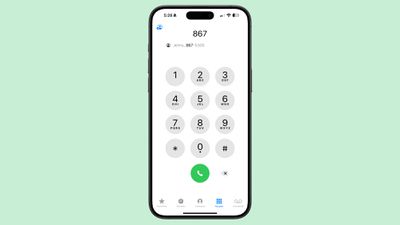
When you start typing in a number with the Keypad in iOS 18, you'll see a list of contacts so you can quickly get to who you want to call.
ios 18 auto fill phone app dialing
Type in the first digit or two of a number and then tap on the "More" icon to see all of your options. You can tap one from there to dial.

T9 Dialing

Related to the contact suggestion feature, you can actually search for names instead of numbers using T9 characters. If you have a contact in your phone under "Eric," you can type in 3 for E, 7 for R, 4 for I, and 2 for C, and the contact card for Eric will pop up.
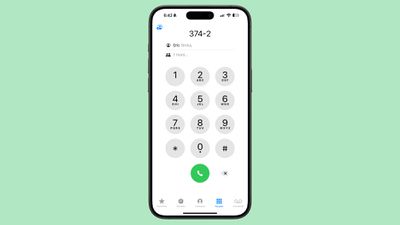
ios 18 phone app t9 dialing
T9 dialing dates back to the days before touchscreens, allowing smartphone users to type using predictive text that associated numbers with letters. The iPhone has not supported T9 dialing until now.

Phone App Release Info

Call recording and transcribing are iOS 18 features that will be available to anyone, but the functionality won't be added to iOS devices until iOS 18.1. Summarizing transcripts is an ‌Apple Intelligence‌ feature that will be limited to devices compatible with ‌Apple Intelligence‌. That includes the iPhone 15 Pro, iPhone 15 Pro Max, or iPhone 16, as well as M-series iPads and Macs.

Read More

Additional information on new features that Apple has added in iOS 18 can be found in our iOS 18 roundup.


Related Forums: iOS 18, iPadOS 18

Popular Stories

iPhone Duo Trio

Here's What Apple's Apps Look Like on the iPhone Duo

Tuesday October 20, 2026 11:12 am PDT by
With just three days to go until the iPhone Duo is released, Apple is getting ready for the launch. Behind the scenes, the App Store now has screenshots of Apple's built-in apps running on the Duo. We've seen some apps in marketing materials, but images of the ones we haven't seen give us an idea of what it will be like using the iPhone Duo day to day. Many apps are shown in landscape...
Apple Creator Studio iWork suite

Apple Pulls Keynote, Pages and Numbers From App Store [Update: Back]

Thursday October 22, 2026 11:01 am PDT by
Apple has temporarily removed Keynote, Pages, and Numbers from the App Store, just after releasing an update that added iPhone Duo support and a new Intelligent Assistant. It is not clear if the apps were removed intentionally, or if it is a bug. Apple has not said when the apps will be reinstated, but if it was in error, they should return soon. Update: The Mac versions are back without...
M5 MacBook Pro

RIP, MacBook Ultra

Monday October 19, 2026 9:37 am PDT by
Apple today sent out invites for an experience in Los Angeles on Wednesday, October 28, and the "Pro and tell" tagline on the invitation likely means that the rumored MacBook models with touch-enabled OLED displays will stick with MacBook Pro branding instead of the once-rumored "MacBook Ultra" name. The long-rumored "iPhone Ultra" ended up being named iPhone Duo, so speculation that Apple...

Top Rated Comments

AppleTO Avatar
28 months ago
What? Why is Apple Intelligence needed to record a call?
Score: 31 Votes (Like | Disagree)
antiprotest Avatar
28 months ago

I don't understand why anyone would do this when all you have to do is say, "Siri, call Eric Slivka". That's a lot easier than pecking at numbers.
"Calling your ex mother-in-law..."
Score: 14 Votes (Like | Disagree)
28 months ago

Only as long as they are also in a one-party consent state. If they live in a two party consent state, then you can be held liable in that state for recording a call.
No, as my law professor explained it decades ago, it's "the law of where your feet are" when it comes to the person doing the recording.
Score: 12 Votes (Like | Disagree)
28 months ago
So you need an iPhone 15 Pro (or newer) for the processing power to run *checks notes* T9 dialing?
Score: 12 Votes (Like | Disagree)
28 months ago
Another reason I'm glad I was young/single in an era before the smart phone....

Last thing I would need is to leave receipts! :)
Score: 10 Votes (Like | Disagree)
TracesOfArsenic Avatar
28 months ago

What? Why is Apple Intelligence needed to record a call?
Exactly. My phone in the 90s did this. When you're hard pressed to sell new hardware I guess you have to bend the truth a little bit.
Score: 9 Votes (Like | Disagree)
Latest Stories
iPhone Duo Launch Begins as First Orders Reach Customers
4 hours ago
1Password for Agents Keeps Your Passwords Hidden From AI
4 hours ago
iPhone Duo 24 Hours Later: Your Questions Answered
5 hours ago
Apple's iWork Apps Get 'Intelligent Assistant' and iPhone Duo Support
6 hours ago
Apple is Apparently Considering a Slightly Larger iPhone Duo
6 hours ago
Giant iPhone Duo Displays Coming to Four Apple Stores
7 hours ago
Apple Pulls Keynote, Pages and Numbers From App Store [Update: Back]
8 hours ago
Apple Updates More Apps With iPhone Duo Support
8 hours ago
Apple Will Label Apps 'Made for iPhone Duo' in App Store
11 hours ago
Amazon Takes $49 Off iPad With Prices Starting at $399.99
12 hours ago
F1 on Apple TV Now Available in Dolby Atmos
12 hours ago
Apple Reveals More Than 50 Apps That Will Be Updated for iPhone Duo
13 hours ago
Apple Blocks Certificates That Could Help Attackers Fake Websites
14 hours ago
Giant iPhone Duo Installations Spotted at Apple Fifth Avenue
15 hours ago
iPhone Duo 2 Prototypes Include Under-Display Face ID
15 hours ago
Tesla App Gains iPad and iPhone Duo Support
19 hours ago
Apple Reportedly Boosts iPhone Duo Orders by 44%
19 hours ago
Fortnite Returning to Australian App Store After Court Ruling
20 hours ago
Apple Ordered to Open iPhone to Rival App Stores in Australia
20 hours ago
Apple Suppliers Face Hurdles Cutting Circuit Board Emissions
20 hours ago
Things Updated for iPhone Duo With Adaptive Layout
21 hours ago
Simplicity and Siri AI Are HomeView's Killer Features, Apple Says
21 hours ago
iPhone Duo Reviewers Really Miss Face ID
1 day ago
Does the iPhone Duo Run Hot? Here's What Reviews Found
1 day ago
Apple Music's New Look is Now Live on Apple's Website
1 day ago
Anthropic Launches Claude Duet, a Proactive AI Agent
1 day ago
What 32,000 Folds Did to the iPhone Duo's Hinge
1 day ago
iPhone Duo's Hidden FaceTime Camera Takes 'Trash' Photos
1 day ago
iPhone Duo Has 'Edge Light' Feature That Debuted on Macs Last Year
1 day ago
Apple Support App Updated for iPhone Duo's Larger Display
1 day ago









































