
iOS 26 Camera App: New Features and Design Changes - GeekWebGuides
Skip to Content

iOS 26 Camera App: New Features and Design Changes

The Camera app received some of the most noticeable design updates in iOS 26, with Apple simplifying the interface to make it easier to get to various controls. Most of what's new focuses on design, but there are a couple other notable changes.
iOS 26 Camera Features

Liquid Glass Design

Like all of the ‌iOS 26‌ apps, the Camera app has adopted the Liquid Glass look. Buttons are more rounded and "float" over the background of the app thanks to a new depth effect.
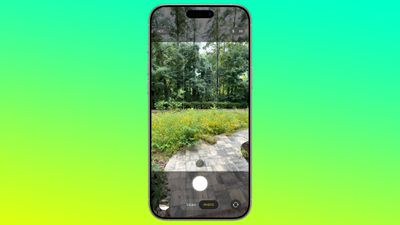
ios 26 camera app
The area behind the camera shutter and control buttons is a touch more see-through than before, so you can see the areas outside of your image more clearly. There's also no bar behind the toggles to change focal length, so the interface looks a bit cleaner.

Two-Tab Layout

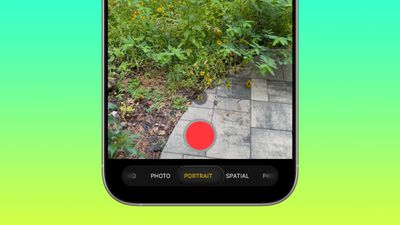
The navigation bar at the bottom of the Camera app has been overhauled in ‌iOS 26‌. Rather than the option to swipe between all of the photo and video modes, there are now just two main options that you see: Photo and Video.
ios 26 camera app nav bar
While it's only the Photo and Video buttons that are visible, you can actually still swipe in the same way to get to the other options like Portrait, Panorama, Slo-Mo, Cinematic, and more.

For multi-lens cameras, the small buttons to change focal length are still in the same position, and the buttons to view the photo you just snapped or change to the front camera haven't changed location. The button to view photos is now round instead of square, in line with the Liquid Glass update, and Apple has shifted the controls down on the display.

The Photo and Video buttons are below the shutter button, when they used to be above. The shutter button itself no longer has a bright white ring around it, with Apple instead opting for a more subtle Liquid Glass ring. Bezel size for the top and bottom bars hasn't changed.

Pop Out Menus

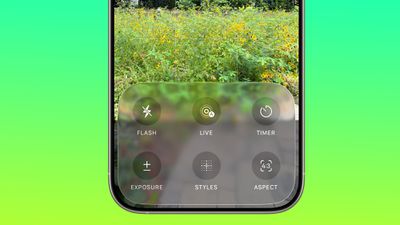
Some of the controls that used to be located at the top of the Camera app are now tucked inside pop out menus. When you select a mode like Photo, you can then tap on the Photo button to get more options.
ios 26 camera app menu
The menu has a Liquid Glass design and it offers large buttons for accessing Flash, Live Photo settings, Timer, Exposure, Styles, Aspect, and Night Mode. Tapping one gives you further options for that setting. So if you tap Exposure, you'll get a slider where you can quickly adjust the exposure setting before you take a photo.

In Video mode, you can tap to access Flash, Exposure, and Action. Most of the other modes also have at least one option that's accessed through this new menu. These menu options are also accessible by tapping on the menu icon at the top right of the display.
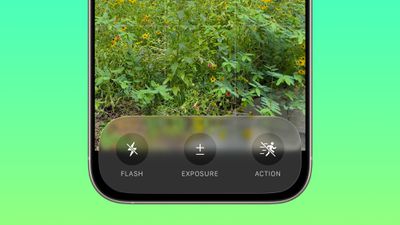
ios 26 camera app video nav bar
There are still some quick access buttons at the top of the Photos app, so you can swap to RAW mode, tap into Styles, or adjust flash and ‌Night Mode‌ settings without having to open the menu. Context-specific settings like the Macro mode toggle also still pop up in the same way as before when applicable.

There are toggles to see the Flash, Live Photo and Action Mode indicators in the Camera section of the Settings app.

Remote AirPods Shutter

The AirPods Pro 2 and AirPods 4 can be used as a camera shutter in ‌iOS 26‌, so you can take a photo by pressing on the stem of the AirPods. To get this to work, connect your AirPods to your iPhone, open the Camera app, and then press and hold on the AirPods stem.

You can take a photo using this method, or continue to hold to start a video. When you're finished recording, press and hold again to stop the video.

Using this feature requires ‌iOS 26‌ and the new AirPods firmware that accompanies ‌iOS 26‌. Using the AirPods as a remote shutter button works with the Camera app and with third-party photo apps.

Cleaning Warning

If your camera lens is dirty, your iPhone can detect that it needs to be cleaned and will send you a notification letting you know you should clean it.
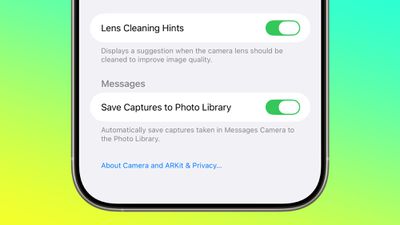
ios 26 camera app lens cleaning

Developer APIs

Developers have access to a new Cinematic mode API in ‌iOS 26‌ that allows third-party apps to capture Cinematic mode video, just like the built-in Camera app.
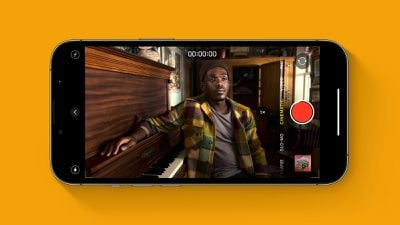
Cinematic Mode iPhone Feature
Cinematic mode supports recording video with a shallow depth of field and automatic focus changes between subjects. Apple uses rack focus to quickly swap the focus from one subject to another, for a movie-like recording experience.

Apple is also providing developers with an Audio Mix API for adjusting sound after a video is captured. Third-party video recording apps can offer the same Audio Mix controls that are available in the Camera app. Options include In-Frame for reducing sounds and voices from sources outside of the frame, Studio for reducing background sounds and reverb, and Cinematic for putting voices into a front-facing track while leaving environmental noises in surround, similar to movie audio.
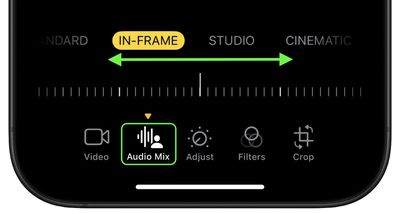
photos

Mac Accessibility

With macOS 26 and ‌iOS 26‌, your Mac can connect to your iPhone to use your iPhone's Camera app as a magnifying glass. A Magnifier on Mac feature uses the iPhone's zoom capabilities, with the iPhone's video feed showing up on a connected Mac through Continuity Camera.

Apple showed a student with vision issues using an iPhone to zoom in on a blackboard in a college class, with the feed coming through to her Mac so she could view what was going on while also taking notes.

Read More

We have a complete iOS 26 roundup that covers all of the new features that are available in the update.


Related Roundups: iOS 26, iPadOS 26
Related Forum: iOS 26

Popular Stories

iOS 27 Feature Dark

Apple Now Pushing iPhone Users Still on iOS 26 to Install iOS 27

Thursday October 8, 2026 1:17 pm PDT by
Starting today, iPhone users still running iOS 26 will see iOS 27.0.1 as the prominent software update in the Settings app under General → Software Update, with iOS 26.7.1 now relegated to a smaller "Also Available" section at the bottom. iOS 27 was released on September 14, but until now that update and later iOS 27.0.1 were shown under the "Also Available" section, with iOS 26.7 and...
apple lock security bug vulnerability fix privacy

iOS 26.7.1 Fixes Vulnerability Used in Targeted Attacks

Monday September 28, 2026 11:45 am PDT by
iOS 26.7.1, iPadOS 26.7.1, macOS Tahoe 26.7.1, and macOS Sequoia 15.8.1 address a major vulnerability that Apple believes was used against a small number of people. Apple's security support pages say there was a CoreGraphics out-of-bounds write issue that could be exploited with a maliciously crafted file, allowing for arbitrary code execution. It has been fixed with improved bounds...
iPhone Duo Trio

Here's What Apple's Apps Look Like on the iPhone Duo

Tuesday October 20, 2026 11:12 am PDT by
With just three days to go until the iPhone Duo is released, Apple is getting ready for the launch. Behind the scenes, the App Store now has screenshots of Apple's built-in apps running on the Duo. We've seen some apps in marketing materials, but images of the ones we haven't seen give us an idea of what it will be like using the iPhone Duo day to day. Many apps are shown in landscape...

Top Rated Comments

17 months ago
Thanks for the roundup! I hate this redesign.

It hides too many frequently used options. The Photo/Video switching to other options is too finicky and it's easy to pass over what you wanted to select, and finding the pop-out menu is not intuitive whatsoever.

Add to it that overlaying UI on top of content is something I fundamentally disagree with. I do not want my content to be obstructed, it proactively reduces usability.
Score: 13 Votes (Like | Disagree)
klasma Avatar
17 months ago
This is very low contrast. They should at least make the round buttons opaque. But the labels also need more contrast, they are below WCAG AA level in that screenshot.

Attachment Image
Score: 12 Votes (Like | Disagree)
antiprotest Avatar
17 months ago
Apple used to be good at design. It was one of several major reasons why I switched from Android to iPhone 3GS, and then from Windows to Mac soon after. Everything was well thought out and looked good, while products from others felt like they were made by people who never used them.

In recent years, I have been getting this same bad feeling from Apple that made me leave the others. They used to think of details that I never thought of, but that pleasantly surprised me once I found out how useful they were, but these years they have missed even obvious, glaring things, and they create pain points rather than solve or remove them.
Score: 11 Votes (Like | Disagree)
bcortens Avatar
17 months ago
These controls take up so much more space than the current design. Currently I can see my photo framed in the centre of the screen and then at the bottom I can swipe up and adjust exposure, contrast, timer, all without obstructing my viewfinder. Why would anyone be excited about this new design. I mean sure if you just open the camera to look at the controls it might be nicer but it doesn’t look like it makes taking pictures easier. Which I rather thought was the point of a camera…
Score: 9 Votes (Like | Disagree)
ThomasJL Avatar
17 months ago
Apple, please rehire the Steve Jobs-like visionary Scott Forstall so he can completely purge every last bit of user-unfriendly flat design (including flat design variants like neumorphism and glassmorphism) and bring back user-friendly iOS 6-style skeuomorphism.
Score: 7 Votes (Like | Disagree)
17 months ago
Who greenlit this crap? Seriously, this must be the worst design choices ever. Imagine how this will be for those with bad eye sight.
Score: 3 Votes (Like | Disagree)
Latest Stories
iPhone Duo Demand Reportedly Exceeds Apple's Expectations
15 minutes ago
iPhone Duo Launch Begins as First Orders Reach Customers
6 hours ago
1Password for Agents Keeps Your Passwords Hidden From AI
7 hours ago
iPhone Duo 24 Hours Later: Your Questions Answered
8 hours ago
Apple's iWork Apps Get 'Intelligent Assistant' and iPhone Duo Support
9 hours ago
Apple is Apparently Considering a Slightly Larger iPhone Duo
9 hours ago
Giant iPhone Duo Displays Coming to Four Apple Stores
10 hours ago
Apple Pulls Keynote, Pages and Numbers From App Store [Update: Back]
11 hours ago
Apple Updates More Apps With iPhone Duo Support
11 hours ago
Apple Will Label Apps 'Made for iPhone Duo' in App Store
14 hours ago
Amazon Takes $49 Off iPad With Prices Starting at $399.99
15 hours ago
F1 on Apple TV Now Available in Dolby Atmos
15 hours ago
Apple Reveals More Than 50 Apps That Will Be Updated for iPhone Duo
16 hours ago
Apple Blocks Certificates That Could Help Attackers Fake Websites
17 hours ago
Giant iPhone Duo Installations Spotted at Apple Fifth Avenue
18 hours ago
iPhone Duo 2 Prototypes Include Under-Display Face ID
18 hours ago
Tesla App Gains iPad and iPhone Duo Support
22 hours ago
Apple Reportedly Boosts iPhone Duo Orders by 44%
22 hours ago
Fortnite Returning to Australian App Store After Court Ruling
23 hours ago
Apple Ordered to Open iPhone to Rival App Stores in Australia
23 hours ago
Apple Suppliers Face Hurdles Cutting Circuit Board Emissions
23 hours ago
Things Updated for iPhone Duo With Adaptive Layout
1 day ago
Simplicity and Siri AI Are HomeView's Killer Features, Apple Says
1 day ago
iPhone Duo Reviewers Really Miss Face ID
1 day ago
Does the iPhone Duo Run Hot? Here's What Reviews Found
1 day ago
Apple Music's New Look is Now Live on Apple's Website
1 day ago
Anthropic Launches Claude Duet, a Proactive AI Agent
1 day ago
What 32,000 Folds Did to the iPhone Duo's Hinge
1 day ago
iPhone Duo's Hidden FaceTime Camera Takes 'Trash' Photos
1 day ago
iPhone Duo Has 'Edge Light' Feature That Debuted on Macs Last Year
1 day ago








































