iOS 26: Here's What You Can Do With Apple's New Games App - MacRumors
Skip to Content

iOS 26: Here's What You Can Do With Apple's New Games App

In iOS 26, iPadOS 26, and macOS Tahoe, Apple added an all-new Games app that's designed to be the go-to place for mobile gaming on Apple devices. The app includes features for discovering new games to play, along with add-ons meant to keep you more engaged.

ios 26 games app
The Games app is pretty similar to the Games tab in the App Store, which isn't going anywhere. It's as if Apple took the Games tab and expanded it into a full app.

Home View

The Home tab is the main view of the Games app, and it is tailored to each user. It has a "Continue Playing" section so you can get to the last game you've been playing with a tap, and there's a large carousel at the top of the interface with spotlighted content like game suggestions, friend achievements, and Games app features.
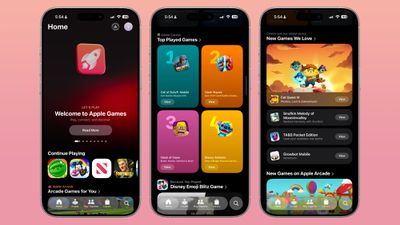
ios 26 games app home
You can swipe through the content in the Home tab, and it works a lot like the Today suggestions in the ‌App Store‌. There are multiple sections to scroll through for content suggestions, some of which is personalized based on your gaming history.

Some of the different sections:

  • Arcade Games for You - Includes all Apple Arcade title suggestions.
  • Friends Are Playing - Games your Game Center friends have played recently.
  • Top Played Games - A ranked list of the most played iOS games.
  • Because You Played - Suggestions based on a specific title you previously played.
  • Top Arcade Games - A ranked list of the top ‌Apple Arcade‌ games.
  • New Games We Love - Recently released titles that aren't part of ‌Apple Arcade‌.
  • New Games on ‌Apple Arcade‌ - Includes the new titles on ‌Apple Arcade‌, but not other ‌App Store‌ titles.
  • Try Before You Buy - Games with demos you can play before you commit to a purchase.
  • Our Most Anticipated Games - Upcoming games with pre-orders available.
  • Friend Suggestions - Lets you invite people to be a Game Center friend via Messages.
  • Top Free Games - A ranked list of the top free-to-play games.
  • Top Paid Games - A ranked list of the top paid games in the ‌App Store‌.

Events

Apple introduced Events for games way back in iOS 15. Events for games are displayed in the Games app so you can see which games are offering fresh content.

Events can include limited time special gameplay, special trophies and items that are available for a short time, major content updates, crossovers, challenges, and more.

Apple Arcade

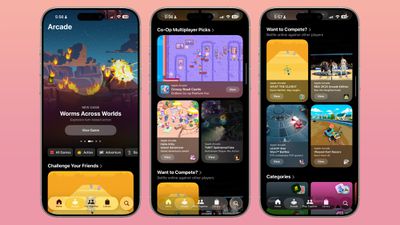
There is a dedicated tab for ‌Apple Arcade‌ content, where Apple promotes its $6.99 per month gaming service. The ‌Apple Arcade‌ tab is also broken down into different sections with gaming recommendations, much like the ‌Apple Arcade‌ section of the ‌App Store‌.

ios 26 games app arcade

Unified Games Library

The Games app is split into four tabs, including Home, Arcade, Play Together, and Library. The Library tab includes all of the games that you have played across all of your devices.
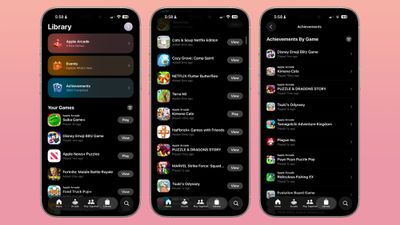
ios 26 games app library
The Library lets you see all of your achievements in one place separated by game, with filters to separate them by platform. There are also quick access links to new ‌Apple Arcade‌ titles and Events.

Game Info

Tapping into a game shows when you last played it and provides options for launching it or downloading it again if it's something that you've deleted or played on a different device.
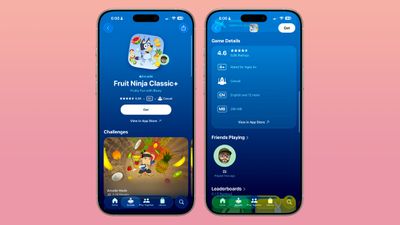
ios 26 game info
All games have a Games Details section that includes clear information on the game's rating, type, whether there's controller support, and how large the game is.

Social Options

In the dedicated Play Together tab, you'll see a list of games that your friends are playing, along with suggestions for multiplayer games that you can play with someone else. There's also a dedicated Challenges tool, which is a new feature.
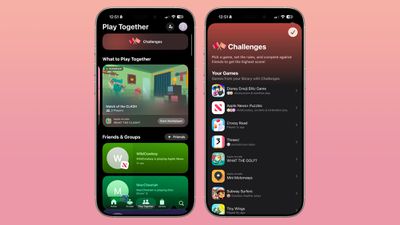
ios 26 games app play together

Multiplayer Games

For a multiplayer game, you can tap on the "Start Multiplayer" option and then invite someone to play with you. There's a list of friends that you've played multiplayer games with before, as well as a Party Code you can send to someone and an invite link.

Both players need to be running ‌iOS 26‌, ‌iPadOS 26‌, or macOS 26 or later to use the Multiplayer features that are in the Games app.

Multiplayer games are games where you play with one or more additional players at the same time in co-op or competitive gameplay.

Challenges

Challenges are a separate multiplayer option for asynchronous competitive gameplay for games that are traditionally single player.

With Challenges, you can select a game, choose rules or parameters for the challenge, and compete against friends to win. Challenge options range from completing a puzzle the fastest to getting the highest score. Each challenge is time limited, and for most games, you can set a time period of a day, three days, or a week.

Game Center

The Games app essentially makes Game Center features more prominent. Game Center has been around for a long time for earning achievements and playing games with friends, but it hasn't been as prominent as it is now.

There's still a Game Center section in the Settings app, where you can invite friends and control who you share your gaming activity with.

When you get a score that's higher than a friend's score in a game you're both playing, you'll see a pop up.

Game Mode

When you start a game, Game Mode is activated. If you tap into Control Center with Game Mode, you'll see an "Overlay" option. Tap that and you can see leaderboards, invite friends to play, and control game settings like sound level, display brightness, and controller parameters.

ios 26 game mode
With Game Mode, you can access Game Center settings and social tools without having to leave the game that you're playing.

Game Mode is not a Focus mode and it doesn't block notifications or otherwise interrupt device operation.

Other Games App Features

Tapping on your profile at the top of the Games app brings up an option to invite friends to Game Center and respond to friend requests, plus you can see your challenge wins and your game achievements.
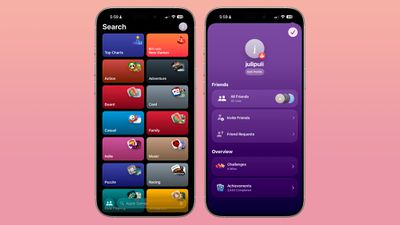
ios 26 games app search
There's also a dedicated Search button where you can type in the name of a game or tap through different game categories to find something new to play.

For Developers

Developers can create challenges and multiplayer activities that will show up in the Games app for improved game visibility.

Device Compatibility

Using the new Games app features requires a device that is able to run ‌iOS 26‌, ‌iPadOS 26‌, or ‌macOS Tahoe‌. For the new Games app features like Challenges, both users need to have a device with the latest software.

The Games app is for gameplay with other Apple users, and there's no functionality for playing games with people who have Android devices or use other platforms.

Read More

We have a complete iOS 26 roundup that covers all of the new features that are available in the update.


Related Roundups: iOS 26, iPadOS 26
Related Forum: iOS 26

Popular Stories

iOS 27 Feature Dark

Apple Now Pushing iPhone Users Still on iOS 26 to Install iOS 27

Thursday October 8, 2026 1:17 pm PDT by
Starting today, iPhone users still running iOS 26 will see iOS 27.0.1 as the prominent software update in the Settings app under General → Software Update, with iOS 26.7.1 now relegated to a smaller "Also Available" section at the bottom. iOS 27 was released on September 14, but until now that update and later iOS 27.0.1 were shown under the "Also Available" section, with iOS 26.7 and...
apple lock security bug vulnerability fix privacy

iOS 26.7.1 Fixes Vulnerability Used in Targeted Attacks

Monday September 28, 2026 11:45 am PDT by
iOS 26.7.1, iPadOS 26.7.1, macOS Tahoe 26.7.1, and macOS Sequoia 15.8.1 address a major vulnerability that Apple believes was used against a small number of people. Apple's security support pages say there was a CoreGraphics out-of-bounds write issue that could be exploited with a maliciously crafted file, allowing for arbitrary code execution. It has been fixed with improved bounds...
M5 MacBook Pro

RIP, MacBook Ultra

Monday October 19, 2026 9:37 am PDT by
Apple today sent out invites for an experience in Los Angeles on Wednesday, October 28, and the "Pro and tell" tagline on the invitation likely means that the rumored MacBook models with touch-enabled OLED displays will stick with MacBook Pro branding instead of the once-rumored "MacBook Ultra" name. The long-rumored "iPhone Ultra" ended up being named iPhone Duo, so speculation that Apple...

Top Rated Comments

GrassShark Avatar
16 months ago
Number one thing to do: Long press > Delete app > Delete
Score: 11 Votes (Like | Disagree)
16 months ago
Once upon a time, the Mac was a fantastic gaming platform. Strategic Conquest is arguably one of the greatest pure simple strategy games ever released - I still play it! Additionally, Bungie was a Mac developer and the Marathon series of the 90’s was right up there as well in the HOF of classics. There were a ton of other Mac first games. Well, Bungie approached Apple for financing as they had an offer from another platform. Apple said no and Microsoft bought them. You know Bungie…… they took the Marathon game engine and created the next gaming iteration of it, made Halo and the rest was history. That game single-handedly fueled the X-box for years. Passing on that opportunity and marginalizing Mac gaming was one of Jobs biggest mistakes. They’ve been half assing it in gaming ever since, even pleading at WWDC that “we’re a gaming platform now” over the past few years to hushed applause and it’s cost the Mac significant market share as a consequence.
Score: 9 Votes (Like | Disagree)
16 months ago
Useless app ever. This app show how Apple is ignorant on gaming. Library UI shouldn’t be like app store but like movie library. See GOG’s Gallaxy!

Anyway we won‘t be able to see games you can see on other consoles on Apple devices for some reasons like OS compatibility you need maintenance with major OS updates and disappearance of purchased games without warning like YS chronicles. Only service games with constant in-app purchases are gonna survive in Apple‘s environment. I gave up on them already.
Score: 9 Votes (Like | Disagree)
BornAgainMac Avatar
16 months ago
I would love to see GTA 6 under Top Paid Games in 2026.
Score: 8 Votes (Like | Disagree)
16 months ago
But still a pitiful lack of games for Mac. Trawling Steam is borderline painful if you're a Mac user.
Score: 5 Votes (Like | Disagree)
Naraxus Avatar
16 months ago

It's always been surprising Apple hasnt pushed harder on games....
No it isn't. Apple has never gotten gaming and they still don't.
Score: 5 Votes (Like | Disagree)
Latest Stories
iPhone Duo Launch Begins as First Orders Reach Customers
1 hour ago
1Password for Agents Keeps Your Passwords Hidden From AI
2 hours ago
iPhone Duo 24 Hours Later: Your Questions Answered
3 hours ago
Apple's iWork Apps Get 'Intelligent Assistant' and iPhone Duo Support
4 hours ago
Apple is Apparently Considering a Slightly Larger iPhone Duo
4 hours ago
Giant iPhone Duo Displays Coming to Four Apple Stores
5 hours ago
Apple Pulls Keynote, Pages and Numbers From App Store [Update: Back]
6 hours ago
Apple Updates More Apps With iPhone Duo Support
6 hours ago
Apple Will Label Apps 'Made for iPhone Duo' in App Store
9 hours ago
Amazon Takes $49 Off iPad With Prices Starting at $399.99
10 hours ago
F1 on Apple TV Now Available in Dolby Atmos
10 hours ago
Apple Reveals More Than 50 Apps That Will Be Updated for iPhone Duo
11 hours ago
Apple Blocks Certificates That Could Help Attackers Fake Websites
12 hours ago
Giant iPhone Duo Installations Spotted at Apple Fifth Avenue
13 hours ago
iPhone Duo 2 Prototypes Include Under-Display Face ID
13 hours ago
Tesla App Gains iPad and iPhone Duo Support
17 hours ago
Apple Reportedly Boosts iPhone Duo Orders by 44%
17 hours ago
Fortnite Returning to Australian App Store After Court Ruling
18 hours ago
Apple Ordered to Open iPhone to Rival App Stores in Australia
18 hours ago
Apple Suppliers Face Hurdles Cutting Circuit Board Emissions
18 hours ago
Things Updated for iPhone Duo With Adaptive Layout
19 hours ago
Simplicity and Siri AI Are HomeView's Killer Features, Apple Says
19 hours ago
iPhone Duo Reviewers Really Miss Face ID
1 day ago
Does the iPhone Duo Run Hot? Here's What Reviews Found
1 day ago
Apple Music's New Look is Now Live on Apple's Website
1 day ago
Anthropic Launches Claude Duet, a Proactive AI Agent
1 day ago
What 32,000 Folds Did to the iPhone Duo's Hinge
1 day ago
iPhone Duo's Hidden FaceTime Camera Takes 'Trash' Photos
1 day ago
iPhone Duo Has 'Edge Light' Feature That Debuted on Macs Last Year
1 day ago
Apple Support App Updated for iPhone Duo's Larger Display
1 day ago