

The Apple Maps app in iOS 26 includes some useful new features for keeping track of where you've been and getting alerts if there are any delays that will impact your daily commute. In this guide, we've rounded up a list of everything new with Maps.

Visited Places
Apple Maps is able to keep track of the places that you've visited, either in your hometown or while traveling. It can track the restaurants, shops, parks, and landmarks that you go to, so you can look back and remember where you've been.
Google has long offered a timeline that automatically saves visits to places, and Apple's new Visited Places option matches the functionality available in the Google Maps Timeline.
After you upgrade to iOS 26, the Maps app pops up an alert letting you know about the new feature, so that you can opt in or opt out.
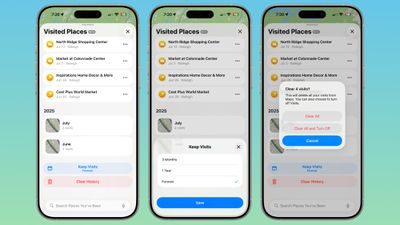
You can see your Visited Places by opening up the Maps app, tapping on your profile picture, tapping on Places, and then tapping into Visited Places. In this interface, the locations that you've visited are listed by month, plus there's a search option.
There are options to change how long visits are kept (three months, one year, and forever), and to clear your current history. You can also remove locations one-by-one by tapping on them, and report incorrect location readings. When you clear your history, Apple Maps pops up an option that lets you clear everything or clear everything and turn off Visited Places entirely.
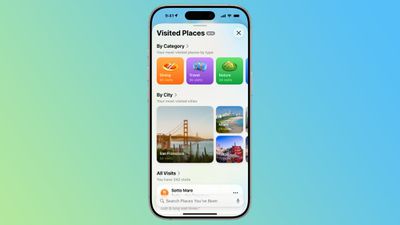
If you want to turn Visited Places off or enable it at a later date, you can do so by going to Settings > Apps > Maps > Location. From there, toggle off Visited Places. You can also access the toggle by going to Privacy and Security > Location Services > Maps.
Precise Location needs to be toggled on for Visited Places to work, and places that you've been are stored on-device. The information is not uploaded to Apple's servers.
Preferred Routes
Using on-device intelligence, Apple Maps is able to learn the routes that you prefer to take to locations that you visit frequently, such as work, home, and school, and it keeps track of when you typically visit those places.
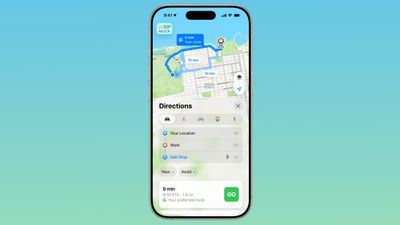
If there's a road closure or traffic that's going to impact your commute, the Maps app is able to alert you about the issue and offer up an alternative route so you can get there on time.
A Maps Suggestions Home Screen widget shows the same information if there are any route issues. This is an under-the-hood feature that only shows up when it's needed, so if you have a short commute that doesn't involve roads that frequently see traffic, you might not have it pop up.
You can turn it on or off by going to Settings > Maps > Location and toggling off the "Preferred Routes and Predicted Destinations" setting.
Liquid Glass Redesign
The Maps app has adopted Apple's Liquid Glass redesign, and it brings some subtle interface changes. The search bar and navigation menu are translucent so you can see some of the Maps background behind it, and place icons are larger than before.
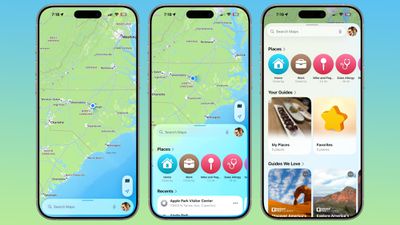
Icons have the layered glass look, and the various menus, cards, and buttons are more rounded than before. The Share Sheet has a popover design and it too is transparent.
The Library tab that was accessible when you tap your profile picture is now called Places, and it has improved spacing and a new Visited Places section.
Turn-by-turn directions are in a smaller pop-up bar rather than taking up the top of the Maps display, and time of arrival, length of travel, and distance are shown more prominently.
Voice Controls
The Voice Volume section in the Maps app is now Voice Controls, and there are added toggles for Muted, Alerts Only, or Unmuted so adjusting how turn-by-turn directions are communicated is more intuitive.
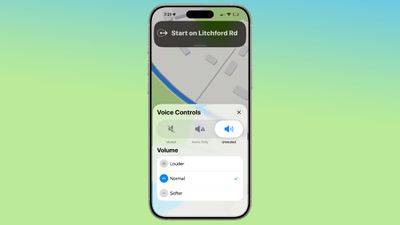
These controls did exist in iOS 18, but only as toggles that had no explanation on the right side of the display when turn-by-turn directions are in progress.
Place Information
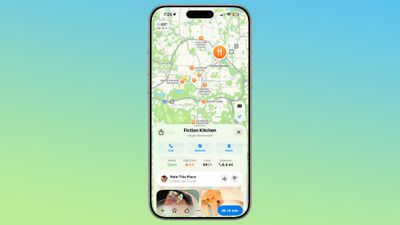
When you tap into or type a location on the Maps app, the Call, Menu, and Website buttons are now more prominently listed at the top of the interface, as are the location's hours and the order option if one is available. There's now a floating button to get directions to a place, and it's always available at the bottom right of the app.
Improved Incident Reports
It's easier to report an incident like a crash with a new incident button that's located on the right side of the iPhone when getting turn-by-turn directions, and more incident types have been added.
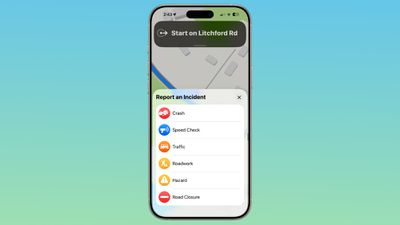
You can report a crash, speed check, traffic, roadwork, hazard, or road closure. In iOS 18, options are limited to crash, speed check, and hazard.
Read More
We have a dedicated iOS 26 roundup that goes into detail on all of the new features that are available in the update.






















