
Customizing Your iPhone 16 Images With Photographic Styles - MacRumors
Skip to Content

Customizing Your iPhone 16 Images With Photographic Styles

One of the major new software-based camera features in the iPhone 16 models is support for a wider range of Photographic Styles, complete with more granular controls to make for a setup where you can create a customized look for all of your images.
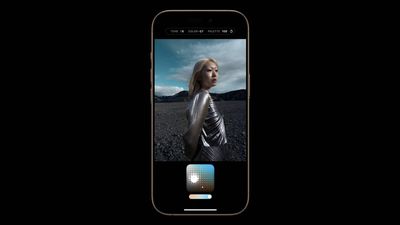
photographic styles iphone 16
Photographic Styles isn't a feature that's quite as easy to use as something as simple as a filter, so we thought we'd delve into how it works and how to get the most from it.

Available Photographic Styles

Photographic Styles aren't new, but with prior iPhone models, there were only four options: Rich Contrast, Vibrant, Warm, and Cool. On the ‌iPhone 16‌, there are several more pre-set styles to choose from.

  • Cool Rose
  • Neutral
  • Rose Gold
  • Gold
  • Amber
  • Standard (No edits)
  • Vibrant
  • Natural
  • Luminous
  • Dramatic
  • Quiet
  • Cozy
  • Ethereal
  • Muted Black and White
  • Stark Black and White

All of the styles have varying Tone, Color, and Palette settings, that correspond to brightness, saturation, and effect intensity.

How Photographic Styles Work

According to Apple, on the ‌iPhone 16‌ models, Photographic Styles adjust specific colors in select parts of your photos to adjust the overall look.

The first five Photographic Styles are tuned for skin undertones, including Cool Rose, Neutral, Amber, Rose Gold, and Gold. Cool Rose accentuates cool pinkish undertones, while neutral neutralizes warm undertones. Amber, Rose Gold, and Gold accentuate those specific tones. These can be fairly subtle, depending on the settings you choose.

Other Styles are closer to what you get with a filter, adding more dramatic effects that impact the mood of the image.

Setting Up and Customizing Your Style

When you've taken at least four photos with the ‌iPhone 16‌ camera, you can go to Settings > Camera > Photographic Styles to set the base tone that you want to use for all of your images.

You can pick from the skin tone-focused options, which include Cool Rose, Neutral, Amber, Rose Gold, and Gold. You'll see the different effects across four images, and you can adjust the intensity to begin with.

After you've selected a favorite undertone, you can further refine the look by dragging a finger over the touchpad, which changes the brightness and saturation. The slider changes the overall intensity.

Once you've set your Photographic Style, it's automatically applied to all of your images and it is the default value for your photos.

If you want to turn it off, you can go to Settings > Camera > Photographic Styles > Reset to Standard.

Real-Time Previews

In the Camera app when you go take a photo, if you tap on the touchpad icon, you can select a different undertone or mood style. Swiping changes the Photographic Style, and the controls below can be used to customize the look.

The option to use customized Photographic Styles in real-time lets you preview what an image will look like with different effects before you even take it.

You can access Photographic Styles from the Camera Control button too. Press Camera Control once to open the Camera app, then light press to bring up the Camera Control menu. Swipe until you get to Styles or Tone, then light press again to select it. From there, you can make adjustments by swiping. To get back to the menu to select another option, use a light double press.

Editing After a Shot

You can add or adjust a Photographic Style after an image has been captured, so it's not something that you need to do in the moment. This is the first time that Apple has allowed Photographic Styles to be edited after the fact - earlier versions of this feature only allowed the Style to be applied when taking an image.

To edit a Photographic Style, go to the Photos app, tap on the three bars to enter the editing interface, and then tap on Styles. You can select any of the styles and then adjust it using the touchpad.

The touchpad's X axis adjusts color, while the Y axis adjusts tone. The slider adjusts overall intensity or Palette. A Tone setting of 0, a Color setting of 0, and a Palette setting of 0 result in a "Standard" photo that has no Photographic Style applied, so that's a good starting point to better understand exactly what each style is changing.

Adjusting the Color to the left desaturates, while dragging it to the right deepens color. Dragging Tone up makes the image brighter, while dragging it down makes it darker.

You can change the Photographic Style setting at any point, and it is a non-destructive edit so it's not permanent. If you want to get back to a normal, unedited photo, choose the Standard setting.

Photographic Styles are entirely distinct from the ‌Photos‌ app Adjust section where you can tweak exposure, brilliance, highlights and shadows, contrast, brightness, saturation, vibrance, warmth, tint, and more.

HEIF Only

If you have your iPhone set to take JPG images instead of HEIF, you won't be able to use Photographic Styles. You need to have HEIF turned on. In the Camera section of the Settings app, HEIF can be enabled by going to Formats and choosing "High Efficiency" instead of "Most Compatible."

Preserve Settings

By default, the Photographic Style that you set up using the Settings app will be used automatically. If you select a different Photographic Style when you're taking a photo, it will use that only until you close the Camera app.

If you want the Photographic Style you selected in the Camera app to be the new default, you need to go to Settings > Camera > Preserve Settings and toggle on Photographic Style. With this turned on, your iPhone will preserve your last used Photographic Style rather than reset to your default.

Photographic Styles and Older iPhones

Older iPhones do not support the new touchpad and adjustment settings for Photographic Styles, but if you take an image on an ‌iPhone 16‌ and then edit it on an older phone, you can see the touchpad to make further adjustments.

Related Roundup: iPhone 16
Related Forum: iPhone

Popular Stories

iPhone Duo Trio

Here's What Apple's Apps Look Like on the iPhone Duo

Tuesday October 20, 2026 11:12 am PDT by
With just three days to go until the iPhone Duo is released, Apple is getting ready for the launch. Behind the scenes, the App Store now has screenshots of Apple's built-in apps running on the Duo. We've seen some apps in marketing materials, but images of the ones we haven't seen give us an idea of what it will be like using the iPhone Duo day to day. Many apps are shown in landscape...
Apple Creator Studio iWork suite

Apple Pulls Keynote, Pages and Numbers From App Store [Update: Back]

Thursday October 22, 2026 11:01 am PDT by
Apple has temporarily removed Keynote, Pages, and Numbers from the App Store, just after releasing an update that added iPhone Duo support and a new Intelligent Assistant. It is not clear if the apps were removed intentionally, or if it is a bug. Apple has not said when the apps will be reinstated, but if it was in error, they should return soon. Update: The Mac versions are back without...
M5 MacBook Pro

RIP, MacBook Ultra

Monday October 19, 2026 9:37 am PDT by
Apple today sent out invites for an experience in Los Angeles on Wednesday, October 28, and the "Pro and tell" tagline on the invitation likely means that the rumored MacBook models with touch-enabled OLED displays will stick with MacBook Pro branding instead of the once-rumored "MacBook Ultra" name. The long-rumored "iPhone Ultra" ended up being named iPhone Duo, so speculation that Apple...

Top Rated Comments

rotvaldi Avatar
27 months ago
Software that could be easily added to older phones… pass for greedys
Score: 37 Votes (Like | Disagree)
McWetty Avatar
27 months ago
These software locked features are starting to erode my Apple love. I won’t go Google, but I’m becoming indifferent to the Think Different…
Score: 30 Votes (Like | Disagree)
Noctilux.95 Avatar
27 months ago
Much rather have better sensor/optics than cheesy filters.
Score: 10 Votes (Like | Disagree)
27 months ago

Software that could be easily added to older phones… pass for greedys
If these new features were available via a paid software update, would you pay for it?
I'm just happy that my Apple devices get free software updates for at least 7 years and, for the most part, are able to run the latest software versions.
Score: 6 Votes (Like | Disagree)
rotvaldi Avatar
27 months ago

These software locked features are starting to erode my Apple love. I won’t go Google, but I’m becoming indifferent to the Think Different…
the point is that already a sideloader could activate them all MikasaX Sideloader and that makes you think that they actually are Software locked with no reason to justify the locking to old generations.
Score: 6 Votes (Like | Disagree)
27 months ago

Imagine being an iPhone 15 Pro user, 12 months ($1000) after buying it, with a chipset that runs at just under 7% of the iPhone 16 Pro or 3% of the iPhone 16 and being told that your phone isn't powerful enough to run some live filters. Imagine believing that. This is a massive kick in the teeth for iPhone 15 Pro users. Let's be frank, this is money grabbing/planned obsolescence at its worst.
So what if it is money grabbing? The purpose of a corporation is to make as much money as it can.

Today, an iPhone 15 does everything it did when you bought it. Nobody is forcing you to buy a new phone and spend that money. Just don't do it! I generally wait 3 years between phones. I didn't this time only because I expect to be dead before the next one comes out.

A new device having more features than your current one hardly makes yours obsolete. The 15 will be a perfectly good and supported phone for MANY years. You could EASILY be just fine using it another 4 years, if you can resist the urge to feel unhappy because you don't have the latest and greatest.

Hell, my MacBook Pro is from 2012. Coming up on 13 years old! It works just great! My 2007 Jeep and 2009 Yamaha TMAX (motorcycle) are also old but just fine.

It's all about mental attitude. Choose to be unhappy with your current phone, or not. It's up to you, not Apple.
Score: 4 Votes (Like | Disagree)
Latest Stories
iPhone Duo Launch Begins as First Orders Reach Customers
3 hours ago
1Password for Agents Keeps Your Passwords Hidden From AI
4 hours ago
iPhone Duo 24 Hours Later: Your Questions Answered
5 hours ago
Apple's iWork Apps Get 'Intelligent Assistant' and iPhone Duo Support
6 hours ago
Apple is Apparently Considering a Slightly Larger iPhone Duo
6 hours ago
Giant iPhone Duo Displays Coming to Four Apple Stores
7 hours ago
Apple Pulls Keynote, Pages and Numbers From App Store [Update: Back]
8 hours ago
Apple Updates More Apps With iPhone Duo Support
8 hours ago
Apple Will Label Apps 'Made for iPhone Duo' in App Store
11 hours ago
Amazon Takes $49 Off iPad With Prices Starting at $399.99
12 hours ago
F1 on Apple TV Now Available in Dolby Atmos
12 hours ago
Apple Reveals More Than 50 Apps That Will Be Updated for iPhone Duo
13 hours ago
Apple Blocks Certificates That Could Help Attackers Fake Websites
14 hours ago
Giant iPhone Duo Installations Spotted at Apple Fifth Avenue
15 hours ago
iPhone Duo 2 Prototypes Include Under-Display Face ID
15 hours ago
Tesla App Gains iPad and iPhone Duo Support
19 hours ago
Apple Reportedly Boosts iPhone Duo Orders by 44%
19 hours ago
Fortnite Returning to Australian App Store After Court Ruling
20 hours ago
Apple Ordered to Open iPhone to Rival App Stores in Australia
20 hours ago
Apple Suppliers Face Hurdles Cutting Circuit Board Emissions
20 hours ago
Things Updated for iPhone Duo With Adaptive Layout
21 hours ago
Simplicity and Siri AI Are HomeView's Killer Features, Apple Says
21 hours ago
iPhone Duo Reviewers Really Miss Face ID
1 day ago
Does the iPhone Duo Run Hot? Here's What Reviews Found
1 day ago
Apple Music's New Look is Now Live on Apple's Website
1 day ago
Anthropic Launches Claude Duet, a Proactive AI Agent
1 day ago
What 32,000 Folds Did to the iPhone Duo's Hinge
1 day ago
iPhone Duo's Hidden FaceTime Camera Takes 'Trash' Photos
1 day ago
iPhone Duo Has 'Edge Light' Feature That Debuted on Macs Last Year
1 day ago
Apple Support App Updated for iPhone Duo's Larger Display
1 day ago










































