
6 iPhone Navigation Gestures You'll Wish You Knew Sooner - MacRumors
Skip to Content

6 iPhone Navigation Gestures You'll Wish You Knew Sooner

Mastering your iPhone's navigation gestures can take time, but doing so can transform your daily interactions, making your smartphone experience smoother and more efficient. Yet, many users remain unaware of some of the most powerful and time-saving gestures available.
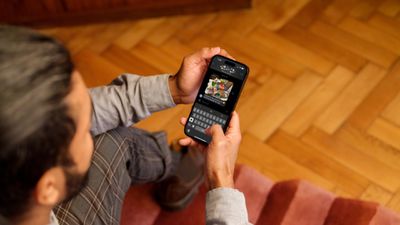
speed up iphone typing trick
Whether you're an iPhone veteran or a newcomer, these hidden tricks can significantly enhance your device's usability. From quickly switching between apps to accessing controls with a simple swipe, here are six gestures designed to streamline your daily tasks.

Return to Top

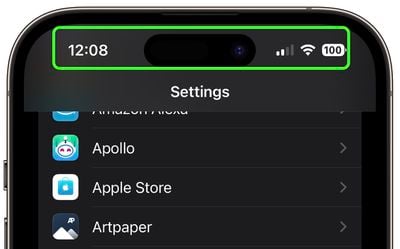
Whenever you're browsing in Safari or scrolling through a long app menu or feed, tap the status bar at the top of your ‌iPhone‌'s display to shoot back up to the top.
settings
If you have an iPhone 14 Pro or iPhone 15 and the Dynamic Island isn't in use, tapping it performs the same action.

Switch Apps

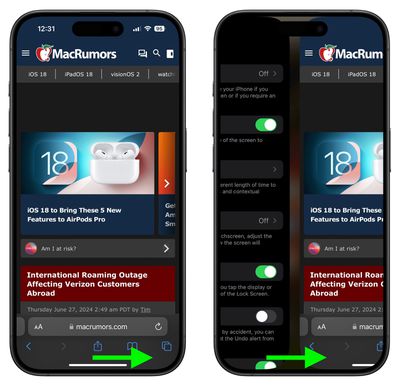
The Quick App Switcher is a handy feature on iPhones with no Home button that allows you to rapidly switch between recently used apps without the need to open the app switcher interface fully. It's ideal for tasks that require frequent app switching, such as copying information from one app to another.
safari
Simply swipe your finger horizontally across the bottom edge of your iPhone’s screen. This gesture will cycle through your most recently used apps, allowing you to switch between them effortlessly.

Access Camera Faster

Capturing memories on camera often requires speed and spontaneity, and this iPhone camera feature is designed to ensure you never miss a shot.
iphone navigation gestures2
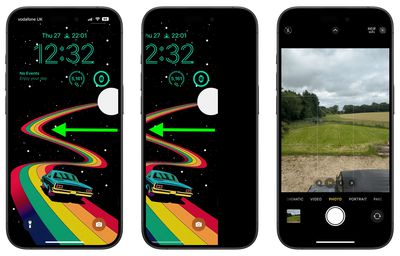
Instead of pressing the Camera icon on your Lock Screen, when your iPhone is locked, simply wake the screen and swipe left. This action immediately launches the Camera app, ready for you to take photos or videos.

Access Hidden Trackpad

Navigating and editing text on your iPhone can sometimes feel cumbersome, especially when trying to precisely place the cursor. Fortunately, Apple has integrated a hidden feature in the virtual keyboard that can make this task much easier.
notes
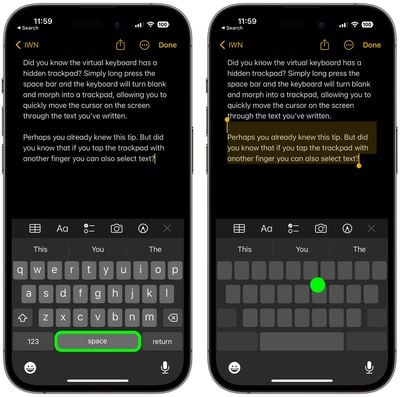
The next time you are writing something a little more lengthy and need to go back and change something, simply long-press the space bar, and the on-screen keyboard will transform into a trackpad that you can use to control the cursor. This allows you to navigate quickly through your text, moving the cursor to any desired spot with ease.

If you tap the trackpad with another finger while in this mode, you can also select chunks of text. This dual-functionality makes editing and tweaking text on your iPhone a breeze. Give it a try next time you're typing a message or note.

Spotlight Search is a powerful and efficient feature on iPhone that allows you to quickly find anything on your device, from apps and contacts to emails and web results. Spotlight can even search text in your photos thanks to Apple's Live Text feature.
iphone navigation gestures4
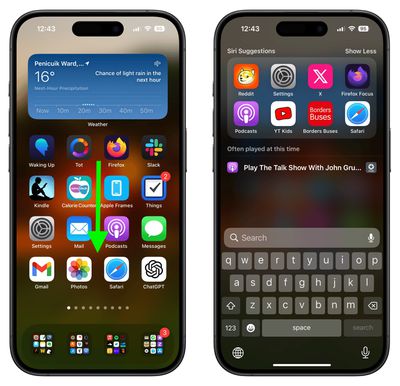
From any home screen, simply swipe downwards in the middle of the screen. This action will reveal the Spotlight Search bar at the top of your screen, along with a keyboard for entering your search query. You can even access it from the Lock Screen. (To disable access, go to Settings ➝ Face ID & Passcode, and toggle off Today View and Search under the "Allow Access When Locked" menu section.)

Reachability

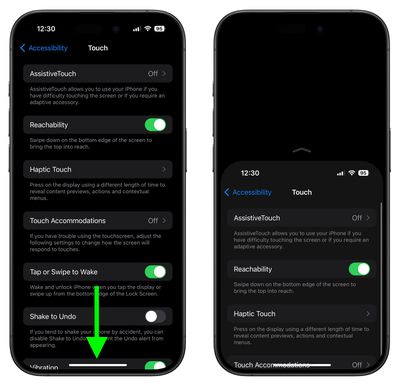
Reachability is a convenient feature designed to make it easier to use your iPhone with one hand, especially on larger models. By temporarily shifting the screen’s top half down, it allows you to reach icons, buttons, and other elements at the top of the screen without needing to use both hands.
settings
To enable the feature, go to Settings ➝ Accessibility ➝ Touch, and turn on the switch next to Reachability. Then all you have to do is lightly swipe downwards on the bottom edge of the screen (above the Home button on iPhone SE models, or the gesture bar on models without a Home button). The entire screen will shift down, bringing the top portion within easier reach. To revert back to full screen, simply repeat the gesture.


Popular Stories

M5 MacBook Pro

RIP, MacBook Ultra

Monday October 19, 2026 9:37 am PDT by
Apple today sent out invites for an experience in Los Angeles on Wednesday, October 28, and the "Pro and tell" tagline on the invitation likely means that the rumored MacBook models with touch-enabled OLED displays will stick with MacBook Pro branding instead of the once-rumored "MacBook Ultra" name. The long-rumored "iPhone Ultra" ended up being named iPhone Duo, so speculation that Apple...
iPhone Duo Trio

Here's What Apple's Apps Look Like on the iPhone Duo

Tuesday October 20, 2026 11:12 am PDT by
With just three days to go until the iPhone Duo is released, Apple is getting ready for the launch. Behind the scenes, the App Store now has screenshots of Apple's built-in apps running on the Duo. We've seen some apps in marketing materials, but images of the ones we haven't seen give us an idea of what it will be like using the iPhone Duo day to day. Many apps are shown in landscape...
apple pro tell logo

Apple Announcing New Products Next Week: 'Pro and Tell'

Monday October 19, 2026 9:05 am PDT by
Apple's Greg Joswiak today hinted at new product announcements coming next week, sharing a social media post that says "Can't wait to pro and tell next week." Rumors suggest Apple is planning to debut the new MacBook Pro with an OLED touchscreen display, an M6 entry-level MacBook Pro, an M6 iMac, an iPad mini with an OLED display. Can't wait to pro and tell next week....
Latest Stories
iPhone Duo Launch Begins as First Orders Reach Customers
2 hours ago
1Password for Agents Keeps Your Passwords Hidden From AI
2 hours ago
iPhone Duo 24 Hours Later: Your Questions Answered
3 hours ago
Apple's iWork Apps Get 'Intelligent Assistant' and iPhone Duo Support
4 hours ago
Apple is Apparently Considering a Slightly Larger iPhone Duo
4 hours ago
Giant iPhone Duo Displays Coming to Four Apple Stores
5 hours ago
Apple Pulls Keynote, Pages and Numbers From App Store [Update: Back]
6 hours ago
Apple Updates More Apps With iPhone Duo Support
6 hours ago
Apple Will Label Apps 'Made for iPhone Duo' in App Store
9 hours ago
Amazon Takes $49 Off iPad With Prices Starting at $399.99
10 hours ago
F1 on Apple TV Now Available in Dolby Atmos
10 hours ago
Apple Reveals More Than 50 Apps That Will Be Updated for iPhone Duo
11 hours ago
Apple Blocks Certificates That Could Help Attackers Fake Websites
12 hours ago
Giant iPhone Duo Installations Spotted at Apple Fifth Avenue
13 hours ago
iPhone Duo 2 Prototypes Include Under-Display Face ID
13 hours ago
Tesla App Gains iPad and iPhone Duo Support
17 hours ago
Apple Reportedly Boosts iPhone Duo Orders by 44%
17 hours ago
Fortnite Returning to Australian App Store After Court Ruling
18 hours ago
Apple Ordered to Open iPhone to Rival App Stores in Australia
18 hours ago
Apple Suppliers Face Hurdles Cutting Circuit Board Emissions
19 hours ago
Things Updated for iPhone Duo With Adaptive Layout
19 hours ago
Simplicity and Siri AI Are HomeView's Killer Features, Apple Says
19 hours ago
iPhone Duo Reviewers Really Miss Face ID
1 day ago
Does the iPhone Duo Run Hot? Here's What Reviews Found
1 day ago
Apple Music's New Look is Now Live on Apple's Website
1 day ago
Anthropic Launches Claude Duet, a Proactive AI Agent
1 day ago
What 32,000 Folds Did to the iPhone Duo's Hinge
1 day ago
iPhone Duo's Hidden FaceTime Camera Takes 'Trash' Photos
1 day ago
iPhone Duo Has 'Edge Light' Feature That Debuted on Macs Last Year
1 day ago
Apple Support App Updated for iPhone Duo's Larger Display
1 day ago









































