
Apple's Messages Communication Safety Explained: What You Need to Know - GeekWebGuides
Skip to Content

Apple's Messages Communication Safety Explained: What You Need to Know

Apple in the iOS 15.2 beta introduced a new Messages Communication Safety option that's designed to keep children safer online by protecting them from potentially harmful images. We've seen a lot of confusion over the feature, and thought it might be helpful to provide an outline of how Communication Safety works and clear up misconceptions.
communication safety feature yellow

Communication Safety Overview

Communication Safety is meant to prevent minors from being exposed to unsolicited photos that contain inappropriate content.

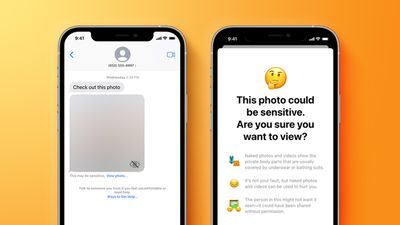
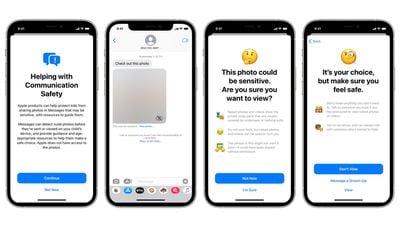
As explained by Apple, Communication Safety is designed to detect nudity in photos sent or received by children. The iPhone or iPad does on-device scanning of images in the Messages app, and if nudity is detected, the photo is blurred.
communication safety 1
If a child taps on the blurred image, the child is told that the image is sensitive, showing "body parts that are usually covered by underwear or bathing suits." The feature explains that photos with nudity can be "used to hurt you" and that the person in the photo might not want it seen if it's been shared without permission.

Apple also presents children with ways to get help by messaging a trusted grown-up in their life. There are two tap-through screens that explain why a child might not want to view a nude photo, but a child can opt to view the photo anyway, so Apple is not restricting access to content, but providing guidance.

Communication Safety is Entirely Opt-In

When iOS 15.2 is released, Communication Safety will be an opt-in feature. It will not be enabled by default, and those who use it will need to expressly turn it on.

Communication Safety is for Children

Communication Safety is a parental control feature enabled through the Family Sharing feature. With Family Sharing, adults in the family are able to manage the devices of children who are under 18.

Parents can opt in to Communication Safety using Family Sharing after updating to iOS 15.2. Communication Safety is only available on devices set up for children who are under 18 and who are part of a Family Sharing group.

Children under 13 are not able to create an Apple ID, so account creation for younger children must be done by a parent using Family Sharing. Children over 13 can create their own ‌Apple ID‌, but can still be invited to a Family Sharing group with parental oversight available.

Apple determines the age of the person who owns the ‌Apple ID‌ by the birthday used at the account creation process.

Communication Safety Can't Be Enabled on Adult Devices

As a Family Sharing feature designed exclusively for ‌Apple ID‌ accounts owned by a person under the age of 18, there is no option to activate Communication Safety on a device owned by an adult.

Adults do not need to be concerned about Messages Communication Safety unless they are parents managing it for their children. In a Family Sharing group consisting of adults, there will be no Communication Safety option, and no scanning of the photos in Messages is being done on an adult's device.

Messages Remain Encrypted

Communication Safety does not compromise the end-to-end encryption available in the Messages app on an iOS device. Messages remain encrypted in full, and no Messages content is sent to another person or to Apple.

Apple has no access to the Messages app on children's devices, nor is Apple notified if and when Communication Safety is enabled or used.

Everything is Done On-Device and Nothing Leaves the iPhone

For Communication Safety, images sent and received in the Messages app are scanned for nudity using Apple's machine learning and AI technology. Scanning is done entirely on device, and no content from Messages is sent to Apple's servers or anywhere else.

The technology used here is similar to the technology that the Photos app uses to identify pets, people, food, plants, and other items in images. All of that identification is also done on device in the same way.

When Apple first described Communication Safety in August, there was a feature designed to notify parents if children opted to view a nude photo after being warned against it. This has been removed.

If a child is warned about a nude photo and views it anyway, parents will not be notified, and full autonomy is in the hands of the child. Apple removed the feature after criticism from advocacy groups that worried it could be a problem in situations of parental abuse.

Communication Safety is Not Apple's Anti-CSAM Measure

Apple initially announced Communication Safety in August 2021, and it was introduced as part of a suite of Child Safety features that also included an anti-CSAM initiative.

Apple's anti-CSAM plan, which Apple has described as being able to identify Child Sexual Abuse Material in iCloud, has not been implemented and is entirely separate from Communication Safety. It was a mistake for Apple to introduce these two features together because one has nothing to do with the other except for both being under the Child Safety umbrella.

There has been a lot of blowback over Apple's anti-CSAM measure because it will see photos uploaded to ‌iCloud‌ scanned against a database of known Child Sexual Abuse Material, and Apple users aren't happy with the prospect of photo scanning. There are concerns that the technology that Apple is using to scan photos and match them against known CSAM could be expanded in the future to cover other types of material.

In response to widespread criticism, Apple has delayed its anti-CSAM plans and is making changes to how it will be implemented before releasing it. No anti-CSAM functionality has been added to iOS at this time.

Release Date and Implementation

Communication Safety is included in iOS 15.2 in the United States, and it is also expanding to the UK in the future.


Related Forum: iOS 15

Popular Stories

iPhone Duo Trio

Here's What Apple's Apps Look Like on the iPhone Duo

Tuesday October 20, 2026 11:12 am PDT by
With just three days to go until the iPhone Duo is released, Apple is getting ready for the launch. Behind the scenes, the App Store now has screenshots of Apple's built-in apps running on the Duo. We've seen some apps in marketing materials, but images of the ones we haven't seen give us an idea of what it will be like using the iPhone Duo day to day. Many apps are shown in landscape...
Apple Creator Studio iWork suite

Apple Pulls Keynote, Pages and Numbers From App Store [Update: Back]

Thursday October 22, 2026 11:01 am PDT by
Apple has temporarily removed Keynote, Pages, and Numbers from the App Store, just after releasing an update that added iPhone Duo support and a new Intelligent Assistant. It is not clear if the apps were removed intentionally, or if it is a bug. Apple has not said when the apps will be reinstated, but if it was in error, they should return soon. Update: The Mac versions are back without...
M5 MacBook Pro

RIP, MacBook Ultra

Monday October 19, 2026 9:37 am PDT by
Apple today sent out invites for an experience in Los Angeles on Wednesday, October 28, and the "Pro and tell" tagline on the invitation likely means that the rumored MacBook models with touch-enabled OLED displays will stick with MacBook Pro branding instead of the once-rumored "MacBook Ultra" name. The long-rumored "iPhone Ultra" ended up being named iPhone Duo, so speculation that Apple...

Top Rated Comments

65 months ago
This feature is done right. I am happy to see that it is all done on the device and that the decisions on what is inappropriate can be left to children and their parents. Apple should not be in the business of child safety. They should be in the business of providing the tools to parents to make sure their children are safe with their devices. The responsibility of child protection should sit first on the parent and this allows exactly that.
Score: 24 Votes (Like | Disagree)
jz0309 Avatar
65 months ago
If this would have been a feature back when my children were minors, I would have definitely turned it on, so thank you Apple
Score: 20 Votes (Like | Disagree)
chucker23n1 Avatar
65 months ago

Most kids have Android phones anyway
Not in the US they don't. https://www.imore.com/nine-out-ten-teens-have-iphone-now
Score: 19 Votes (Like | Disagree)
thadoggfather Avatar
65 months ago

The iPhone is like a Nintendo Switch.
An Android is like a MacBook Pro.

It’s sort of clear where Apple is going with iOS:

- CSAM
- Apple Arcade
- Apple TV+
- Memoji

And it’s also clear where Apple is going with macOS

- SD Cards
- Magsafe
- USB-C
- Side-loading .DMG
I am just so lost here on so many levels.
Score: 18 Votes (Like | Disagree)
fwmireault Avatar
65 months ago
Very much needed article, thank you MR for the clarification. I really hope that people who still mix this up with CSAM scanning will read it before making any comments.
Score: 13 Votes (Like | Disagree)
jz0309 Avatar
65 months ago

Moving forward, Kids won't use Messages, they'll migrate to WhatsApp OR whatever, to get out from under Apple's control.

With that group, Apple will have lost one of the key iOS features that makes iOS "sticky," Messages !

NOT saying they will migrate away from Apple products, but Apple will have lost some control over them.

Some Analysts think Messages is the #1 reason Apple has a sticky eco-system.

I don't agree, I think it's a lack of viable & credible competition.
The children are not under Apples control, they are under their PARENTS control, rightfully so.. read the article!
Score: 9 Votes (Like | Disagree)
Latest Stories
iPhone Duo Launch Begins as First Orders Reach Customers
2 hours ago
1Password for Agents Keeps Your Passwords Hidden From AI
3 hours ago
iPhone Duo 24 Hours Later: Your Questions Answered
3 hours ago
Apple's iWork Apps Get 'Intelligent Assistant' and iPhone Duo Support
4 hours ago
Apple is Apparently Considering a Slightly Larger iPhone Duo
4 hours ago
Giant iPhone Duo Displays Coming to Four Apple Stores
5 hours ago
Apple Pulls Keynote, Pages and Numbers From App Store [Update: Back]
6 hours ago
Apple Updates More Apps With iPhone Duo Support
7 hours ago
Apple Will Label Apps 'Made for iPhone Duo' in App Store
10 hours ago
Amazon Takes $49 Off iPad With Prices Starting at $399.99
10 hours ago
F1 on Apple TV Now Available in Dolby Atmos
11 hours ago
Apple Reveals More Than 50 Apps That Will Be Updated for iPhone Duo
11 hours ago
Apple Blocks Certificates That Could Help Attackers Fake Websites
12 hours ago
Giant iPhone Duo Installations Spotted at Apple Fifth Avenue
13 hours ago
iPhone Duo 2 Prototypes Include Under-Display Face ID
13 hours ago
Tesla App Gains iPad and iPhone Duo Support
17 hours ago
Apple Reportedly Boosts iPhone Duo Orders by 44%
18 hours ago
Fortnite Returning to Australian App Store After Court Ruling
18 hours ago
Apple Ordered to Open iPhone to Rival App Stores in Australia
19 hours ago
Apple Suppliers Face Hurdles Cutting Circuit Board Emissions
19 hours ago
Things Updated for iPhone Duo With Adaptive Layout
19 hours ago
Simplicity and Siri AI Are HomeView's Killer Features, Apple Says
20 hours ago
iPhone Duo Reviewers Really Miss Face ID
1 day ago
Does the iPhone Duo Run Hot? Here's What Reviews Found
1 day ago
Apple Music's New Look is Now Live on Apple's Website
1 day ago
Anthropic Launches Claude Duet, a Proactive AI Agent
1 day ago
What 32,000 Folds Did to the iPhone Duo's Hinge
1 day ago
iPhone Duo's Hidden FaceTime Camera Takes 'Trash' Photos
1 day ago
iPhone Duo Has 'Edge Light' Feature That Debuted on Macs Last Year
1 day ago
Apple Support App Updated for iPhone Duo's Larger Display
1 day ago









































