
iOS 16: Everything New With Notes and Reminders - GeekWebGuides
Skip to Content

iOS 16: Everything New With Notes and Reminders

The iOS 16 update focuses primarily on the Lock Screen and new features for apps like Mail, Messages, and Photos, but Apple did make some small changes to the Notes and Reminders app, adding a handful of new options.
ios 16 notes
This guide highlights all of the new features in the Notes and Reminders apps for iOS 16, which is available now.

Notes

There are some quality of life improvements for the Notes app, most notably an option to lock notes with the same passcode used to lock your iPhone.

iPhone Quick Note

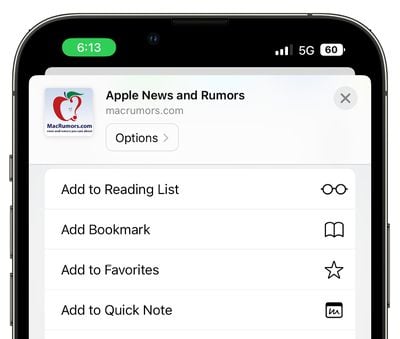
The Share Sheet has gained an "Add to Quick Note" option so you can create Quick Notes on iPhone. Add to Quick Note is an option across the iOS operating system, in first and third-party apps. You can create Quick Notes with Safari links, images, and more.
ios 16 notes quick note
Quick Notes used to be an iPad-only feature introduced in iPadOS 15, but iOS 16 brings them to the iPhone as well. On iPad, you can create Quick Notes from the Lock Screen, but on iPhone, the Share Sheet interface is required.

Updated Smart Folders

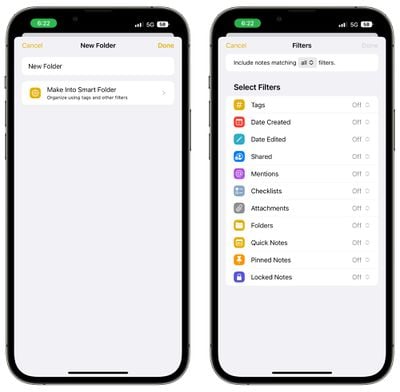
There are new Smart Folder filters available for better note organization. Rules can be created for Date Created, Date Modified, Shared, Mentions, Checklists, Attachments, Folder, Quick Notes, Pinned Notes, and Locked Notes.
notes smart folder options ios 16
Smart Folders used to be based solely on tags, so this is a notable update to the way notes are organized.

Lock Notes With Passcode

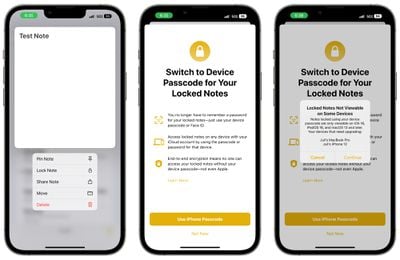
Rather than selecting a specific passcode for a locked note, you can instead lock your notes with your iPhone's passcode. That makes more sense than thinking up a standalone password, because you're not likely to forget your iPhone passcode.
ios 16 passcode locked notes
Notes locked with a passcode can be automatically unlocked with Face ID and the feature does not need to be enabled, plus you can access your locked notes across all of your devices by using the passcode for the device you're using.

Note that notes locked with your passcode can only be viewed on devices running iOS 16, iPadOS 16, or macOS Ventura. Devices running older versions of iOS and macOS will not be able to view passcode-locked notes.

Grouping by Date

In your list of notes and your gallery view, Notes are now grouped by chronological categories like Today and Yesterday to make it easier to find your most recent notes.
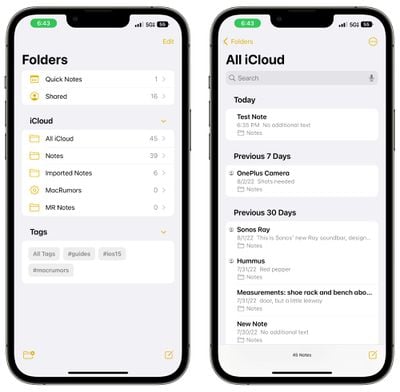
notes ios 16 date organization

Filters

When using Smart Folders or the Tag Browser, you can opt to filter for any or all of the criteria that you've chosen.
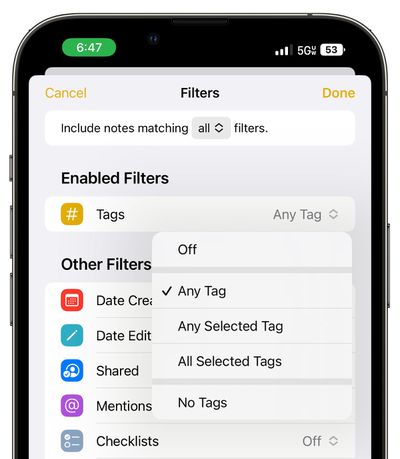
ios 16 notes filters any all

Reminders

Pinned lists, list templates, and the completed smart list bring some notable improvements for those who use the Reminders app on a regular basis.

Pinned Lists

The lists that you use most often can be pinned to the top of the Reminders app for easy access. Pinned lists show up right alongside Reminder app sections like Today, Scheduled, and Flagged.
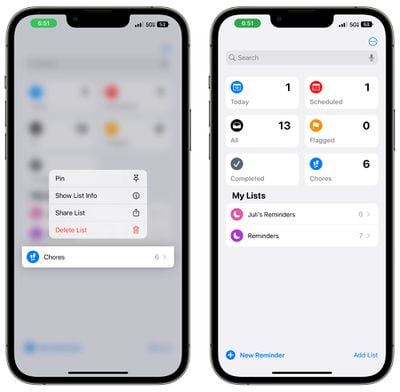
ios 16 pin reminder

Completed Smart List

Apple has added a whole new "Completed" section to the Reminders app that aggregates all of the reminders that you have checked off and finished. It is organized in sections that include Previous 7 Days and Previous 30 Days, then further back, it organizes reminders into months and years.
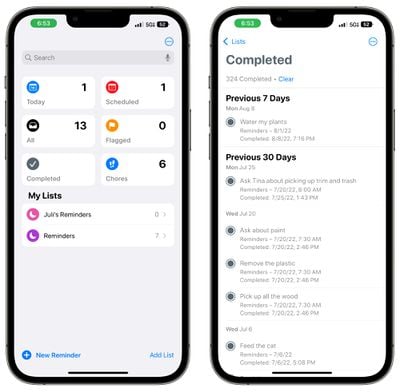
ios 16 completed reminders
Completed reminders can be cleared out by tapping on the "Clear" button at the top of the app, or they can be deleted individually by swiping.

List Templates

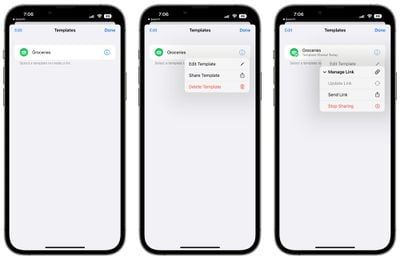
If you have a list that you reuse often like a grocery list or a packing list, you can save it as a template so it can be reused anytime. When creating a new list, the template section shows up as an option so you can choose your previously created templates.
ios 16 reminders templates
You can go into the Templates section of the Reminders app and make any template shareable. From there, you can copy a link and send it to other people.
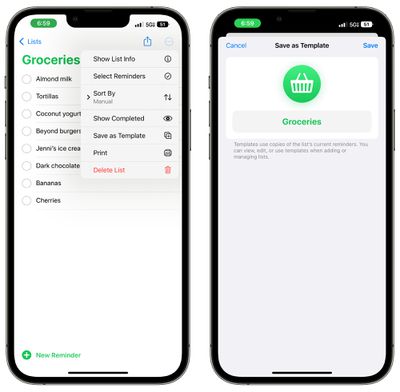
ios 16 reminders save as template
Others are also able to share templates with you, and those templates can be imported into the Reminders app.

Scheduled and Today List Improvements

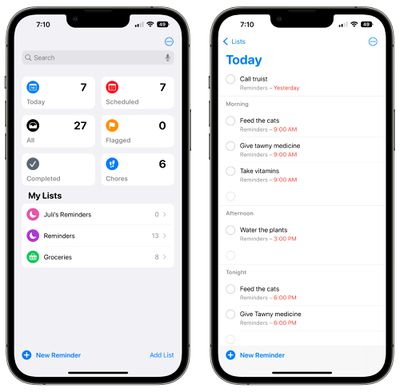
Grouping by time and date is designed to make it easier to view and add reminders. The Today List is now grouped by Morning, Afternoon, and Night for a better division of the day.
ios 16 reminders today organization
The Scheduled List has week and month groups for longer-term organization.

Improved List Groups

Any list group can be tapped to display a combined view of both the lists and the reminders that are inside.

Shared List Notifications

When tasks are added or completed in a shared list, you can opt to receive a notification.

Enhanced Notes

Notes added to reminders now support underlining, bold, and strikethrough text, plus bullet points can be used.

Filters

You can opt to filter for any or all of the criteria in a custom smart list or the tag browser.

Collaboration

Both Notes and Reminders work with the new collaboration feature that Apple implemented in iOS 16. You can send an invitation to collaborate to someone in Messages or FaceTime, and everyone on the thread is added to the Note or Reminder that you're working with.

Guide Feedback

Have questions about Notes and Reminders in iOS 16, know of a feature we left out, or want to offer feedback on this guide? Send us an email here.


Related Forum: iOS 16

Popular Stories

iPhone Duo Trio

Here's What Apple's Apps Look Like on the iPhone Duo

Tuesday October 20, 2026 11:12 am PDT by
With just three days to go until the iPhone Duo is released, Apple is getting ready for the launch. Behind the scenes, the App Store now has screenshots of Apple's built-in apps running on the Duo. We've seen some apps in marketing materials, but images of the ones we haven't seen give us an idea of what it will be like using the iPhone Duo day to day. Many apps are shown in landscape...
Apple Creator Studio iWork suite

Apple Pulls Keynote, Pages and Numbers From App Store [Update: Back]

Thursday October 22, 2026 11:01 am PDT by
Apple has temporarily removed Keynote, Pages, and Numbers from the App Store, just after releasing an update that added iPhone Duo support and a new Intelligent Assistant. It is not clear if the apps were removed intentionally, or if it is a bug. Apple has not said when the apps will be reinstated, but if it was in error, they should return soon. Update: The Mac versions are back without...
M5 MacBook Pro

RIP, MacBook Ultra

Monday October 19, 2026 9:37 am PDT by
Apple today sent out invites for an experience in Los Angeles on Wednesday, October 28, and the "Pro and tell" tagline on the invitation likely means that the rumored MacBook models with touch-enabled OLED displays will stick with MacBook Pro branding instead of the once-rumored "MacBook Ultra" name. The long-rumored "iPhone Ultra" ended up being named iPhone Duo, so speculation that Apple...

Top Rated Comments

drumcat Avatar
55 months ago
Reminders is the ultimate grocery/shopping list. I call mine "Shopping", and it works great with Siri:

"Add (item) to the Shopping list" and then I forget a lot less when I go. And I don't want to be at the nasty grocery store long anyhow. Great setup for us.

edit: Shout out to the one "disagree". LMAO.
Score: 13 Votes (Like | Disagree)
Mac47 Avatar
55 months ago
What they really need is a version of Notes for Apple Watch.
Score: 6 Votes (Like | Disagree)
Will Co Avatar
55 months ago
Nice. I use reminders extensively and these features are welcome additions.
Score: 5 Votes (Like | Disagree)
TrueBlou Avatar
55 months ago
Notes is definitely among my most used apps, but Reminders, now that I really should use more than I do.
I’ve still got the old (now bad habit) way of just adding ‘reminders’ to my Calendar. Which is fine, it works, but man my calendar’s bound to be stuffed with unnecessary, old random nonsense going back a decade or more. At least if I use Reminders it’s easier to get rid of the old crud.
Score: 4 Votes (Like | Disagree)
Razorpit Avatar
55 months ago
Notes is a dangerous app to use. There’s no backing up of a note. One wrong move and things can be gone forever. I use Pages instead. At least with Pages things get backed up with Time Machine.
Score: 3 Votes (Like | Disagree)
55 months ago
All these Notes improvements are neat, but I would give my left ear for the ability to reorder lists by drag and drop.
Score: 3 Votes (Like | Disagree)
Latest Stories
Happy 25th Anniversary, iPod
1 minute ago
iPhone Duo Demand Reportedly Exceeds Apple's Expectations
3 hours ago
iPhone Duo Launch Begins as First Orders Reach Customers
9 hours ago
1Password for Agents Keeps Your Passwords Hidden From AI
10 hours ago
iPhone Duo 24 Hours Later: Your Questions Answered
10 hours ago
Apple's iWork Apps Get 'Intelligent Assistant' and iPhone Duo Support
11 hours ago
Apple is Apparently Considering a Slightly Larger iPhone Duo
11 hours ago
Giant iPhone Duo Displays Coming to Four Apple Stores
12 hours ago
Apple Pulls Keynote, Pages and Numbers From App Store [Update: Back]
13 hours ago
Apple Updates More Apps With iPhone Duo Support
14 hours ago
Apple Will Label Apps 'Made for iPhone Duo' in App Store
16 hours ago
Amazon Takes $49 Off iPad With Prices Starting at $399.99
17 hours ago
F1 on Apple TV Now Available in Dolby Atmos
17 hours ago
Apple Reveals More Than 50 Apps That Will Be Updated for iPhone Duo
18 hours ago
Apple Blocks Certificates That Could Help Attackers Fake Websites
19 hours ago
Giant iPhone Duo Installations Spotted at Apple Fifth Avenue
20 hours ago
iPhone Duo 2 Prototypes Include Under-Display Face ID
20 hours ago
Tesla App Gains iPad and iPhone Duo Support
1 day ago
Apple Reportedly Boosts iPhone Duo Orders by 44%
1 day ago
Fortnite Returning to Australian App Store After Court Ruling
1 day ago
Apple Ordered to Open iPhone to Rival App Stores in Australia
1 day ago
Apple Suppliers Face Hurdles Cutting Circuit Board Emissions
1 day ago
Things Updated for iPhone Duo With Adaptive Layout
1 day ago
Simplicity and Siri AI Are HomeView's Killer Features, Apple Says
1 day ago
iPhone Duo Reviewers Really Miss Face ID
1 day ago
Does the iPhone Duo Run Hot? Here's What Reviews Found
1 day ago
Apple Music's New Look is Now Live on Apple's Website
1 day ago
Anthropic Launches Claude Duet, a Proactive AI Agent
1 day ago
What 32,000 Folds Did to the iPhone Duo's Hinge
1 day ago
iPhone Duo's Hidden FaceTime Camera Takes 'Trash' Photos
2 days ago








































