
These Are the Gestures Used to Control Vision Pro - MacRumors
Skip to Content

These Are the Gestures Used to Control Vision Pro

With the launch of the Vision Pro, Apple published plenty of support documents and tutorials, including an overview of the gestures used to control the headset. Most people have found the gesture-based control to be intuitive, but for those having difficulty, Apple also has some tips on getting the best experience.
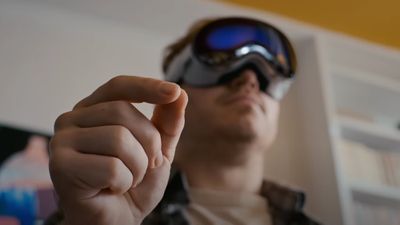
apple vision pro gestures

Vision Pro Gestures

  • Tap Fingers Together - To select an item on the Vision Pro, look at it and then tap your thumb and index finger together. Apple says this is the equivalent of tapping something on the iPhone or clicking something on the Mac.
  • Pinch and Drag - Moving items on Vision Pro can be done by looking at an item and then pinching your thumb and index finger together. Pinch and hold while moving the item, and then let go. Pinching and dragging is used for arranging apps, resizing windows, scrolling, and dragging things from one app to another.
  • Pinch and Flick - Scrolling through content quickly can be done by pinching your thumb and index finger together and then flicking the wrist up or down in a smooth motion. This gesture is used for moving horizontally through apps in the Home View, scrolling long web pages, and browsing images in the Photos app.
  • Pinch for Options - If you pinch and hold on an item in Vision Pro, you can bring up a list of items. Just look at an item, tap your thumb and index finger together, and hold. Once the options appear, you can let go and then tap to select the preferred option.
  • Touch - There are elements in visionOS that can be interacted with directly with the fingers. The virtual keyboard is one such example, as typing can be done by touching on the keys with one finger on each hand.

Gesture Tips

For the best experience with Vision Pro, Apple recommends using it in a well-lit room, without long sleeves or large jewelry, and with your hands visible.

  • Make sure to use Vision Pro in a well-lit area and ensure that the front of the device is clean and free of smudges so that the outward-facing cameras can see your hands.
  • Keep your hands resting comfortably in your lap - there is no need to hold your arm up.
  • Make sure your hands are visible and not hidden under a desk or blanket.
  • Gloves, long sleeves, and large jewelry that covers a significant part or all of the hand can interfere with Vision Pro gesture tracking.
  • Don't cross your hands or cover up your gesturing hand with your other hand.

There are also a range of Accessibility features that can be used for improving the Vision Pro experience in certain cases, with details available on Apple's support website.

Related Roundup: Apple Vision Pro
Buyer's Guide: Vision Pro (Neutral)
Related Forum: Apple Vision Pro


Popular Stories

Vision Pro M5 Announcement

New Vision Pro Headset: Apple Considering Four Different Concepts

Monday September 28, 2026 3:52 am PDT by
Apple is working on a "completely revamped" Vision Pro headset that could go in any of four directions and likely won't arrive before late 2028 or early 2029, according to Bloomberg's Mark Gurman. Writing in his latest Power On newsletter, Gurman said Apple's Vision team is exploring four concepts for the device, codenamed N224, including designs that offload internal components in a similar ...
Apple Remnants Vision Pro

Apple Unveils Immersive Horror Film Coming Exclusively to Vision Pro

Tuesday October 13, 2026 5:26 am PDT by
Apple on Monday announced Remnants, an immersive horror film that will be released exclusively on the Vision Pro on Friday, October 16. The film will be in the Apple Immersive Video format, meaning it will be a 3D video recorded in 8K resolution with a 180-degree field of view and Spatial Audio. Apple shared a short video of people reacting to the film while wearing the Vision Pro....

General visionOS watchOS and tvOS Betas Feature Redux

Apple Releases Third watchOS 27.2, tvOS 27.2 and visionOS 27.2 Betas

Monday October 5, 2026 11:20 am PDT by
Alongside new betas of iOS 27.2, iPadOS 27.2, and macOS Golden Gate 27.2, Apple has released the third betas of watchOS 27.2, tvOS 27.2, and visionOS 27.2. The betas come two weeks after Apple released the second betas. Registered developers can download the betas through the Settings app on each device. With iOS 27.2 and watchOS 27.2, Apple is testing the new Health app that it showed...

Top Rated Comments

red elma Avatar
36 months ago
Make sure your dog/cat is not sitting right next to you while doing all these pinch'n flicking...
Score: 4 Votes (Like | Disagree)
36 months ago
I have some bad news. Gestures don't work in the dark, and especially when you're lying reclined. So there goes my plan for watching movies in bed while my dog is trying to sleep.
Score: 2 Votes (Like | Disagree)
36 months ago
Breaking news…

It has been reported that during a long haul flight a passenger was accused of inappropriately touching a fellow passenger. The victim claims they then started pinching and flicking, so they responded by slapping the passenger.

The accused claims they were composing an email 🥴
Score: 2 Votes (Like | Disagree)
japanime Avatar
36 months ago

For the best experience with Vision Pro, Apple recommends using it in a well-lit room, without long sleeves or large jewelry
So, you've got to take off your wedding band and show some skin? I think we can all see where this is going. 🤣
Score: 2 Votes (Like | Disagree)
Gasu E. Avatar
36 months ago
You can rub your thumb against your index and middle finger to indicate how much you spent on it.
Score: 1 Votes (Like | Disagree)
arkitect Avatar
36 months ago

So, you've got to take off your wedding band and show some skin? I think we can all see where this is going. 🤣
🤣


For the best experience with Vision Pro, Apple recommends using it in a well-lit room, without long sleeves or large jewelry, and with your hands visible.
Hmmm.
And take off your Apple watch as well… I would assume.
Score: 1 Votes (Like | Disagree)
Latest Stories
iPhone Duo Launch Begins as First Orders Reach Customers
1 hour ago
1Password for Agents Keeps Your Passwords Hidden From AI
2 hours ago
iPhone Duo 24 Hours Later: Your Questions Answered
3 hours ago
Apple's iWork Apps Get 'Intelligent Assistant' and iPhone Duo Support
4 hours ago
Apple is Apparently Considering a Slightly Larger iPhone Duo
4 hours ago
Giant iPhone Duo Displays Coming to Four Apple Stores
5 hours ago
Apple Pulls Keynote, Pages and Numbers From App Store [Update: Back]
6 hours ago
Apple Updates More Apps With iPhone Duo Support
6 hours ago
Apple Will Label Apps 'Made for iPhone Duo' in App Store
9 hours ago
Amazon Takes $49 Off iPad With Prices Starting at $399.99
10 hours ago
F1 on Apple TV Now Available in Dolby Atmos
10 hours ago
Apple Reveals More Than 50 Apps That Will Be Updated for iPhone Duo
11 hours ago
Apple Blocks Certificates That Could Help Attackers Fake Websites
12 hours ago
Giant iPhone Duo Installations Spotted at Apple Fifth Avenue
13 hours ago
iPhone Duo 2 Prototypes Include Under-Display Face ID
13 hours ago
Tesla App Gains iPad and iPhone Duo Support
17 hours ago
Apple Reportedly Boosts iPhone Duo Orders by 44%
17 hours ago
Fortnite Returning to Australian App Store After Court Ruling
18 hours ago
Apple Ordered to Open iPhone to Rival App Stores in Australia
18 hours ago
Apple Suppliers Face Hurdles Cutting Circuit Board Emissions
18 hours ago
Things Updated for iPhone Duo With Adaptive Layout
19 hours ago
Simplicity and Siri AI Are HomeView's Killer Features, Apple Says
19 hours ago
iPhone Duo Reviewers Really Miss Face ID
1 day ago
Does the iPhone Duo Run Hot? Here's What Reviews Found
1 day ago
Apple Music's New Look is Now Live on Apple's Website
1 day ago
Anthropic Launches Claude Duet, a Proactive AI Agent
1 day ago
What 32,000 Folds Did to the iPhone Duo's Hinge
1 day ago
iPhone Duo's Hidden FaceTime Camera Takes 'Trash' Photos
1 day ago
iPhone Duo Has 'Edge Light' Feature That Debuted on Macs Last Year
1 day ago
Apple Support App Updated for iPhone Duo's Larger Display
1 day ago








































