Apple Provides Tips For Making Your Persona Look Better

Apple designed the Vision Pro to use a "Persona" or a digital representation of the wearer in FaceTime, Zoom, and other video apps. Apple says that the Persona is meant to be a "dynamic, natural representation" of the user's face, but many people have found it to be anything but natural.
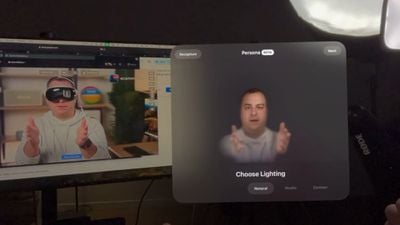
dan persona vision pro
In fact, many reviewers found the Personas to be creepy, weird, and off-putting because of the uncanny valley experience, and that may be why Apple has only released Personas in a beta capacity. Apple today provided instructions on setting up a Persona, complete with tips on how to get the best result.

You can watch MacRumors videographer Dan set up a Persona below, but it's basically as simple as tapping on Persona in Settings and following the instructions. Making a Persona uses the Vision Pro's camera and captures the user's face and facial expressions.


Here's what Apple says Vision Pro owners can do to make the best Persona:

  • Take your time getting ready. Capture will not start until the Vision Pro is at eye level.
  • Use front-facing, even lighting. Do not have bright windows or lamps behind or beside you. The Vision Pro may prompt you to adjust lighting.
  • Ensure your face is well-lit with no strong shadows.
  • Make sure your hair is not covering your face.
  • Use a simple background and stay away from nearby objects like chair backs and lamps.
  • Make sure there are no people behind you.
  • Make sure the Vision Pro is held horizontally at eye level throughout the capture.
  • When asked to smile, make as large and natural a smile as you can.
  • If you're not able to perform one of the expressions, such as raising an eyebrow or smiling with teeth, double clicking on the Digital Crown will skip the expression.
  • Hats, earrings, AirPods, and other items might not be captured fully. They will need to be removed and the Persona will need to be redone if they don't look right.

If your Persona does not come out as expected, you can redo the process and change variables until it looks better. Note that glasses cannot be captured, and must be added afterward through Apple's pre-selected styles.

Different lighting options can be applied to a Persona, including Natural, Studio, or Contour. There are also settings to adjust the temperature and brightness of the Persona.

When you capture your Persona, Apple is also capturing your eyes for the EyeSight feature that shows the wearer's eyes when other people are nearby.


Related Roundup: Apple Vision Pro
Buyer's Guide: Vision Pro (Buy Now)
Related Forum: Apple Vision Pro

Popular Stories

Apple Logo Zoomed

Tim Cook Teases Plans for Apple's Upcoming 50th Anniversary

Thursday February 5, 2026 12:54 pm PST by
Apple turns 50 this year, and its CEO Tim Cook has promised to celebrate the milestone. The big day falls on April 1, 2026. "I've been unusually reflective lately about Apple because we have been working on what do we do to mark this moment," Cook told employees today, according to Bloomberg's Mark Gurman. "When you really stop and pause and think about the last 50 years, it makes your heart ...
iOS 26

iOS 26.3 and iOS 26.4 Will Add These New Features to Your iPhone

Tuesday February 3, 2026 7:47 am PST by
While the iOS 26.3 Release Candidate is now available ahead of a public release, the first iOS 26.4 beta is likely still at least a week away. Following beta testing, iOS 26.4 will likely be released to the general public in March or April. Below, we have recapped known or rumored iOS 26.3 and iOS 26.4 features so far. iOS 26.3 iPhone to Android Transfer Tool iOS 26.3 makes it easier...
imac video apple feature

Apple Makes Its Second-Biggest Acquisition Ever

Tuesday February 3, 2026 12:45 pm PST by
Apple recently acquired Israeli startup Q.ai for close to $2 billion, according to Financial Times sources. That would make this Apple's second-biggest acquisition ever, after it paid $3 billion for the popular headphone maker Beats in 2014. This is also the largest known Apple acquisition since the company purchased Intel's smartphone modem business and patents for $1 billion in 2019....
wwdc sans text feature

Apple Rumored to Announce New Product on February 19

Thursday February 5, 2026 12:22 pm PST by
Apple plans to announce the iPhone 17e on Thursday, February 19, according to Macwelt, the German equivalent of Macworld. The report, citing industry sources, is available in English on Macworld. Apple announced the iPhone 16e on Wednesday, February 19 last year, so the iPhone 17e would be unveiled exactly one year later if this rumor is accurate. It is quite uncommon for Apple to unveil...
Finder Siri Feature

Why Apple's iOS 26.4 Siri Upgrade Will Be Bigger Than Originally Promised

Friday February 6, 2026 3:06 pm PST by
In the iOS 26.4 update that's coming this spring, Apple will introduce a new version of Siri that's going to overhaul how we interact with the personal assistant and what it's able to do. The iOS 26.4 version of Siri won't work like ChatGPT or Claude, but it will rely on large language models (LLMs) and has been updated from the ground up. Upgraded Architecture The next-generation...

Top Rated Comments

SpaceGrayAlways Avatar
26 months ago
I think people are overreacting. Is it perfect? Absolutely not. But is it by far the best lifelike avatar on the market? Absolutely. And it's doing it all in real time with a full AVP on your face. From a technological standpoint it is incredible. It will improve over time and I look forward to seeing those improvements... But just... WOW
Score: 21 Votes (Like | Disagree)
elliotmoore91 Avatar
26 months ago
hahaha. Dan looks like an actual potato.
Score: 13 Votes (Like | Disagree)
topdrawer Avatar
26 months ago
i didn't see any distinction between you and the persona.
Score: 9 Votes (Like | Disagree)
anthony13 Avatar
26 months ago
This product continues to baffle me.
Score: 9 Votes (Like | Disagree)
Corso99 Avatar
26 months ago
I think I'll wait for the $599 Apple Vision SE in 2028.
Score: 9 Votes (Like | Disagree)
XboxEvolved Avatar
26 months ago
-Do not taunt Super Happy FunBall
Score: 7 Votes (Like | Disagree)