Apple in September released iOS 17, its latest major software update for compatible iPhones. Keep reading to learn if Apple's newest mobile operating system will run on your particular iPhone model.
What's New in iOS 17
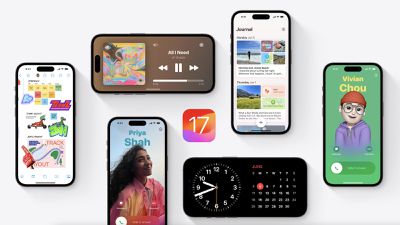
iOS 17 brings a number of improvements and features to iPhones. It introduces a customized look for each person that calls you on your phone, with the person who places the call able to customize their look. A new StandBy feature turns an iPhone placed horizontally into a little home hub that displays information like the calendar, time, home controls, and more, and Live Activities can be displayed in full screen too.
Widgets on the Home Screen are interactive, so you can do things like check off an item on a to-do list or turn off the lights without having to open an app. AirDrop has been improved and there's a NameDrop function for sharing contacts quickly, plus you can hold two iPhones together to start a SharePlay session. SharePlay also now works with CarPlay so passengers can play their music in the car too.
Other new features include a journaling app coming later this year, AirPlay in select hotel rooms, improvements to AirPods Pro 2 thanks to a new Adaptive Audio feature, offline Maps, Siri that does not require the "Hey" activation, and improvements to search and spotlight. Of course the question is, will it run on your iPhone, or will you need to upgrade come September, when iOS is expected to be released?
iOS 17 Compatibility
iOS 17 is compatible with the iPhone XS and newer, meaning that support has been dropped for the iPhone 8, iPhone 8 Plus, and iPhone X. For a full list, iOS 17 supports the following iPhone models:
- iPhone 14
- iPhone 14 Plus
- iPhone 14 Pro
- iPhone 14 Pro Max
- iPhone 13
- iPhone 13 mini
- iPhone 13 Pro
- iPhone 13 Pro Max
- iPhone 12
- iPhone 12 mini
- iPhone 12 Pro
- iPhone 12 Pro Max
- iPhone 11
- iPhone 11 Pro
- iPhone 11 Pro Max
- iPhone XS
- iPhone XS Max
- iPhone XR
- iPhone SE (2nd generation or later)
How to Identify Your iPhone Model
If you're unsure which iPad model you have, go to Settings -> General -> About, and you'll find the Model Name listed there.
You can also find out which version of iOS your device is running by going to Settings -> Software Update. If an update is available for your iPhone, it will notify you here.