

 If you've ever used the desktop version of Safari, you'll likely be familiar with the browser's Downloads pane, which helps you keep track of any currently downloading and downloaded files.
With iOS 13, Apple has brought a similar feature to the mobile version of its Safari browser in the form of the Download Manager. Now, when you choose to download a file, such as an image or document, a little download icon is displayed in the top right corner of the screen.
You can tap the icon to check the status of your downloads, and tapping the magnifying glass next to a file will open its folder location, whether that's on your device or in the cloud.
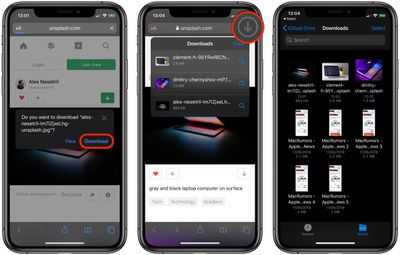
By default, files downloaded in Safari are saved in the "Downloads" section of the Files app, but you can easily customize the storage location: Launch the Settings app, select the Safari section, and tap Downloads. From this screen you can opt to store downloaded files in iCloud Drive, on your iPhone, or in another location of your choosing.
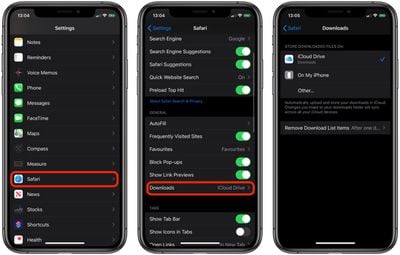
The Downloads screen in Safari settings also includes an option to Remove Download List Items automatically After one day (the default), Upon successful download, or Manually.























![Apple Pulls Keynote, Pages and Numbers From App Store [Update: Back]](https://images.macrumors.com/t/Okb7kitB_gNr6qe5Pex9nQIysD8=/112x112/article-new/2026/01/Apple-Creator-Studio-iWork-suite.jpg)






















