airdropApple's AirDrop feature lets you wirelessly send and receive files between nearby Macs as well as to and from local iOS devices. It's usually accessed from the sidebar of an open Finder Window (or using the Command + Shift + R keyboard shortcut within Finder), but here we're going to share with you a trick that enables you to launch AirDrop straight from your Mac's Dock.

Having the AirDrop shortcut in your Dock will allow you to access it from any screen, regardless of the application you're using, and without having to open a Finder window first. Regular AirDrop users in particular should appreciate the convenience it provides.

How to Add AirDrop to Your Mac's Dock

  1. Open a Finder window or click the Desktop.

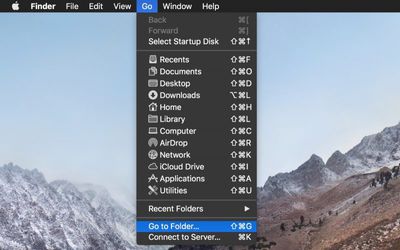
  2. In the Finder menu bar, select Go -> Go to Folder.
    Finder go to folder

  3. Paste the following directory path into the dialog and press Enter: /System/Library/CoreServices/Finder.app/Contents/Applications/
    Finder go to folder dialog

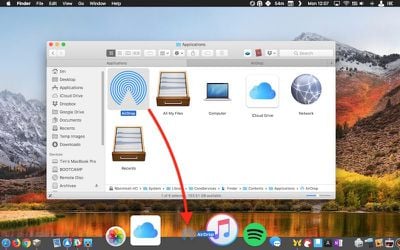
  4. The Contents/Applications folder within the Finder.app package will appear. Using your mouse, drag the AirDrop app to the desired location in your Dock.
    drag airdrop to dock

  5. Close the Finder window.

Next time you want to open the AirDrop window to share something, simply click the app icon in your Mac's Dock. Note that you can also drag the iCloud Drive app from the Finder package in the same way, for quick one-click access to the files and folders in your cloud storage.

Tag: AirDrop

Top Rated Comments

Gorms Avatar
101 months ago
This is actually really useful for me. Thank you for this tip!

AirDrop is one of macOS’ best features... (when it works)
Score: 8 Votes (Like | Disagree)
Saipher Avatar
101 months ago
Thank you MacRumors, these tips articles are very helpful. :)
Score: 5 Votes (Like | Disagree)
Chupa Chupa Avatar
101 months ago
Not sure I understand how this streamlines workflow. Dragging a file to the dock seems like more work than just ctrl+click -> share -> airdrop. What am I missing?
Score: 4 Votes (Like | Disagree)
rubberfish Avatar
101 months ago
Thanks for the tip. I share files back and forth with my iPad all the time.
Score: 2 Votes (Like | Disagree)
unsharptooth Avatar
101 months ago
[doublepost=1527258466][/doublepost]This would be really useful if you could just drop your file there and a pop up asked you who you wanted to send it to. And maybe a pop up after it's finished sending too. Hopefully they improve upon that with 10.14.
Yu can select the files, right click > share > Airdrop. You’ll get a pop up listing nearby devices and progress when sending.
Score: 2 Votes (Like | Disagree)
rhoydotp Avatar
101 months ago
Receiving files.
100% agree with this! Most people just probably send and not receive files so it may not be that useful to them.
Score: 1 Votes (Like | Disagree)

Popular Stories

maxresdefault

Apple Shows Off a Key Reason to Upgrade to the iPhone 17

Saturday February 7, 2026 9:26 am PST by
Apple today shared an ad that shows how the upgraded Center Stage front camera on the latest iPhones improves the process of taking a group selfie. "Watch how the new front facing camera on iPhone 17 Pro takes group selfies that automatically expand and rotate as more people come into frame," says Apple. While the ad is focused on the iPhone 17 Pro and iPhone 17 Pro Max, the regular iPhone...
Finder Siri Feature

Why Apple's iOS 26.4 Siri Upgrade Will Be Bigger Than Originally Promised

Friday February 6, 2026 3:06 pm PST by
In the iOS 26.4 update that's coming this spring, Apple will introduce a new version of Siri that's going to overhaul how we interact with the personal assistant and what it's able to do. The iOS 26.4 version of Siri won't work like ChatGPT or Claude, but it will rely on large language models (LLMs) and has been updated from the ground up. Upgraded Architecture The next-generation...
wwdc sans text feature

Apple Rumored to Announce New Product on February 19

Thursday February 5, 2026 12:22 pm PST by
Apple plans to announce the iPhone 17e on Thursday, February 19, according to Macwelt, the German equivalent of Macworld. The report, citing industry sources, is available in English on Macworld. Apple announced the iPhone 16e on Wednesday, February 19 last year, so the iPhone 17e would be unveiled exactly one year later if this rumor is accurate. It is quite uncommon for Apple to unveil...
apple wallet drivers license feature iPhone 15 pro

Apple Says These 7 U.S. States Plan to Offer iPhone Driver's Licenses

Monday February 9, 2026 6:24 am PST by
In select U.S. states, residents can add their driver's license or state ID to the Apple Wallet app on the iPhone and Apple Watch, and then use it to display proof of identity or age at select airports and businesses, and in select apps. The feature is currently available in 13 U.S. states and Puerto Rico, and it is expected to launch in at least seven more in the future. To set up the...
14 inch MacBook Pro Keyboard

New MacBook Pros Could Now Arrive in March

Sunday February 8, 2026 6:02 am PST by
New MacBook Pro models with the M5 Pro and M5 Max chips could arrive as soon as Monday, March 2, according to Bloomberg's Mark Gurman. In today's "Power On" newsletter, Gurman said that the release of new MacBook Pro models is tied to the release of macOS Tahoe 26.3. The launch is said to be slated for as early as the week of March 2. He added that the M4 Pro and M4 Max models on sale today...