How to Add an AirDrop Shortcut to Your Mac's Dock - MacRumors
Skip to Content

How to Add an AirDrop Shortcut to Your Mac's Dock

by

airdropApple's AirDrop feature lets you wirelessly send and receive files between nearby Macs as well as to and from local iOS devices. It's usually accessed from the sidebar of an open Finder Window (or using the Command + Shift + R keyboard shortcut within Finder), but here we're going to share with you a trick that enables you to launch AirDrop straight from your Mac's Dock.

Having the AirDrop shortcut in your Dock will allow you to access it from any screen, regardless of the application you're using, and without having to open a Finder window first. Regular AirDrop users in particular should appreciate the convenience it provides.

How to Add AirDrop to Your Mac's Dock

  1. Open a Finder window or click the Desktop.

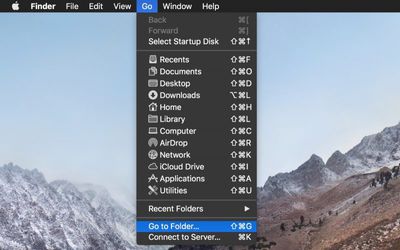
  2. In the Finder menu bar, select Go -> Go to Folder.
    Finder go to folder

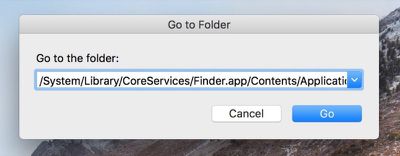
  3. Paste the following directory path into the dialog and press Enter: /System/Library/CoreServices/Finder.app/Contents/Applications/
    Finder go to folder dialog

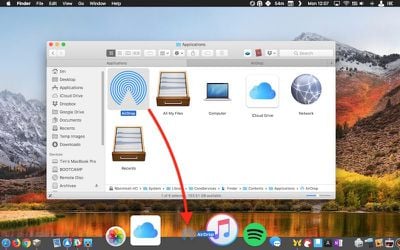
  4. The Contents/Applications folder within the Finder.app package will appear. Using your mouse, drag the AirDrop app to the desired location in your Dock.
    drag airdrop to dock

  5. Close the Finder window.

Next time you want to open the AirDrop window to share something, simply click the app icon in your Mac's Dock. Note that you can also drag the iCloud Drive app from the Finder package in the same way, for quick one-click access to the files and folders in your cloud storage.


Tag: AirDrop

Top Rated Comments

Gorms Avatar
104 months ago
This is actually really useful for me. Thank you for this tip!

AirDrop is one of macOS’ best features... (when it works)
Score: 8 Votes (Like | Disagree)
Saipher Avatar
104 months ago
Thank you MacRumors, these tips articles are very helpful. :)
Score: 5 Votes (Like | Disagree)
Chupa Chupa Avatar
104 months ago
Not sure I understand how this streamlines workflow. Dragging a file to the dock seems like more work than just ctrl+click -> share -> airdrop. What am I missing?
Score: 4 Votes (Like | Disagree)
unsharptooth Avatar
104 months ago
[doublepost=1527258466][/doublepost]This would be really useful if you could just drop your file there and a pop up asked you who you wanted to send it to. And maybe a pop up after it's finished sending too. Hopefully they improve upon that with 10.14.
Yu can select the files, right click > share > Airdrop. You’ll get a pop up listing nearby devices and progress when sending.
Score: 2 Votes (Like | Disagree)
104 months ago
Thanks for the tip. I share files back and forth with my iPad all the time.
Score: 2 Votes (Like | Disagree)
rhoydotp Avatar
104 months ago
Receiving files.
100% agree with this! Most people just probably send and not receive files so it may not be that useful to them.
Score: 1 Votes (Like | Disagree)

Popular Stories

Apple Event Logo

Apple's Next Era Begins September 1

Thursday May 7, 2026 10:36 am PDT by
Apple recently announced that Tim Cook will be stepping down as CEO later this year, after 15 years of leading the company. Effective September 1, Apple's hardware engineering chief John Ternus will become the company's next CEO, while Cook will become executive chairman of Apple's board of directors. In his new role, Apple said Cook will assist with "certain aspects" of the company,...
Instagram Feature 2

PSA: Instagram Encrypted Messaging Ends on Friday, May 8

Tuesday May 5, 2026 8:24 am PDT by
Instagram will remove end-to-end encryption for direct messages between users from May 8, 2026. When the date comes around, Meta will potentially be able to see the contents of all messages between users on the social media platform. Encrypting messages has been an optional feature in Instagram since 2023, but in March of this year the social media platform quietly updated a help page to say ...
Apple Event Logo

Apple Just Released a New Accessory

Monday May 4, 2026 8:13 am PDT by
Apple today released a new Pride Edition Sport Loop for the Apple Watch. The band features a rainbow design with 11 colors of woven nylon yarns. The new Pride Edition Sport Loop is available to order now on Apple.com and in the Apple Store app in 40mm, 42mm, and 46mm sizes, and it will be available at Apple Store locations starting later this week. In the U.S., the band costs $49. There...