iOS 15: How to Add a Hotel Room Key to iPhone and Apple Watch - GeekWebGuides
Skip to Content

iOS 15: How to Add a Hotel Room Key to iPhone and Apple Watch

by

In iOS 15, Apple has introduced the ability to add a hotel room key to the Wallet app on your iPhone, allowing users to consult their phone or Apple Watch for reservation details, as well as use them to check in and unlock their room.
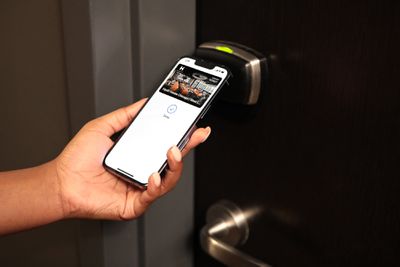
hyatt apple wallet 1
For example, Hyatt, a well-known hotel chain, in December 2021 announced its adoption of Apple's Wallet technology, with guests able to use Apple Wallet room keys across six U.S. hotels in Hawaii, Key West, Chicago, Dallas, Silicon Valley, and Long Beach.

To add a hotel room key to your iPhone, you'll need an Apple ID signed in to iCloud with two-factor authentication enabled, a reservation at a hotel or resort that supports the feature, and the hotel or resort app installed and signed in with a valid account.

How to Add a Hotel Room Key on iPhone

  1. Open the hotel or resort app and sign in to your account.
  2. Open your reservation in the app.
  3. Tap Add to Apple Wallet.
  4. Follow the instructions on the screen to add your hotel room key.

Once you've added your hotel room key to iPhone, the key will also be automatically added to your paired Apple Watch. You can view the key on both devices in the Wallet app, where you can tap the ellipsis (three dots in a circle) icon for additional information.

Note that Express Mode is automatically enabled, which allows you to use your hotel room key by simply holding your device against the lock. When your stay is over, your room key will be remotely deactivated and archived in your Apple Wallet.

How to Check in to Your Hotel With Your iPhone

On the day of your reservation, you can check in using your iPhone like so:

  1. Open the Wallet app and tap the hotel room key.
  2. The key should say "Check-in Available Now" and you should be able to tap the Check-in button.
  3. Follow the on-screen instructions to check in to your room.
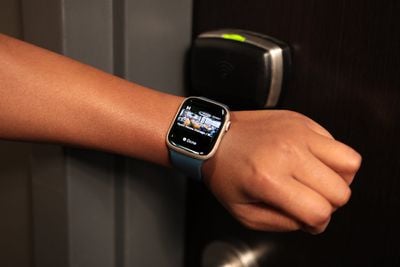
hyatt apple wallet 2

How to Open Your Hotel Room Using iPhone or Apple Watch

  1. With your iPhone turned on, hold the top of the device or the display of your Apple Watch near the lock.
  2. If Express Mode is enabled, the door should unlock. If you turned off Express Mode, you can use the hotel room key by double-clicking the Side button of your iPhone or Apple Watch to open Wallet app, then selecting your hotel room key and authenticating with Face ID, Touch ID, or your passcode. Finally, hold the device near the lock to use the key.

Note that if your device is lost or stolen and you mark it as lost, this will automatically turn off all cards and passes in the Apple Wallet app, including your hotel room key.
Related Forum: iOS 15

Popular Stories

GM Says Apple Wallet Car Keys Coming to These Vehicles Feature

GM Says Apple Wallet Car Keys Coming to These Vehicles

Monday October 19, 2026 6:51 am PDT by
In a late September press release that we just discovered now, GM announced that it has started rolling out Apple Wallet car key support in select Cadillac, Chevrolet, and GMC vehicle models, with additional models to follow over time. Google Wallet and Samsung Wallet will also be supported, with a related Samsung press release mentioning availability in the U.S. and Canada. GM said the...
Apple Wallet Bee Card

Manchester's Bee Card Now Fully Supported in Apple Wallet

Wednesday October 7, 2026 9:09 am PDT by
In August, Transport for Greater Manchester announced that the Bee Card could be added to the Apple Wallet app on the iPhone and Apple Watch, but it was limited to younger riders using free or discounted "Our Pass" tickets. As of this Tuesday, though, the Bee Card is now fully supported in Apple Wallet for all types of Bee Network tickets. To add the card to Apple Wallet, open the app, tap...
MBTA Testing New CharlieCard With Apple Wallet Support in Boston Feature

Boston's MBTA Testing New Charlie Card With Apple Wallet Support

Wednesday October 7, 2026 10:54 am PDT by
This year, the Massachusetts Bay Transportation Authority (MBTA) has been testing a new version of the Charlie Card with Apple Wallet support on the iPhone and Apple Watch. The new Charlie Card is limited to testers who signed up in 2024, with a public release to follow "at a later...
Latest Stories
iPhone Duo Launch Begins as First Orders Reach Customers
4 hours ago
1Password for Agents Keeps Your Passwords Hidden From AI
4 hours ago
iPhone Duo 24 Hours Later: Your Questions Answered
5 hours ago
Apple's iWork Apps Get 'Intelligent Assistant' and iPhone Duo Support
6 hours ago
Apple is Apparently Considering a Slightly Larger iPhone Duo
6 hours ago
Giant iPhone Duo Displays Coming to Four Apple Stores
7 hours ago
Apple Pulls Keynote, Pages and Numbers From App Store [Update: Back]
8 hours ago
Apple Updates More Apps With iPhone Duo Support
8 hours ago
Apple Will Label Apps 'Made for iPhone Duo' in App Store
11 hours ago
Amazon Takes $49 Off iPad With Prices Starting at $399.99
12 hours ago
F1 on Apple TV Now Available in Dolby Atmos
12 hours ago
Apple Reveals More Than 50 Apps That Will Be Updated for iPhone Duo
13 hours ago
Apple Blocks Certificates That Could Help Attackers Fake Websites
14 hours ago
Giant iPhone Duo Installations Spotted at Apple Fifth Avenue
15 hours ago
iPhone Duo 2 Prototypes Include Under-Display Face ID
15 hours ago
Tesla App Gains iPad and iPhone Duo Support
19 hours ago
Apple Reportedly Boosts iPhone Duo Orders by 44%
19 hours ago
Fortnite Returning to Australian App Store After Court Ruling
20 hours ago
Apple Ordered to Open iPhone to Rival App Stores in Australia
20 hours ago
Apple Suppliers Face Hurdles Cutting Circuit Board Emissions
21 hours ago
Things Updated for iPhone Duo With Adaptive Layout
21 hours ago
Simplicity and Siri AI Are HomeView's Killer Features, Apple Says
21 hours ago
iPhone Duo Reviewers Really Miss Face ID
1 day ago
Does the iPhone Duo Run Hot? Here's What Reviews Found
1 day ago
Apple Music's New Look is Now Live on Apple's Website
1 day ago
Anthropic Launches Claude Duet, a Proactive AI Agent
1 day ago
What 32,000 Folds Did to the iPhone Duo's Hinge
1 day ago
iPhone Duo's Hidden FaceTime Camera Takes 'Trash' Photos
1 day ago
iPhone Duo Has 'Edge Light' Feature That Debuted on Macs Last Year
1 day ago
Apple Support App Updated for iPhone Duo's Larger Display
1 day ago