

 The Shortcuts app, introduced in iOS 12, is designed to allow iOS users to create multi-step shortcuts and automations using both first and third-party apps, with the shortcuts able to be activated using Siri commands.
Siri isn't the only way to launch shortcuts outside of the Shortcuts app. In addition, Apple provides a Shortcuts widget for quickly launching actions, but you can also put them on your Home screen for even quicker access, just like a normal app.
The only thing to bear in mind is that some shortcuts aren't really suitable for accessing from the Home screen, and are made to be launched through apps. We're using Federico Viticci's excellent Frames shortcut for framing screenshots, however, which works fine. Here's how it's done.
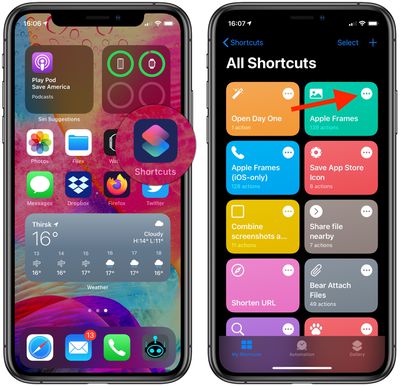
- Launch the Shortcuts app on your iPhone or iPad.
- Tap the ellipsis button (the three dots) in the corner of the shortcut that you want to add to your Home screen.

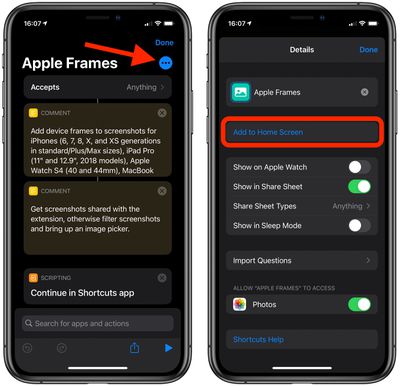
- On the next screen, tap the ellipsis button in the upper-right corner once again.
- There are a few options on this menu, but our focus is on the top half of the screen. To rename the shortcut, tap its name. You can also give it a distinctive icon by tapping the current icon and selecting a custom color and glyph. In the next screen, you can also select a photo or a different icon for your shortcut.
- When you're done, tap Add to Home Screen.
- If you tap the smaller preview icon on the the next screen, options will appear to Take Photo, Choose Photo, and Choose File.
- When you're happy, tap Add in the top-right corner of the screen.
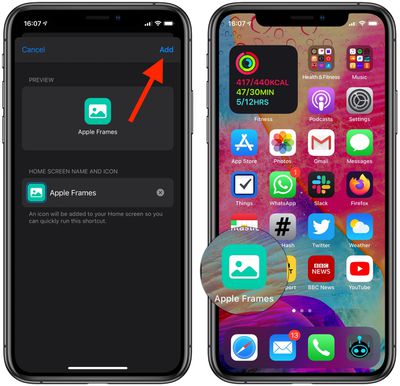
Your shortcut should now appear on your Home screen, ready to be used at a tap.















































