How to Add Widgets to Your iPhone Lock Screen - GeekWebGuides
Skip to Content

How to Add Widgets to Your iPhone Lock Screen

by

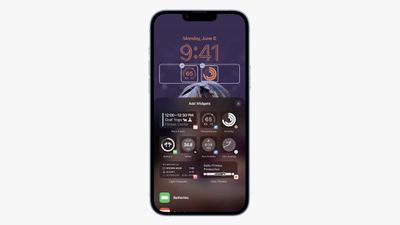
Apple has improved the Lock Screen on iPhones in recent years, making it more customizable than ever and able to display information-rich widgets. This article shows you how to add select widgets your iPhone's Lock Screen in ‌iOS 16‌ and later.

lock screen widgets ios 16
Lock Screen Widgets used to be the sole preserve of Android phones, but in 2022 Apple finally added them to iPhone when it overhauled the Lock Screen. Now you can customize the Lock Screen with unique fonts, colors, and of course widgets, providing you with glanceable information that you can check without having to open your iPhone's Home Screen or the Today view.

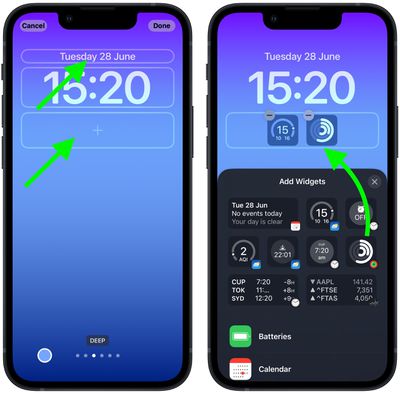
The widgets that you can add above the time on the Lock Screen include another time zone, a set alarm, the next calendar event, a weather condition, your activity rings, the next reminder, and a chosen stock. These widgets sit alongside the date above the digital clock.
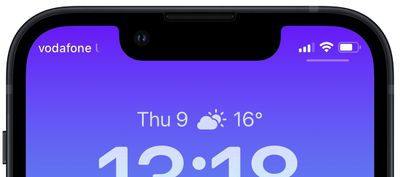
lock screen top widget e1654777513233
‌Widgets‌ that can be placed below the time are more information-rich and include device battery levels, Calendar, Clock, Fitness, Home, News, Reminders, Stocks, and Weather. Many third-party apps installed on your iPhone will also include handy widgets that you can use. You can add up to four square symbol-based widgets below the time, or up to two rectangular widgets with more information, or alternatively a combination of two square widgets and one rectangular widget.
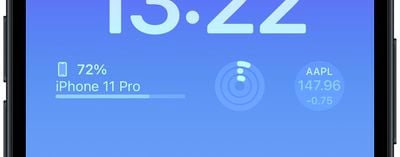
lock screen widgets bottom
To get started adding widgets, all you need to do is unlock your ‌iPhone‌ with Face ID or Touch ID, and then long press on the Lock Screen to enter the Lock Screen gallery. The following steps guide you through the rest of the process.

Adding Widgets to Your Lock Screen

  1. In the Lock Screen gallery, tap Customize below the Lock Screen you want to add widgets to.
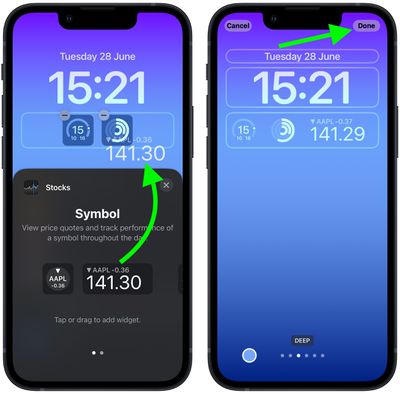
  2. Tap the frame either above or below the time to bring up the widgets selector.
  3. Tap any of the suggested widgets at the top of the widgets selector to add them to the frame.
    Lock Screen

  4. You can also tap from the column list of apps to choose from a range of widgets available for each app. Swipe to the one you want, then tap it or drag it to the frame to place it where you want.
  5. When you're finished arranging your widgets, tap Done in the top-right corner of the screen.
  6. Tap the current Lock Screen in the wallpaper gallery to activate it.
    Lock Screen

Developers often create Lock Screen widgets for third-party apps using Apple's WidgetKit API, so whenever you install a new app, be sure to check out the Lock Screen widgets list to see if new ones have been added.

Popular Stories

Apple HomeView lineup feature5

Apple HomeView Has These 15 Apps, Some CarPlay Apps and Widgets Also Supported

Wednesday October 14, 2026 9:03 am PDT by
Apple's tech specs page for its all-new HomeView smart home hub contains a list of all of the built-in Apple apps available on the device. While it has no App Store, the HomeView can also display CarPlay-enabled audio and video apps from a paired iPhone. This includes Audiobooks, Apple Music Classical, Apple News, and Apple TV, along with third-party apps such as Spotify, according to WIRED. ...
iPhone Duo Trio

Here's What Apple's Apps Look Like on the iPhone Duo

Tuesday October 20, 2026 11:12 am PDT by
With just three days to go until the iPhone Duo is released, Apple is getting ready for the launch. Behind the scenes, the App Store now has screenshots of Apple's built-in apps running on the Duo. We've seen some apps in marketing materials, but images of the ones we haven't seen give us an idea of what it will be like using the iPhone Duo day to day. Many apps are shown in landscape...
Apple Creator Studio iWork suite

Apple Pulls Keynote, Pages and Numbers From App Store [Update: Back]

Thursday October 22, 2026 11:01 am PDT by
Apple has temporarily removed Keynote, Pages, and Numbers from the App Store, just after releasing an update that added iPhone Duo support and a new Intelligent Assistant. It is not clear if the apps were removed intentionally, or if it is a bug. Apple has not said when the apps will be reinstated, but if it was in error, they should return soon. Update: The Mac versions are back without...
Latest Stories
iPhone Duo Launch Begins as First Orders Reach Customers
5 hours ago
1Password for Agents Keeps Your Passwords Hidden From AI
6 hours ago
iPhone Duo 24 Hours Later: Your Questions Answered
6 hours ago
Apple's iWork Apps Get 'Intelligent Assistant' and iPhone Duo Support
7 hours ago
Apple is Apparently Considering a Slightly Larger iPhone Duo
7 hours ago
Giant iPhone Duo Displays Coming to Four Apple Stores
8 hours ago
Apple Pulls Keynote, Pages and Numbers From App Store [Update: Back]
9 hours ago
Apple Updates More Apps With iPhone Duo Support
10 hours ago
Apple Will Label Apps 'Made for iPhone Duo' in App Store
12 hours ago
Amazon Takes $49 Off iPad With Prices Starting at $399.99
13 hours ago
F1 on Apple TV Now Available in Dolby Atmos
13 hours ago
Apple Reveals More Than 50 Apps That Will Be Updated for iPhone Duo
14 hours ago
Apple Blocks Certificates That Could Help Attackers Fake Websites
15 hours ago
Giant iPhone Duo Installations Spotted at Apple Fifth Avenue
16 hours ago
iPhone Duo 2 Prototypes Include Under-Display Face ID
16 hours ago
Tesla App Gains iPad and iPhone Duo Support
20 hours ago
Apple Reportedly Boosts iPhone Duo Orders by 44%
21 hours ago
Fortnite Returning to Australian App Store After Court Ruling
21 hours ago
Apple Ordered to Open iPhone to Rival App Stores in Australia
21 hours ago
Apple Suppliers Face Hurdles Cutting Circuit Board Emissions
22 hours ago
Things Updated for iPhone Duo With Adaptive Layout
22 hours ago
Simplicity and Siri AI Are HomeView's Killer Features, Apple Says
23 hours ago
iPhone Duo Reviewers Really Miss Face ID
1 day ago
Does the iPhone Duo Run Hot? Here's What Reviews Found
1 day ago
Apple Music's New Look is Now Live on Apple's Website
1 day ago
Anthropic Launches Claude Duet, a Proactive AI Agent
1 day ago
What 32,000 Folds Did to the iPhone Duo's Hinge
1 day ago
iPhone Duo's Hidden FaceTime Camera Takes 'Trash' Photos
1 day ago
iPhone Duo Has 'Edge Light' Feature That Debuted on Macs Last Year
1 day ago
Apple Support App Updated for iPhone Duo's Larger Display
1 day ago