

If you have an Apple TV+ subscription or you've rented or purchased movies via iTunes, you can download the videos to your iPhone and iPad over Wi-Fi or cellular using Apple's TV app, which allows you to watch them offline.

Apple gives iPhone and iPad users granular control of TV app video download settings. So if you want, you can choose high quality video if you don't mind them taking longer to download and taking up more storage space. Alternatively, you can prioritize faster downloads that take up less storage, but at the price of video quality.
You can adjust these settings independently for when you're downloading over Wi-Fi or cellular, which is particularly handy if you don't have an unlimited data plan or you don't want to hog your household's bandwidth. Simply follow the series of steps below to adjust the download quality over the data connection that applies to you.
Adjusting Video Download Settings Over Cellular
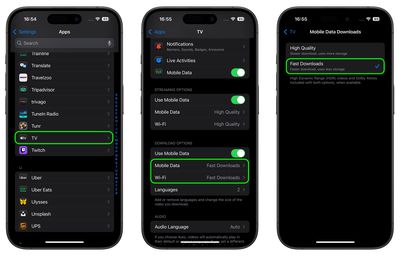
- Launch the Settings app on your iPhone.
- Scroll to the bottom and tap Apps, then tap TV.
- Under "Download Options," tap Cellular (or Mobile Data).
- Select High Quality (slower download, uses more storage) or Fast Downloads (lower quality, uses less storage).
Adjusting Video Download Settings Over Wi-Fi
- Launch the Settings app on your iPhone.
- Scroll to the bottom and tap Apps, then tap TV.
- Under "Download Options," tap Wi-Fi.
- Select High Quality (slower download, uses more storage) or Fast Downloads (lower quality, uses less storage).
Note that selecting High Quality allows High Dynamic Range (HDR) video to be downloaded to your device when available.

























![Apple Pulls Keynote, Pages and Numbers From App Store [Update: Back]](https://images.macrumors.com/t/Okb7kitB_gNr6qe5Pex9nQIysD8=/112x112/article-new/2026/01/Apple-Creator-Studio-iWork-suite.jpg)



















