In iOS 14, Apple continues to build out its extensive accessibility features, and here we're going to show you how you can use the new Headphone Accommodations to amplify certain sounds if you're having difficulty hearing them.
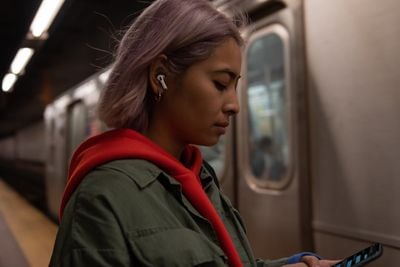
AirPods Pro lifestyle apple
Headphones Accommodations works with Apple and Beats headphones, and is designed especially for those who are hard of hearing: It's able to amplify soft sounds and adjust frequencies to make music, movies, calls, and more sound crisper and clearer.

Follow the steps below to activate the Headphones Accommodations feature in iOS 14 and later.

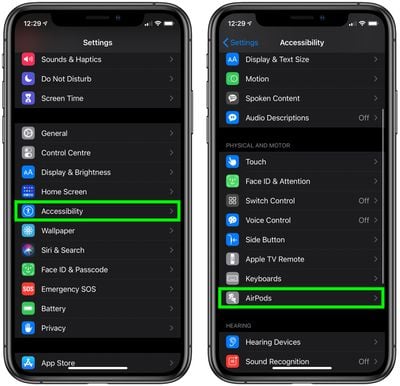
  1. Launch the Settings app on your iPhone or iPad.
  2. Tap Accessibility.
  3. Scroll down to the Physical and Motor menu and select AirPods.
    settings

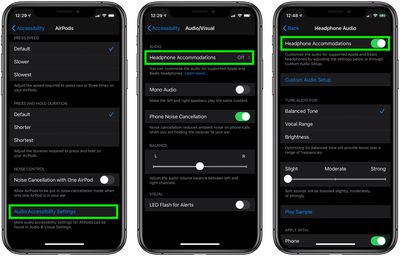
  4. Tap the Audio Accessibility Settings option in blue text.
  5. Tap Headphone Accommodations.
  6. Toggle the switch next to Headphone Accommodations to activate it and extend the menu of options.
    how to use headphone accommodations c

From here, you can access a range of options such as tuning audio for Balanced Tone, Vocal Range, or Brightness, and adjusting the volume of soft sounds to be louder.
accessibility
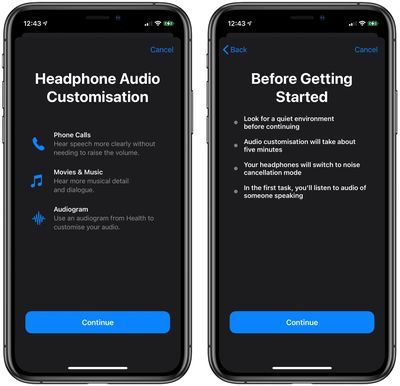
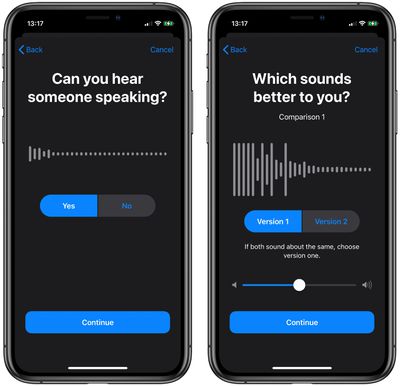
There's also a Custom Audio Setup that walks through a test with soft speaking and different music to determine whether you have specific audio preferences that should be compensated for with the Headphone Accommodations feature.
accessibility
Headphone Accommodations works with the Transparency mode on ‌AirPods Pro and AirPods Max‌ too, making quiet voices louder and tuning the sounds of the environment around you to meet your audio needs.


Top Rated Comments

libmanj Avatar
72 months ago
As a person with moderate high frequency hearing loss, this is EXACTLY what I have been hoping Apple would do. Bravo!
Score: 7 Votes (Like | Disagree)
upandown Avatar
72 months ago

I hate the word "enhance" when it comes to these audio processing features, a great way to instantly destroy all the hard work done by the artists to master these tracks. Listen to the music how it was intended to be
Agreed on original artist intent however this set of features is originally intended for people with hearing deficiencies. Which I think is great.
Score: 7 Votes (Like | Disagree)
ianKent Avatar
72 months ago
Good step in the right direction. For those with tinnitus, where high frequencies can agitate the condition, there needs to be something a little more manual, like an equalizer or an option to decrease higher frequencies.
Score: 6 Votes (Like | Disagree)
DoctorTech Avatar
72 months ago

I hate the word "enhance" when it comes to these audio processing features, a great way to instantly destroy all the hard work done by the artists to master these tracks. Listen to the music how it was intended to be
We don't all hear the same. I have some hearing loss from over exposure to loud noise over the past 30 years. My hearing is fine at lower frequencies but not so much at higher frequencies. This "enhancement" will allow me to hear the music as the artist intended by boosting volume of frequencies that I don't hear as well. I am REALLY looking forward to this feature!

I am hoping Apple will also make this feature available in MacOS and TVOS. I often watch YouTube and/or Apple TV on my laptop and/or television via my Apple TV box. The majority of the time, I am the only one in the room so it would be nice to put on by PowerBeats Pros and listen to enhanced audio of TV, movies and videos.
Score: 3 Votes (Like | Disagree)
Grohowiak Avatar
72 months ago
Sounds like a good old equalizer with auto settings.
Funny that till this day we have to use third party apps on iOS and Mac if we want to do this ourselves.
Score: 2 Votes (Like | Disagree)
DeepIn2U Avatar
72 months ago
Unfortunately this currently implantation doe NOT use all the various microphones on the iPhone. If you have AirPods Pro you’re better off using ambient sound directly via the headphones.
Score: 2 Votes (Like | Disagree)

Popular Stories

Apple Logo Zoomed

Tim Cook Teases Plans for Apple's Upcoming 50th Anniversary

Thursday February 5, 2026 12:54 pm PST by
Apple turns 50 this year, and its CEO Tim Cook has promised to celebrate the milestone. The big day falls on April 1, 2026. "I've been unusually reflective lately about Apple because we have been working on what do we do to mark this moment," Cook told employees today, according to Bloomberg's Mark Gurman. "When you really stop and pause and think about the last 50 years, it makes your heart ...
wwdc sans text feature

Apple Rumored to Announce New Product on February 19

Thursday February 5, 2026 12:22 pm PST by
Apple plans to announce the iPhone 17e on Thursday, February 19, according to Macwelt, the German equivalent of Macworld. The report, citing industry sources, is available in English on Macworld. Apple announced the iPhone 16e on Wednesday, February 19 last year, so the iPhone 17e would be unveiled exactly one year later if this rumor is accurate. It is quite uncommon for Apple to unveil...
Finder Siri Feature

Why Apple's iOS 26.4 Siri Upgrade Will Be Bigger Than Originally Promised

Friday February 6, 2026 3:06 pm PST by
In the iOS 26.4 update that's coming this spring, Apple will introduce a new version of Siri that's going to overhaul how we interact with the personal assistant and what it's able to do. The iOS 26.4 version of Siri won't work like ChatGPT or Claude, but it will rely on large language models (LLMs) and has been updated from the ground up. Upgraded Architecture The next-generation...
iOS 26

iOS 26.3 and iOS 26.4 Will Add These New Features to Your iPhone

Tuesday February 3, 2026 7:47 am PST by
While the iOS 26.3 Release Candidate is now available ahead of a public release, the first iOS 26.4 beta is likely still at least a week away. Following beta testing, iOS 26.4 will likely be released to the general public in March or April. Below, we have recapped known or rumored iOS 26.3 and iOS 26.4 features so far. iOS 26.3 iPhone to Android Transfer Tool iOS 26.3 makes it easier...
maxresdefault

Apple Shows Off a Key Reason to Upgrade to the iPhone 17

Saturday February 7, 2026 9:26 am PST by
Apple today shared an ad that shows how the upgraded Center Stage front camera on the latest iPhones improves the process of taking a group selfie. "Watch how the new front facing camera on iPhone 17 Pro takes group selfies that automatically expand and rotate as more people come into frame," says Apple. While the ad is focused on the iPhone 17 Pro and iPhone 17 Pro Max, the regular iPhone...