In iOS 26, Apple Maps has a feature called Visited Places that when enabled automatically logs where you've been, with the aim of making it easier to revisit your favorite spots or to share locations with friends.

iOS 26 Maps Glass
While it can be useful for tracking your travels, you might prefer to keep your location history private. Here's how to disable the feature and clear your history.

What Is Visited Places?

Visited Places keeps a record of locations you've visited, organizing them by category such as restaurants, shops, or transit stops. The feature is end-to-end encrypted, so Apple can't read your data, and it syncs across all your Apple devices signed into the same account.
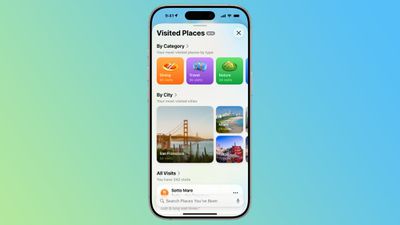
ios 26 maps app visited places overview
You can search your visited places by name, date, or category, add personal notes, and even save locations to custom guides. However, if you'd rather not have Maps tracking your movements at all, you can turn it off completely.

How to Turn Off Visited Places

When you upgrade to ‌iOS 26‌, the Maps app pops up an alert on first launch letting you know about the new Visited Places feature, so that you can opt in or opt out. If you opted in and now want to disable it, or you don't remember seeing the popup, here's what to do.

  1. Open the Settings app on your iPhone.
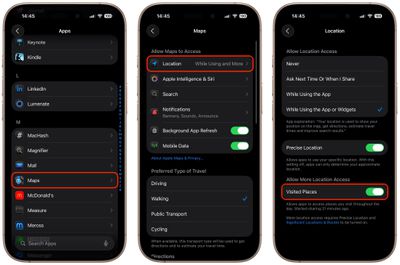
  2. Tap through to Apps ➝ Maps ➝ Location.
  3. Toggle off the Visited Places switch.

settings

With the toggle disabled, Maps will no longer track the places you visit. Note that you can also access the toggle by going to Privacy and Security ➝ Location Services ➝ Maps.

How to Clear Your Visited Places History

In the Maps app's Visited Places card, the Keep Visits buttons gives you options to change how long visits are kept (three months, one year, and forever). If you want to delete the entirety of location history, you can also clear it from within the Maps app.

  1. Open the Maps app on your iPhone.
  2. Tap Places, then tap Visited Places.
  3. Scroll to the bottom, tap Clear History, then tap Clear All.

Your visited places history will now be permanently deleted. You can also remove individual locations by tapping More (the three dots) next to any place card and selecting Remove.


Top Rated Comments

Stetrain Avatar
19 weeks ago
"Apple Maps may be doing exactly the thing it said it would do in the dialog where it asked if you wanted to enable the feature"
Score: 51 Votes (Like | Disagree)
vertsix Avatar
19 weeks ago
"You May Be Logging Places You Visit On Apple Maps – How to Disable"

Fixed it. There is a pop-up when you open Apple Maps for the first time on iOS 26 that gives you this option. It is opt-in. The author is making it seem like this is something malicious.
Score: 34 Votes (Like | Disagree)
orbital~debris Avatar
19 weeks ago

('https://www.geekwebguides.com/how-to/apple-maps-visited-places-disable/')
Article Link: Apple Maps May Be Logging Places You Visit – How to Disable ('https://www.geekwebguides.com/how-to/apple-maps-visited-places-disable/')
MacRumors, please consider writing posts with more ‘unbiased’ titles.

While the content is pretty fair, in that it describes the steps Apple have taken to keep this data private, encrypted etc., and that you can remove it, the title of the post is more likely than not to set readers into a particular frame of mind about the feature i.e. that it’s a bad thing that should be disabled.

I think Apple created the feature with good intentions, and it should be taken in that light.

The article could simply describe the feature, and then have a paragraph/heading about disabling if you wish to.
Score: 32 Votes (Like | Disagree)
turbineseaplane Avatar
19 weeks ago
I just can't stop laughing at this first image.

Just go ahead and make it totally transparent at this point - lmfao


Attachment Image
Score: 31 Votes (Like | Disagree)
neuropsychguy Avatar
19 weeks ago

Apple Maps is always worth uninstalling on Day 1 anyway.
Why, what's better? For my driving I've found it's as good as Google Maps -- sometimes better, sometimes worse, but overall similar. I've not found anything else clearly better than either.
Score: 29 Votes (Like | Disagree)
technolambo Avatar
19 weeks ago
The headline here and framing is complete FUD. This is exactly the type of article my family will read and follow mindlessly out of fear.


In iOS 26, Apple Maps has a feature called Visited Places that when enabled automatically logs where you've been
It isn't doing it "automatically" - it's doing it when you enable it. It is opt-in and users are asked explicitly.


While it can be useful for tracking your travels, you might prefer to keep your location history private
Complete FUD - it is private and encrypted, as the article itself points out:

The feature is end-to-end encrypted, so Apple can't read your data,
Score: 25 Votes (Like | Disagree)

Popular Stories

Apple Logo Zoomed

Tim Cook Teases Plans for Apple's Upcoming 50th Anniversary

Thursday February 5, 2026 12:54 pm PST by
Apple turns 50 this year, and its CEO Tim Cook has promised to celebrate the milestone. The big day falls on April 1, 2026. "I've been unusually reflective lately about Apple because we have been working on what do we do to mark this moment," Cook told employees today, according to Bloomberg's Mark Gurman. "When you really stop and pause and think about the last 50 years, it makes your heart ...
wwdc sans text feature

Apple Rumored to Announce New Product on February 19

Thursday February 5, 2026 12:22 pm PST by
Apple plans to announce the iPhone 17e on Thursday, February 19, according to Macwelt, the German equivalent of Macworld. The report, citing industry sources, is available in English on Macworld. Apple announced the iPhone 16e on Wednesday, February 19 last year, so the iPhone 17e would be unveiled exactly one year later if this rumor is accurate. It is quite uncommon for Apple to unveil...
Finder Siri Feature

Why Apple's iOS 26.4 Siri Upgrade Will Be Bigger Than Originally Promised

Friday February 6, 2026 3:06 pm PST by
In the iOS 26.4 update that's coming this spring, Apple will introduce a new version of Siri that's going to overhaul how we interact with the personal assistant and what it's able to do. The iOS 26.4 version of Siri won't work like ChatGPT or Claude, but it will rely on large language models (LLMs) and has been updated from the ground up. Upgraded Architecture The next-generation...
iOS 26

iOS 26.3 and iOS 26.4 Will Add These New Features to Your iPhone

Tuesday February 3, 2026 7:47 am PST by
While the iOS 26.3 Release Candidate is now available ahead of a public release, the first iOS 26.4 beta is likely still at least a week away. Following beta testing, iOS 26.4 will likely be released to the general public in March or April. Below, we have recapped known or rumored iOS 26.3 and iOS 26.4 features so far. iOS 26.3 iPhone to Android Transfer Tool iOS 26.3 makes it easier...
iphone 17 pro dark blue 1

iPhone 18 Pro Max Rumored to Deliver Next-Level Battery Life

Friday February 6, 2026 5:14 am PST by
The iPhone 18 Pro Max will feature a bigger battery for continued best-in-class battery life, according to a known Weibo leaker. Citing supply chain information, the Weibo user known as "Digital Chat Station" said that the iPhone 18 Pro Max will have a battery capacity of 5,100 to 5,200 mAh. Combined with the efficiency improvements of the A20 Pro chip, made with TSMC's 2nm process, the...