How to Take Control of Apple News Alerts in iOS 11 - GeekWebGuides
Skip to Content

How to Take Control of Apple News Alerts in iOS 11

by

Apple News Icon1Apple News is the built-in news app for iOS 11 that aggregates and curates stories and topics from a variety of third-party news sources. The service is only available in the U.S., Australia, and the U.K. at the time of writing, so not all new iPhones and iPads will come with the stock app installed.

Apple News aims to offer a cleanly presented and personalized news service that caters to your tastes and interests, although one of its default behaviors is to spit out alerts from sources that you may or may not be interested in. Apple News refers to news sources in the app as "channels", and here we are going to run through two ways to control the alerts you receive from them.

How to Control News Alerts From Specific Channels

  1. Launch the News app on your iOS device.

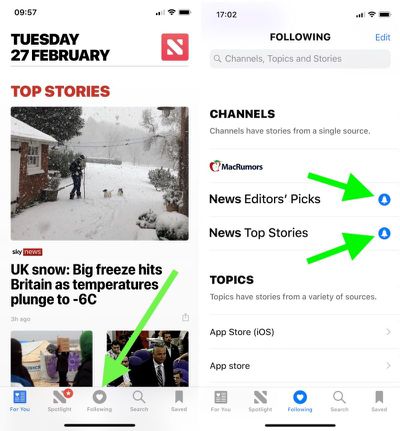
  2. Tap the Following button at the bottom of the screen.

  3. Under the Channels list, look for any news sources that you didn't sign up for, and tap the blue bell icon next to them. If the bell icon next to a channel is greyed out, alerts from it are already disabled; if there's no bell icon beside a channel, it doesn't send alerts at all.
    apple news app 1

  4. To remove a source from your channels so that it no longer shows up anywhere in Apple News, tap the Edit button in the upper right of the screen, and then tap the red minus icon next to the source in question.
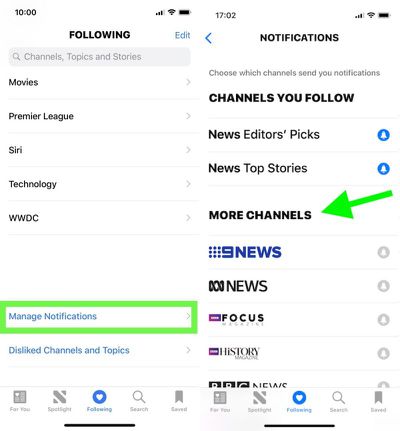
Tip: Scroll all the way to the bottom of the "Following" screen and you'll find another option to Manage Notifications. Tapping this opens a dedicated Notifications screen, where you'll see the channels you follow that offer news alerts as well as other channels with alert options that you don't currently follow.
apple news app 2

How to Disable Apple News Alerts Completely

If you'd rather disable all alerts for Apple News in one fell swoop, follow these steps.

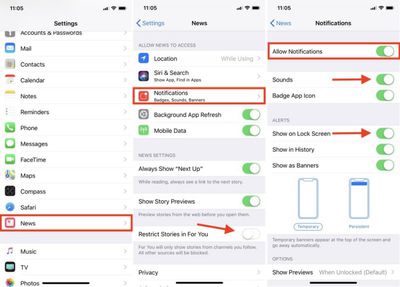
  1. Launch the Settings app on your iOS device.

  2. Scroll down the main list and tap News.

  3. Tap Notifications. (Tip: From this screen, you can prevent stories by channels you don't follow from appearing in the News app's "For You" section. Simply toggle on Restrict Stories in For You.)

  4. Toggle off Allow Notifications.

apple news notifications
If later you decide that you don't want to kill off News alerts altogether, this last screen is the one to return to, as it also offers additional options for controlling the behavior of notifications when they're enabled. You could simply stop new alerts from making an audible sound, for example, or just prevent them from showing up on the Lock Screen.


Related Forum: iOS 11

Top Rated Comments

HiRez Avatar
113 months ago
The problem with almost any app that has notifications is they they can’t seem to help themselves from abusing it by sending you a never-ending stream of alerts that swamps your lock screen and notification list.

So for News, like just about everything else for me, Off is the only sane option.
Score: 6 Votes (Like | Disagree)
PinkyMacGodess Avatar
113 months ago
I just want to know how to remove completely some of the sources for 'news'. Like I have some of the worst sources popup for science and tech news, and also want to block often wrong Fox News so I don't see their 'reportage' hit pieces anymore.

Resolved: You have to go into one of their articles, touch 'share', and then can 'dislike channel'. Seems a lot less intuitive than just swiping right (or left?) and clicking 'dislike channel'. But I'm finally free of their bullhockey 'news'.:D
Score: 3 Votes (Like | Disagree)
The Game 161 Avatar
113 months ago
the best way to take control of apple's new app is to delete it.
why? it's a very good app for news.
Score: 2 Votes (Like | Disagree)
PinkyMacGodess Avatar
113 months ago
I found it terrible, but to each their own.
It requires some participation from the user. I've got quite an eclectic mix of sources, and am generally pretty happy with it. It's what you put into it...
Score: 1 Votes (Like | Disagree)
jonnyb098 Avatar
113 months ago
Dittos. The bias shown in their curation and need to editorialize is shameful.
How is it biased??? I see news stories from CNN, FOX with almost a perfect split.

This is like when people complain about recommendations in Apple Music. The curation is only as good as you make it based on reading habits and likes/dislikes.
Score: 1 Votes (Like | Disagree)
113 months ago
the best way to take control of apple's new app is to delete it.
Dittos. The bias shown in their curation and need to editorialize is shameful.
Score: 1 Votes (Like | Disagree)

Popular Stories

iPhone Duo Trio

Here's What Apple's Apps Look Like on the iPhone Duo

Tuesday October 20, 2026 11:12 am PDT by
With just three days to go until the iPhone Duo is released, Apple is getting ready for the launch. Behind the scenes, the App Store now has screenshots of Apple's built-in apps running on the Duo. We've seen some apps in marketing materials, but images of the ones we haven't seen give us an idea of what it will be like using the iPhone Duo day to day. Many apps are shown in landscape...
Apple Creator Studio iWork suite

Apple Pulls Keynote, Pages and Numbers From App Store [Update: Back]

Thursday October 22, 2026 11:01 am PDT by
Apple has temporarily removed Keynote, Pages, and Numbers from the App Store, just after releasing an update that added iPhone Duo support and a new Intelligent Assistant. It is not clear if the apps were removed intentionally, or if it is a bug. Apple has not said when the apps will be reinstated, but if it was in error, they should return soon. Update: The Mac versions are back without...
M5 MacBook Pro

RIP, MacBook Ultra

Monday October 19, 2026 9:37 am PDT by
Apple today sent out invites for an experience in Los Angeles on Wednesday, October 28, and the "Pro and tell" tagline on the invitation likely means that the rumored MacBook models with touch-enabled OLED displays will stick with MacBook Pro branding instead of the once-rumored "MacBook Ultra" name. The long-rumored "iPhone Ultra" ended up being named iPhone Duo, so speculation that Apple...
Latest Stories
MacBook Neo Helps Apple Outpace Rivals as Market Declines
1 hour ago
Happy 25th Anniversary, iPod
2 hours ago
iPhone Duo Demand Reportedly Exceeds Apple's Expectations
4 hours ago
iPhone Duo Launch Begins as First Orders Reach Customers
11 hours ago
1Password for Agents Keeps Your Passwords Hidden From AI
11 hours ago
iPhone Duo 24 Hours Later: Your Questions Answered
12 hours ago
Apple's iWork Apps Get 'Intelligent Assistant' and iPhone Duo Support
13 hours ago
Apple is Apparently Considering a Slightly Larger iPhone Duo
13 hours ago
Giant iPhone Duo Displays Coming to Four Apple Stores
14 hours ago
Apple Pulls Keynote, Pages and Numbers From App Store [Update: Back]
15 hours ago
Apple Updates More Apps With iPhone Duo Support
15 hours ago
Apple Will Label Apps 'Made for iPhone Duo' in App Store
18 hours ago
Amazon Takes $49 Off iPad With Prices Starting at $399.99
19 hours ago
F1 on Apple TV Now Available in Dolby Atmos
19 hours ago
Apple Reveals More Than 50 Apps That Will Be Updated for iPhone Duo
20 hours ago
Apple Blocks Certificates That Could Help Attackers Fake Websites
21 hours ago
Giant iPhone Duo Installations Spotted at Apple Fifth Avenue
22 hours ago
iPhone Duo 2 Prototypes Include Under-Display Face ID
22 hours ago
Tesla App Gains iPad and iPhone Duo Support
1 day ago
Apple Reportedly Boosts iPhone Duo Orders by 44%
1 day ago
Fortnite Returning to Australian App Store After Court Ruling
1 day ago
Apple Ordered to Open iPhone to Rival App Stores in Australia
1 day ago
Apple Suppliers Face Hurdles Cutting Circuit Board Emissions
1 day ago
Things Updated for iPhone Duo With Adaptive Layout
1 day ago
Simplicity and Siri AI Are HomeView's Killer Features, Apple Says
1 day ago
iPhone Duo Reviewers Really Miss Face ID
1 day ago
Does the iPhone Duo Run Hot? Here's What Reviews Found
1 day ago
Apple Music's New Look is Now Live on Apple's Website
1 day ago
Anthropic Launches Claude Duet, a Proactive AI Agent
2 days ago
What 32,000 Folds Did to the iPhone Duo's Hinge
2 days ago