Apple Watch Ultra: How to Activate, Cancel, and Disable the Siren - MacRumors
Skip to Content

Apple Watch Ultra: How to Activate, Cancel, and Disable the Siren

by

If you ever become lost, injured, or have some other emergency situation and want to draw attention to your location, ‌Apple Watch Ultra‌ includes an 86-decibel siren that you can use.
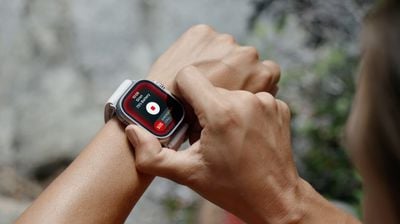
ultra siren watch
The siren uses a unique sound signature that incorporates two distinct alternating patterns, which can repeat for several hours. The first pattern suggests distress, while the second mimics the universally recognized SOS pattern, and the siren can be heard up to 600 feet or 180 meters away.

As such, it's pretty loud, so don't turn it on in enclosed environments or hold your watch close to your ears when the Siren is sounding.

How to Turn on Siren on Apple Watch Ultra

You can turn on the Siren using the Action button or the side button.

Using the Action Button:

  1. Press and hold the Action button until the Siren slider appears.
  2. Drag the Siren slider to start a countdown.
  3. After the countdown, the Siren starts.

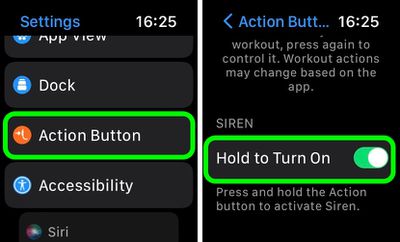
Alternatively, you can press and hold the Action button to start the countdown, then continue holding the Action button until Siren starts. If you don't want the Siren going off using this continual hold action, go to Settings -> Action Button, and switch off the toggle next to Hold to Turn On.
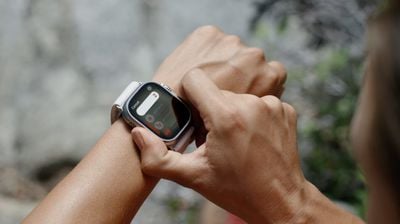
siren countdown

Using the Side Button

  1. Press and hold the Side button until the Siren slider appears.
  2. Drag the Siren slider to start a countdown.
  3. After the countdown, the Siren starts.

How to Cancel the Siren on Apple Watch Ultra

You can cancel the Siren during the countdown. If you're holding the Action button, simply release it to cancel. If you initiated the countdown by dragging the Siren slider, cover the watch display with the palm of your hand for at least three seconds to cancel.
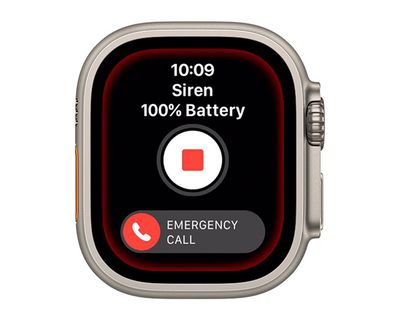
watch
To cancel the Siren while it's sounding, simply tap the central Stop button in the Siren app.

How to Disable the Siren Action Button Function

If you're concerned about the possibility of accidentally activating the Siren via a long press of the Action button, you can disable the function. Here's how.

  1. Launch the Settings app on your Apple Watch Ultra.
  2. Tap Action Button.
  3. Scroll down and under "Siren" toggle off the switch next to Hold to Turn On.
settings

Once that's done, holding down the Action button won't activate the Siren. Note that you can still activate the Siren by way of the Action Button, but now you have to hold the button and then swipe across the Siren slider, making it much harder to unintentionally sound the alert.

Related Roundup: Apple Watch Ultra 4
Related Forum: Apple Watch

Top Rated Comments

AlexisV Avatar
53 months ago


Attachment Image
Score: 4 Votes (Like | Disagree)
53 months ago

This seems like a feature that could and should be included in every Apple Watch
Survival is an apple watch ultra exclusive feature
Score: 2 Votes (Like | Disagree)
FloridaScrubJay Avatar
53 months ago
Hope it is not used as an alternative for the flight attendant call button on airplanes. 😳
Score: 2 Votes (Like | Disagree)
OliOliOliOli Avatar
53 months ago

If you ever become lost, injured, or have some other emergency situation and want to draw attention to your location, ‌Apple Watch Ultra‌ includes an 86-decibel siren that you can use.


The siren uses a unique sound signature that incorporates two distinct alternating patterns, which can repeat for several hours. The first pattern suggests distress, while the second mimics the universally recognized SOS pattern, and the siren can be heard up to 600 feet or 180 meters away.

As such, it's pretty loud, so don't turn it on in enclosed environments or hold your watch close to your ears when the Siren is sounding.

How to Turn on Siren on Apple Watch Ultra

You can turn on the Siren using the Action button or the side button.
Using the Action Button:

[LIST=1]
* Press and hold the Action button until the Siren slider appears.
* Drag the Siren slider to start a countdown.
* After the countdown, the Siren starts.

Alternatively, you can press and hold the Action button to start the countdown, then continue holding the Action button until Siren starts. If you don't want the Siren going off using this continual hold action, go to Settings -> Action Button, and switch off the toggle next to Hold to Turn On.


Using the Side Button

[LIST=1]
* Press and hold the Side button until the Siren slider appears.
* Drag the Siren slider to start a countdown.
* After the countdown, the Siren starts.

How to Cancel the Siren on Apple Watch Ultra

You can cancel the Siren during the countdown. If you're holding the Action button, simply release it to cancel. If you initiated the countdown by dragging the Siren slider, cover the watch display with the palm of your hand for at least three seconds to cancel.


To cancel the Siren while it's sounding, simply tap the central Stop button in the Siren app.

Article Link: Apple Watch Ultra: How to Use the Built-In Siren to Signal for Help ('https://www.geekwebguides.com/how-to/apple-watch-ultra-use-siren/')
It’s strange, that’s is also a great option for womens in dangerous situations and no one mention it…
Score: 1 Votes (Like | Disagree)
Madhatter32 Avatar
53 months ago
If you actually need this feature you are in a world of hurt.
Score: 1 Votes (Like | Disagree)
53 months ago
A great feature to obnoxiously let everyone in your surrounding know you bought an apple Watch ultra
Score: 1 Votes (Like | Disagree)

Popular Stories

apple watch s12 ultra 4

Apple Watch Series 12, Ultra 4 Owners Report Skin Irritation

Wednesday October 7, 2026 12:02 pm PDT by
Some Apple Watch Series 12 and Ultra 4 owners have experienced unexpected skin irritation with the new models, according to reports on the MacRumors forums and Reddit. Affected users complain of a burning sensation and redness under the sensor area. The Apple Watch Series 12 and Ultra 4 measure heart rate every five seconds, and some people have wondered if that's the cause of the skin...
lululook apple watch titanium

MacRumors Giveaway: Win an Apple Watch Ultra 4 From Lululook

Friday September 25, 2026 10:56 am PDT by
For this week's giveaway, we've teamed up with Lululook to offer MacRumors readers a chance to win a new Apple Watch Ultra 4. Lululook makes all kinds of accessories for Apple devices, including the Apple Watch. The company has a selection of Apple Watch bands that work well with the new Series 12 and the Ultra 4 models. Lululook's $129.99 Strata Milanese Band matches the Apple Watch Ultra...
ifixit apple watch series 12 teardown

Apple Watch Series 12 and Ultra 4 Score 4/10 for Repairability

Wednesday October 7, 2026 2:44 pm PDT by
Repair site iFixit this week continued taking apart the latest Apple devices, this time tearing down the Apple Watch Series 12 and the Apple Watch Ultra 4. The Apple Watch Ultra 4 has no repairability changes. There are copious amounts of glue between the casing and the display for waterproofing, and getting to the battery has to be done through the screen. It's easy to slice through the...
Latest Stories
iPhone Duo Launch Begins as First Orders Reach Customers
3 hours ago
1Password for Agents Keeps Your Passwords Hidden From AI
4 hours ago
iPhone Duo 24 Hours Later: Your Questions Answered
5 hours ago
Apple's iWork Apps Get 'Intelligent Assistant' and iPhone Duo Support
6 hours ago
Apple is Apparently Considering a Slightly Larger iPhone Duo
6 hours ago
Giant iPhone Duo Displays Coming to Four Apple Stores
7 hours ago
Apple Pulls Keynote, Pages and Numbers From App Store [Update: Back]
8 hours ago
Apple Updates More Apps With iPhone Duo Support
8 hours ago
Apple Will Label Apps 'Made for iPhone Duo' in App Store
11 hours ago
Amazon Takes $49 Off iPad With Prices Starting at $399.99
12 hours ago
F1 on Apple TV Now Available in Dolby Atmos
12 hours ago
Apple Reveals More Than 50 Apps That Will Be Updated for iPhone Duo
13 hours ago
Apple Blocks Certificates That Could Help Attackers Fake Websites
14 hours ago
Giant iPhone Duo Installations Spotted at Apple Fifth Avenue
15 hours ago
iPhone Duo 2 Prototypes Include Under-Display Face ID
15 hours ago
Tesla App Gains iPad and iPhone Duo Support
19 hours ago
Apple Reportedly Boosts iPhone Duo Orders by 44%
19 hours ago
Fortnite Returning to Australian App Store After Court Ruling
20 hours ago
Apple Ordered to Open iPhone to Rival App Stores in Australia
20 hours ago
Apple Suppliers Face Hurdles Cutting Circuit Board Emissions
20 hours ago
Things Updated for iPhone Duo With Adaptive Layout
21 hours ago
Simplicity and Siri AI Are HomeView's Killer Features, Apple Says
21 hours ago
iPhone Duo Reviewers Really Miss Face ID
1 day ago
Does the iPhone Duo Run Hot? Here's What Reviews Found
1 day ago
Apple Music's New Look is Now Live on Apple's Website
1 day ago
Anthropic Launches Claude Duet, a Proactive AI Agent
1 day ago
What 32,000 Folds Did to the iPhone Duo's Hinge
1 day ago
iPhone Duo's Hidden FaceTime Camera Takes 'Trash' Photos
1 day ago
iPhone Duo Has 'Edge Light' Feature That Debuted on Macs Last Year
1 day ago
Apple Support App Updated for iPhone Duo's Larger Display
1 day ago