

Apple in iOS 16 introduced the ability to add vitamins and prescription medications to the Health app, which can remind you to take them. Keep reading to learn how to remove entries from your medications log.

In iOS 16, Apple added a new medication management feature to the Health app that helps you keep track of your medications and reminds you to take the right dosages at the correct frequency.
Of course, prescriptions and medication needs can change over time, which is why you can easily make changes to your medication log and edit out items in the Health app that you no longer need to take.
When you no longer need to log a medication, you can archive it, and it won't show up in your medication list or schedule. Here's how to archive a medication or vitamin entry in Apple's Health app in iOS 16.
- Open the Health app on your iPhone.
- Select the Browse section, and then select Medications or type "Medications" into the Health app search bar and select it from the results.
- Under "Your Medications," locate the medication that you want to archive.
- Swipe leftwards across the medication and then tap the yellow Archive button that appears.
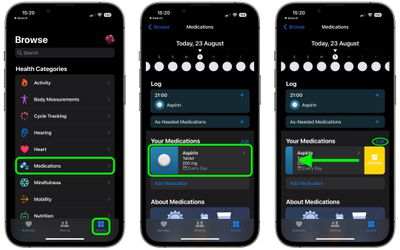
That's all there is to it. Alternatively, you can tap the Edit button at the top of "Your Medications" and then tap the Archive icon next to the medication in question. Note that once a medication is archived, it cannot be added to favorites.
























![Apple Pulls Keynote, Pages and Numbers From App Store [Update: Back]](https://images.macrumors.com/t/Okb7kitB_gNr6qe5Pex9nQIysD8=/112x112/article-new/2026/01/Apple-Creator-Studio-iWork-suite.jpg)





















