

If you set up a Focus for Fitness on your iPhone, you can automatically silence calls and alerts on your Apple Watch when you begin a workout. This article explains how it's done.
Often when you're working out, the last thing you want to receive is a phone call, message, or other alert that pulls you out of your flow. Fortunately, Apple includes a Fitness Focus that you can easily set up so that nothing distracts you from achieving your immediate fitness goals during a workout.
Follow the steps to set up your Fitness Focus.
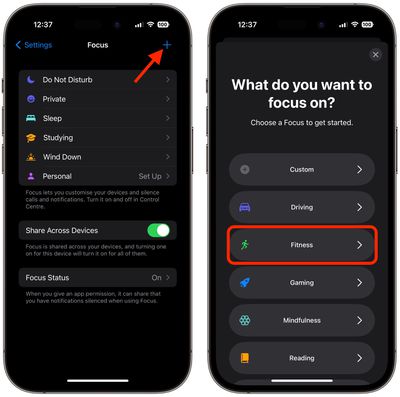
- Launch the Settings app on your iPhone, then tap Focus.
- Tap the + button in the top-right corner of the screen.
- Select Fitness, then tap Customize Focus.

- If desired, use the People and Apps options to allow notifications from select people and/or apps when the Focus is active.
- You can optionally also choose an iPhone Lock Screen and Apple Watch face to help limit distractions.
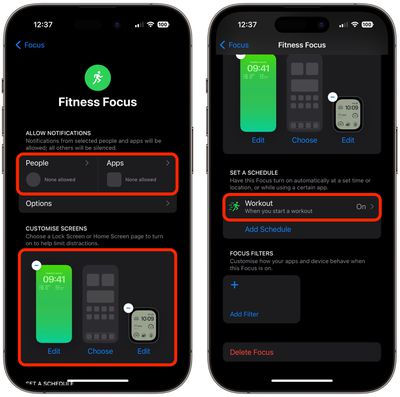
That's all there is to it. Note that Workout under "Set a Schedule" is already set for you, making your Fitness Focus ready to kick into action the next time you start a workout.
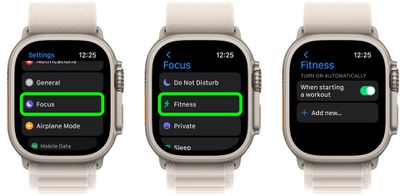
You can also double-check on your Apple Watch that the Fitness Focus will turn on automatically the next time you start a workout.
- On Apple Watch, open the Settings app.
- Tap Focus.
- Tap Fitness.
- Make sure the switch is on for "Turn on automatically when starting a workout."
























![Apple Pulls Keynote, Pages and Numbers From App Store [Update: Back]](https://images.macrumors.com/t/Okb7kitB_gNr6qe5Pex9nQIysD8=/112x112/article-new/2026/01/Apple-Creator-Studio-iWork-suite.jpg)





















