In iOS 12, Apple has introduced new password-related features that are designed to make it easier for iPhone and iPad users to create strong, secure, and unique passwords for app and website logins. In this guide, we'll show you how to use two of those features: automatic strong passwords and password auditing.
icloud keychain
Automatic strong passwords ensures that if you're prompted by a website or app to make up a password on the spot, Apple will automatically offer to generate a secure one for you. Password auditing meanwhile flags weak passwords and tells you if a password has been reused for different account login credentials. Here's how to use the two features.

How to Use Automatic Strong Passwords in iOS 12

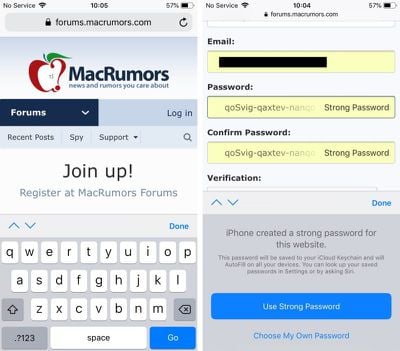
  1. Launch Safari and navigate to the site asking you to create new login credentials, or launch a third-party app asking you to sign up for a new account.
  2. Enter a username or email address in the first field.
  3. Tap on the Password field – iOS will generate a strong password.
    ios 12 automatic strong passwords

  4. Tap Use Strong Password to accept the password suggestion and save it to your iCloud Keychain.
Pro tip: Next time you need one of your passwords, you can ask Siri. For example, you could say: "Siri, show me my BBC password." Siri will then open up your iCloud Keychain with the relevant entry, but only after you authenticate your identity with a fingerprint, a Face ID scan, or a passcode.

How to Identify Reused Passwords in iOS 12

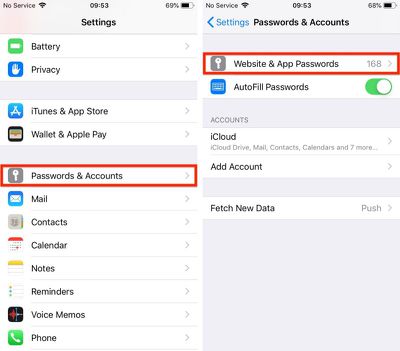
  1. Launch the Settings app on your iPhone or iPad.
  2. Tap Passwords & Accounts.
    ios 12 password auditing 1

  3. Authenticate via Touch ID, Face ID, or your passcode.
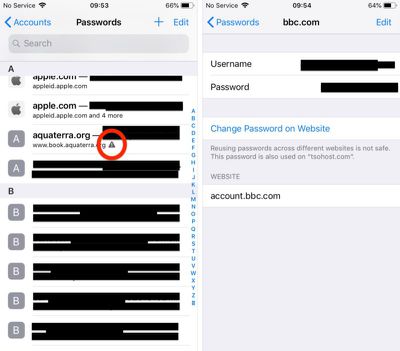
  4. Scroll down the list of passwords and tap on any entries with a triangular warning symbol.
    ios 12 password auditing 2

  5. Tap Change Password on Website to open the associated website and make the change.
Note that the last screen shows you on which other websites you've used the same password.

Pro tip: You can share passwords with other people directly from the iOS Password Manager via AirDrop. Simply tap the password field and an option to AirDrop the login will appear. The login can be AirDropped to any device running iOS 12 or macOS Mojave.

Related Forum: iOS 12

Top Rated Comments

Kip_ Avatar
99 months ago
The old version using 4 groups of 3 characters has a possible max of (62^3)^4 or 3.22x10^21 combinations.

The new version using 3 groups of 6 characters has a possible max of (62^6)^3 or 1.83x10^32 combinations.

This assumes that the groups are made up of any of the 26 lower case letters, 26 upper case letters and the 10 digits. If we eliminate i,I,l,L,o,O,1,0 that reduces to 54 possible characters and values of 6.14x10^20 and 1.52x10^31 respectively.

I'm reasonably assured they're not going to get guessed by knowing that the dash is in a particular place.
Score: 7 Votes (Like | Disagree)
Infinite Vortex Avatar
99 months ago
Personally I'm not a big fan of this type of thing for a number of reasons…

1) At no time do you, or will you, know your password. So what do you do when you need to use that auto-generated password outside of Safari or something that has access into the Keychain?

2) There is no means to access the saved passwords outside of fully connecting to your iCloud account on an Apple device. So if you lose/damage your iPhone (or iPad or Mac) and don't have another Apple device available you that you are able to connect to iCloud as a primary account you are completely locked out of EVERYTHING until you replace that Apple device with another Apple device. Clever on Apple's part but infuriating the moment the customer realises it.

3) Each time you want to access a password you need to use a credential that protects ALL of your other credentials. This means that primary credential is used more often making it more susceptible to "breach". Credentials are typical most at risk at the point/time of entry so the more you need to use it the more at risk it is.

4) It is all highly presumptive that everything is working right.
Score: 7 Votes (Like | Disagree)
Fall Under Cerulean Kites Avatar
99 months ago
I prefer not to use automatically generated passwords because they eventually are reversed engineered.
Really? There are plenty of easier and more likely vectors than “reverse engineering” the password generation mechanism.

As long as it doesn't force me to use excessively long and confusing passwords, I'm ok with this. I know many sites, institute insanely long and complex passwords so this may be helpful
This is the world we’re heading to. Away from simple passwords that can be memorized and on to machine-generated passwords which are complex enough to thwart brute-force hacking. Look at SSL/TLS. Sure, these use certificates, but it’s a similar idea. Machine-generated, machine-stored, machine-entered authentication. Personally, I welcome it, as I would argue no one can reasonably generate and remember secure, unique passwords for all of the services they use.

Can you edit that strong password? There are a lot of stupid websites that don’t take passwords longer than 10 characters or accept the dashes.
If it doesn’t exist already, this will be a feature of future password managers. It would be trivial to screen-scrape and/or keep a database of password requirements, and generate a compliant password based on that knowledge.
Score: 6 Votes (Like | Disagree)
ignatius345 Avatar
97 months ago
As long as it doesn't force me to use excessively long and confusing passwords, I'm ok with this. I know many sites, institute insanely long and complex passwords so this may be helpful
Passwords only feel "excessively long and confusing" if you're trying to remember them. If you're using a password manager you trust and have on you all the time, you can ditch memorability as a factor and make them as hack-resistant as possible.
Score: 5 Votes (Like | Disagree)
jonblatho Avatar
99 months ago
If it doesn’t exist already, this will be a feature of future password managers. It would be trivial to screen-scrape and/or keep a database of password requirements, and generate a compliant password based on that knowledge.
Apple already does this ('https://twitter.com/_inside/status/959549503920660480').
Score: 5 Votes (Like | Disagree)
Mr. Heckles Avatar
97 months ago
I prefer not to use automatically generated passwords because they eventually are reversed engineered.
This has to be the dumbest excuse ever not using this. Really?
Score: 5 Votes (Like | Disagree)

Popular Stories

maxresdefault

Apple Shows Off a Key Reason to Upgrade to the iPhone 17

Saturday February 7, 2026 9:26 am PST by
Apple today shared an ad that shows how the upgraded Center Stage front camera on the latest iPhones improves the process of taking a group selfie. "Watch how the new front facing camera on iPhone 17 Pro takes group selfies that automatically expand and rotate as more people come into frame," says Apple. While the ad is focused on the iPhone 17 Pro and iPhone 17 Pro Max, the regular iPhone...
Finder Siri Feature

Why Apple's iOS 26.4 Siri Upgrade Will Be Bigger Than Originally Promised

Friday February 6, 2026 3:06 pm PST by
In the iOS 26.4 update that's coming this spring, Apple will introduce a new version of Siri that's going to overhaul how we interact with the personal assistant and what it's able to do. The iOS 26.4 version of Siri won't work like ChatGPT or Claude, but it will rely on large language models (LLMs) and has been updated from the ground up. Upgraded Architecture The next-generation...
wwdc sans text feature

Apple Rumored to Announce New Product on February 19

Thursday February 5, 2026 12:22 pm PST by
Apple plans to announce the iPhone 17e on Thursday, February 19, according to Macwelt, the German equivalent of Macworld. The report, citing industry sources, is available in English on Macworld. Apple announced the iPhone 16e on Wednesday, February 19 last year, so the iPhone 17e would be unveiled exactly one year later if this rumor is accurate. It is quite uncommon for Apple to unveil...
apple wallet drivers license feature iPhone 15 pro

Apple Says These 7 U.S. States Plan to Offer iPhone Driver's Licenses

Monday February 9, 2026 6:24 am PST by
In select U.S. states, residents can add their driver's license or state ID to the Apple Wallet app on the iPhone and Apple Watch, and then use it to display proof of identity or age at select airports and businesses, and in select apps. The feature is currently available in 13 U.S. states and Puerto Rico, and it is expected to launch in at least seven more in the future. To set up the...
14 inch MacBook Pro Keyboard

New MacBook Pros Could Now Arrive in March

Sunday February 8, 2026 6:02 am PST by
New MacBook Pro models with the M5 Pro and M5 Max chips could arrive as soon as Monday, March 2, according to Bloomberg's Mark Gurman. In today's "Power On" newsletter, Gurman said that the release of new MacBook Pro models is tied to the release of macOS Tahoe 26.3. The launch is said to be slated for as early as the week of March 2. He added that the M4 Pro and M4 Max models on sale today...