How to Use Automatic Strong Passwords and Password Auditing in iOS 12 - MacRumors
Skip to Content

How to Use Automatic Strong Passwords and Password Auditing in iOS 12

by

In iOS 12, Apple has introduced new password-related features that are designed to make it easier for iPhone and iPad users to create strong, secure, and unique passwords for app and website logins. In this guide, we'll show you how to use two of those features: automatic strong passwords and password auditing.
icloud keychain
Automatic strong passwords ensures that if you're prompted by a website or app to make up a password on the spot, Apple will automatically offer to generate a secure one for you. Password auditing meanwhile flags weak passwords and tells you if a password has been reused for different account login credentials. Here's how to use the two features.

How to Use Automatic Strong Passwords in iOS 12

  1. Launch Safari and navigate to the site asking you to create new login credentials, or launch a third-party app asking you to sign up for a new account.
  2. Enter a username or email address in the first field.
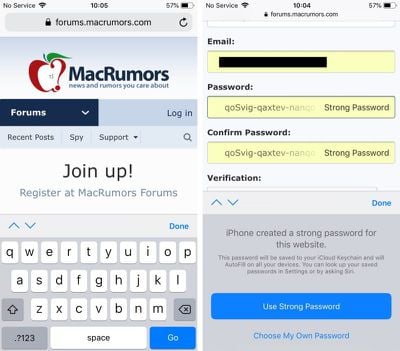
  3. Tap on the Password field – iOS will generate a strong password.
    ios 12 automatic strong passwords

  4. Tap Use Strong Password to accept the password suggestion and save it to your iCloud Keychain.
Pro tip: Next time you need one of your passwords, you can ask Siri. For example, you could say: "Siri, show me my BBC password." Siri will then open up your iCloud Keychain with the relevant entry, but only after you authenticate your identity with a fingerprint, a Face ID scan, or a passcode.

How to Identify Reused Passwords in iOS 12

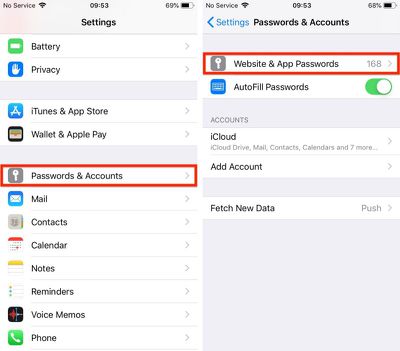
  1. Launch the Settings app on your iPhone or iPad.
  2. Tap Passwords & Accounts.
    ios 12 password auditing 1

  3. Authenticate via Touch ID, Face ID, or your passcode.
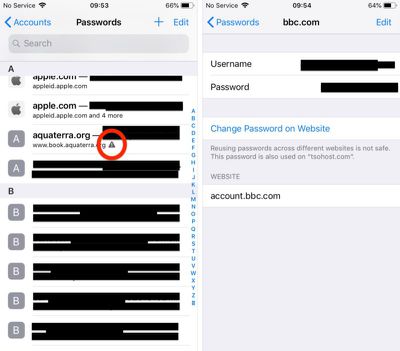
  4. Scroll down the list of passwords and tap on any entries with a triangular warning symbol.
    ios 12 password auditing 2

  5. Tap Change Password on Website to open the associated website and make the change.
Note that the last screen shows you on which other websites you've used the same password.

Pro tip: You can share passwords with other people directly from the iOS Password Manager via AirDrop. Simply tap the password field and an option to AirDrop the login will appear. The login can be AirDropped to any device running iOS 12 or macOS Mojave.


Related Forum: iOS 12

Top Rated Comments

108 months ago
The old version using 4 groups of 3 characters has a possible max of (62^3)^4 or 3.22x10^21 combinations.

The new version using 3 groups of 6 characters has a possible max of (62^6)^3 or 1.83x10^32 combinations.

This assumes that the groups are made up of any of the 26 lower case letters, 26 upper case letters and the 10 digits. If we eliminate i,I,l,L,o,O,1,0 that reduces to 54 possible characters and values of 6.14x10^20 and 1.52x10^31 respectively.

I'm reasonably assured they're not going to get guessed by knowing that the dash is in a particular place.
Score: 7 Votes (Like | Disagree)
Infinite Vortex Avatar
108 months ago
Personally I'm not a big fan of this type of thing for a number of reasons…

1) At no time do you, or will you, know your password. So what do you do when you need to use that auto-generated password outside of Safari or something that has access into the Keychain?

2) There is no means to access the saved passwords outside of fully connecting to your iCloud account on an Apple device. So if you lose/damage your iPhone (or iPad or Mac) and don't have another Apple device available you that you are able to connect to iCloud as a primary account you are completely locked out of EVERYTHING until you replace that Apple device with another Apple device. Clever on Apple's part but infuriating the moment the customer realises it.

3) Each time you want to access a password you need to use a credential that protects ALL of your other credentials. This means that primary credential is used more often making it more susceptible to "breach". Credentials are typical most at risk at the point/time of entry so the more you need to use it the more at risk it is.

4) It is all highly presumptive that everything is working right.
Score: 7 Votes (Like | Disagree)
Fall Under Cerulean Kites Avatar
108 months ago
I prefer not to use automatically generated passwords because they eventually are reversed engineered.
Really? There are plenty of easier and more likely vectors than “reverse engineering” the password generation mechanism.

As long as it doesn't force me to use excessively long and confusing passwords, I'm ok with this. I know many sites, institute insanely long and complex passwords so this may be helpful
This is the world we’re heading to. Away from simple passwords that can be memorized and on to machine-generated passwords which are complex enough to thwart brute-force hacking. Look at SSL/TLS. Sure, these use certificates, but it’s a similar idea. Machine-generated, machine-stored, machine-entered authentication. Personally, I welcome it, as I would argue no one can reasonably generate and remember secure, unique passwords for all of the services they use.

Can you edit that strong password? There are a lot of stupid websites that don’t take passwords longer than 10 characters or accept the dashes.
If it doesn’t exist already, this will be a feature of future password managers. It would be trivial to screen-scrape and/or keep a database of password requirements, and generate a compliant password based on that knowledge.
Score: 6 Votes (Like | Disagree)
106 months ago
As long as it doesn't force me to use excessively long and confusing passwords, I'm ok with this. I know many sites, institute insanely long and complex passwords so this may be helpful
Passwords only feel "excessively long and confusing" if you're trying to remember them. If you're using a password manager you trust and have on you all the time, you can ditch memorability as a factor and make them as hack-resistant as possible.
Score: 5 Votes (Like | Disagree)
Mr. Heckles Avatar
106 months ago
I prefer not to use automatically generated passwords because they eventually are reversed engineered.
This has to be the dumbest excuse ever not using this. Really?
Score: 5 Votes (Like | Disagree)
jonblatho Avatar
108 months ago
If it doesn’t exist already, this will be a feature of future password managers. It would be trivial to screen-scrape and/or keep a database of password requirements, and generate a compliant password based on that knowledge.
Apple already does this ('https://twitter.com/_inside/status/959549503920660480').
Score: 5 Votes (Like | Disagree)

Popular Stories

iPhone Duo Trio

Here's What Apple's Apps Look Like on the iPhone Duo

Tuesday October 20, 2026 11:12 am PDT by
With just three days to go until the iPhone Duo is released, Apple is getting ready for the launch. Behind the scenes, the App Store now has screenshots of Apple's built-in apps running on the Duo. We've seen some apps in marketing materials, but images of the ones we haven't seen give us an idea of what it will be like using the iPhone Duo day to day. Many apps are shown in landscape...
Apple Creator Studio iWork suite

Apple Pulls Keynote, Pages and Numbers From App Store [Update: Back]

Thursday October 22, 2026 11:01 am PDT by
Apple has temporarily removed Keynote, Pages, and Numbers from the App Store, just after releasing an update that added iPhone Duo support and a new Intelligent Assistant. It is not clear if the apps were removed intentionally, or if it is a bug. Apple has not said when the apps will be reinstated, but if it was in error, they should return soon. Update: The Mac versions are back without...
M5 MacBook Pro

RIP, MacBook Ultra

Monday October 19, 2026 9:37 am PDT by
Apple today sent out invites for an experience in Los Angeles on Wednesday, October 28, and the "Pro and tell" tagline on the invitation likely means that the rumored MacBook models with touch-enabled OLED displays will stick with MacBook Pro branding instead of the once-rumored "MacBook Ultra" name. The long-rumored "iPhone Ultra" ended up being named iPhone Duo, so speculation that Apple...
Latest Stories
iPhone Duo Demand Reportedly Exceeds Apple's Expectations
19 minutes ago
iPhone Duo Launch Begins as First Orders Reach Customers
6 hours ago
1Password for Agents Keeps Your Passwords Hidden From AI
7 hours ago
iPhone Duo 24 Hours Later: Your Questions Answered
8 hours ago
Apple's iWork Apps Get 'Intelligent Assistant' and iPhone Duo Support
9 hours ago
Apple is Apparently Considering a Slightly Larger iPhone Duo
9 hours ago
Giant iPhone Duo Displays Coming to Four Apple Stores
10 hours ago
Apple Pulls Keynote, Pages and Numbers From App Store [Update: Back]
11 hours ago
Apple Updates More Apps With iPhone Duo Support
11 hours ago
Apple Will Label Apps 'Made for iPhone Duo' in App Store
14 hours ago
Amazon Takes $49 Off iPad With Prices Starting at $399.99
15 hours ago
F1 on Apple TV Now Available in Dolby Atmos
15 hours ago
Apple Reveals More Than 50 Apps That Will Be Updated for iPhone Duo
16 hours ago
Apple Blocks Certificates That Could Help Attackers Fake Websites
17 hours ago
Giant iPhone Duo Installations Spotted at Apple Fifth Avenue
18 hours ago
iPhone Duo 2 Prototypes Include Under-Display Face ID
18 hours ago
Tesla App Gains iPad and iPhone Duo Support
22 hours ago
Apple Reportedly Boosts iPhone Duo Orders by 44%
22 hours ago
Fortnite Returning to Australian App Store After Court Ruling
23 hours ago
Apple Ordered to Open iPhone to Rival App Stores in Australia
23 hours ago
Apple Suppliers Face Hurdles Cutting Circuit Board Emissions
23 hours ago
Things Updated for iPhone Duo With Adaptive Layout
1 day ago
Simplicity and Siri AI Are HomeView's Killer Features, Apple Says
1 day ago
iPhone Duo Reviewers Really Miss Face ID
1 day ago
Does the iPhone Duo Run Hot? Here's What Reviews Found
1 day ago
Apple Music's New Look is Now Live on Apple's Website
1 day ago
Anthropic Launches Claude Duet, a Proactive AI Agent
1 day ago
What 32,000 Folds Did to the iPhone Duo's Hinge
1 day ago
iPhone Duo's Hidden FaceTime Camera Takes 'Trash' Photos
1 day ago
iPhone Duo Has 'Edge Light' Feature That Debuted on Macs Last Year
1 day ago