
How to Use Automatic Setup in iOS 11 to Get Your New iPhone 8 Up and Running Quick - MacRumors
Skip to Content

How to Use Automatic Setup in iOS 11 to Get Your New iPhone 8 Up and Running Quick

by

iOS 11 includes a new "Automatic Setup" feature, which is aimed at making it quicker to get a new device ready to use right out of the box. Automatic Setup streamlines the setup process for new iPhones and iPads, transferring over preferences, Apple ID and Wi-Fi info, preferred settings, and iCloud Keychain passwords.

Automatic Setup is not the same as restoring from an iCloud backup and it does not offer full device-to-device content transfer. After transferring settings using Automatic Setup, you will still need to transfer over app data by restoring from a backup, a step available after Automatic Setup is complete.
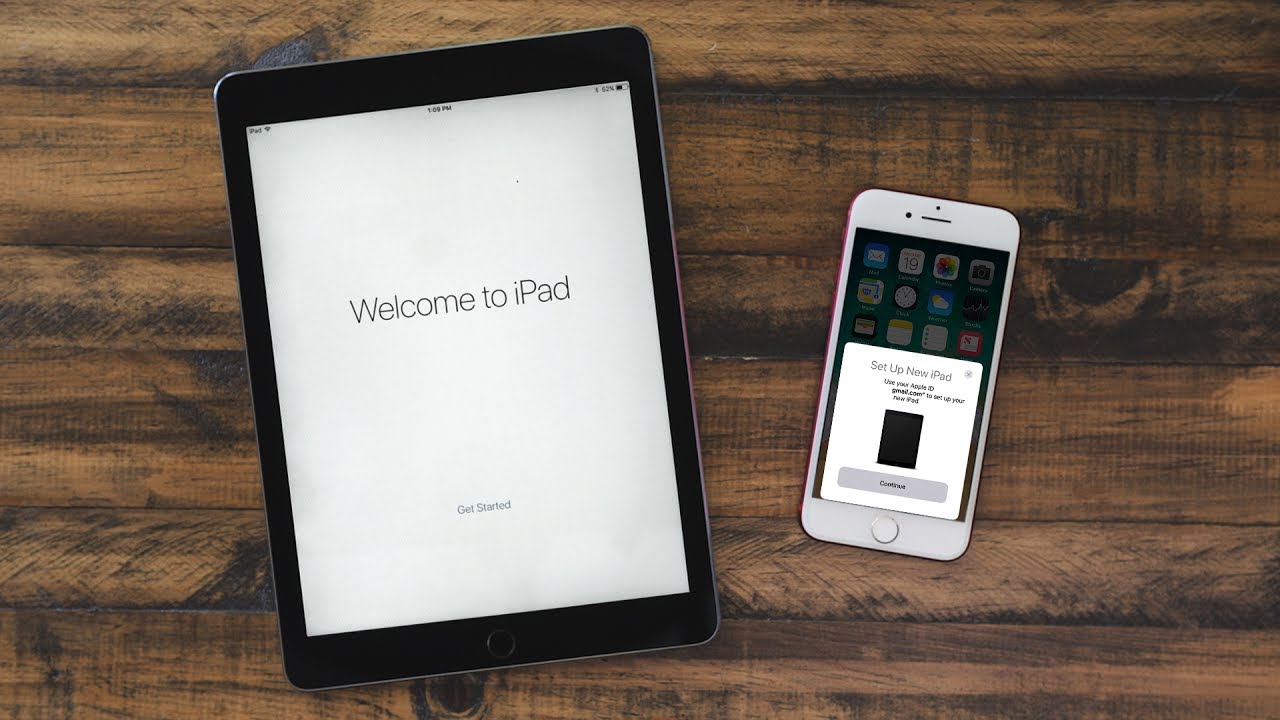

When you buy a new device, Automatic Setup will pop up automatically, but there are some steps to follow to get everything transferred over.

  1. Power on your new device.
  2. After choosing your language, you'll see a "Set Up Your iPhone (or iPad)" prompt.
  3. When this appears, place your existing iOS device near the new device to initiate Automatic Setup.
  4. Your existing device will show a pop up letting you know you can use Automatic Setup. Tap "Continue" to start.
  5. An Apple Watch-style pairing image will appear on the new device, and you'll be instructed to scan it with the camera on your existing device.
  6. In an area with decent lighting, hold the existing device's camera over the image to pair.
  7. Enter the passcode from your existing device on the new device.
  8. From there, all of your data starts transferring over to the new device.

After Automatic Setup, you'll need to go through the Touch ID, Siri, and Wallet setup processes, but your other information is synced over. An "Express Settings" feature further speeds up new device activation, automatically enabling Find My iPhone, location services, and analytics. If you don't want these options enabled, tap on "Customize Settings" to change them.

At this point, you can restore all of your apps and app data from an iCloud backup, or set a device up as new. You will need to use the iCloud backup step for a full content transfer from your old device to your new device as Automatic Setup is only for settings and bypassing some of the setup steps that can take several minutes.

To use Automatic Setup, both of the devices involved need to be running the iOS 11 update, so it's perfect for customers who are receiving an iPhone 8 or 8 Plus and have already upgraded their previous-generation devices to iOS 11.


Related Forum: iOS 11

Top Rated Comments

Knightcastle Avatar
119 months ago
I still use iTunes backup for upgrades to make sure all apps etc go across too.

iCloud backup has never been sufficient for a device to device transfer in my eyes, and is only good for unplanned device loss/damage
Score: 6 Votes (Like | Disagree)
jonnysods Avatar
119 months ago
I'd rather be patient and restore the whole device. Doesn't take long on my home Internets.
Score: 3 Votes (Like | Disagree)
leesweet Avatar
119 months ago
Yeah, still don’t see why it can’t transfer EVERYTHING. It takes hours to get all the data and apps redone even with iTunes since the App Store is hammered on launch day and there is no way to actually backup and restore a phone image.
Score: 2 Votes (Like | Disagree)
119 months ago
I really think this is more for Apple Store employees to use on customer devices when they replace them (upgrades, warranty replacements, etc.) As it is now they walk through the prompts but this might let them simply put the old next to the new to get it going then have you wipe the old before they take it away.
This has marginal convenience at home though.
Score: 2 Votes (Like | Disagree)
jclo Avatar
119 months ago
I've updated the post, please give it a look and let me know if I've made it clearer what Automatic Setup does and does not do. Also, let me know if there's anything else I should add. Thanks for the feedback, guys :)
Score: 2 Votes (Like | Disagree)
NoBoMac Avatar
119 months ago
Mine failed as well. Can't recall the message I got. Maybe partially worked? Hard to tell since this go round of phone switching was painful and ultimately required changing settings on the wifi (lots of "unexpected error" messages anytime needed to enter AppleID, contact App Store).
[doublepost=1506178085][/doublepost]

Is [encrypted iCloud backups] new? In the past, iCloud wasn’t ‘encrypted’ so it never saves any passwords
Not that new. 2.5yrs, maybe. I recall when HealthApp first popped up, people were complaining about iCloud backups not saving that information due to lack of encryption. Was corrected not that long after iirc.

Anyway, per this link, backups are encrypted.

https://support.apple.com/en-us/HT202303

And this link, it is about iTunes backups, but, does state iCloud backups are automatically encrypted.

https://support.apple.com/en-us/HT205220
Score: 1 Votes (Like | Disagree)

Popular Stories

iPhone Duo Trio

Here's What Apple's Apps Look Like on the iPhone Duo

Tuesday October 20, 2026 11:12 am PDT by
With just three days to go until the iPhone Duo is released, Apple is getting ready for the launch. Behind the scenes, the App Store now has screenshots of Apple's built-in apps running on the Duo. We've seen some apps in marketing materials, but images of the ones we haven't seen give us an idea of what it will be like using the iPhone Duo day to day. Many apps are shown in landscape...
Apple Creator Studio iWork suite

Apple Pulls Keynote, Pages and Numbers From App Store [Update: Back]

Thursday October 22, 2026 11:01 am PDT by
Apple has temporarily removed Keynote, Pages, and Numbers from the App Store, just after releasing an update that added iPhone Duo support and a new Intelligent Assistant. It is not clear if the apps were removed intentionally, or if it is a bug. Apple has not said when the apps will be reinstated, but if it was in error, they should return soon. Update: The Mac versions are back without...
M5 MacBook Pro

RIP, MacBook Ultra

Monday October 19, 2026 9:37 am PDT by
Apple today sent out invites for an experience in Los Angeles on Wednesday, October 28, and the "Pro and tell" tagline on the invitation likely means that the rumored MacBook models with touch-enabled OLED displays will stick with MacBook Pro branding instead of the once-rumored "MacBook Ultra" name. The long-rumored "iPhone Ultra" ended up being named iPhone Duo, so speculation that Apple...
Latest Stories
iPhone Duo Demand Reportedly Exceeds Apple's Expectations
21 minutes ago
iPhone Duo Launch Begins as First Orders Reach Customers
7 hours ago
1Password for Agents Keeps Your Passwords Hidden From AI
7 hours ago
iPhone Duo 24 Hours Later: Your Questions Answered
8 hours ago
Apple's iWork Apps Get 'Intelligent Assistant' and iPhone Duo Support
9 hours ago
Apple is Apparently Considering a Slightly Larger iPhone Duo
9 hours ago
Giant iPhone Duo Displays Coming to Four Apple Stores
10 hours ago
Apple Pulls Keynote, Pages and Numbers From App Store [Update: Back]
11 hours ago
Apple Updates More Apps With iPhone Duo Support
11 hours ago
Apple Will Label Apps 'Made for iPhone Duo' in App Store
14 hours ago
Amazon Takes $49 Off iPad With Prices Starting at $399.99
15 hours ago
F1 on Apple TV Now Available in Dolby Atmos
15 hours ago
Apple Reveals More Than 50 Apps That Will Be Updated for iPhone Duo
16 hours ago
Apple Blocks Certificates That Could Help Attackers Fake Websites
17 hours ago
Giant iPhone Duo Installations Spotted at Apple Fifth Avenue
18 hours ago
iPhone Duo 2 Prototypes Include Under-Display Face ID
18 hours ago
Tesla App Gains iPad and iPhone Duo Support
22 hours ago
Apple Reportedly Boosts iPhone Duo Orders by 44%
22 hours ago
Fortnite Returning to Australian App Store After Court Ruling
23 hours ago
Apple Ordered to Open iPhone to Rival App Stores in Australia
23 hours ago
Apple Suppliers Face Hurdles Cutting Circuit Board Emissions
1 day ago
Things Updated for iPhone Duo With Adaptive Layout
1 day ago
Simplicity and Siri AI Are HomeView's Killer Features, Apple Says
1 day ago
iPhone Duo Reviewers Really Miss Face ID
1 day ago
Does the iPhone Duo Run Hot? Here's What Reviews Found
1 day ago
Apple Music's New Look is Now Live on Apple's Website
1 day ago
Anthropic Launches Claude Duet, a Proactive AI Agent
1 day ago
What 32,000 Folds Did to the iPhone Duo's Hinge
1 day ago
iPhone Duo's Hidden FaceTime Camera Takes 'Trash' Photos
1 day ago
iPhone Duo Has 'Edge Light' Feature That Debuted on Macs Last Year
1 day ago








































