
How to Calibrate Apple Watch for a More Accurate Offline Workout - GeekWebGuides
Skip to Content

How to Calibrate Apple Watch for a More Accurate Offline Workout

by

Apple Watch tracks your movement and heart rate. It uses that information in conjunction with your gender, height, age, and weight to estimate how many calories you burn during daily movement, including light strolls and dedicated workouts.

However, Apple Watch needs proper calibration to get the most accurate reading of your movement and heart rate, which is used to help determine distance and pace measurements when you are walking or running without your iPhone, or while using a treadmill.

christy turlington burns
Calibration is fairly easy and takes about 20 minutes of exercise. For this purpose, you will need both your iPhone and your Apple Watch. After calibrating, you won't need to bring your iPhone on walks or runs anymore.

Make sure the environment is ideal for GPS tracking. Flat ground with good reception and clear skies works best, but as long as your GPS is on, you should be just fine.

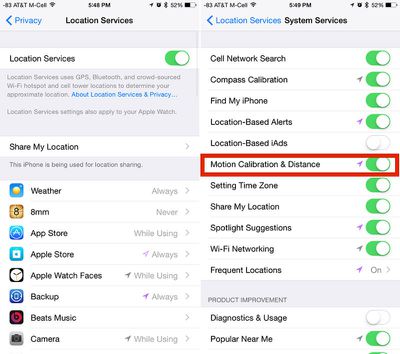
Ensure that Location Services is activated on your iPhone. Open the Settings app and select Privacy. Then tap Location Services and make sure the switch is in the On position.
locationservicescalibration
Check that "Motion Calibration and Distance" is activated on your iPhone. On the Location Services screen, scroll down to the very bottom and select System Services. Find Motion Calibration & Distance and make sure the switch is in the On position.

Hold your iPhone in your hand or attach it to an armband during your outdoor run or walk. This will help get the best possible calibration on your iPhone.
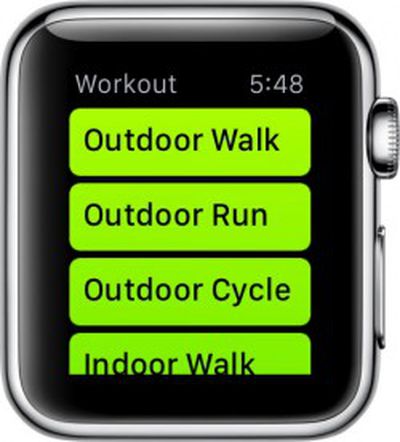
applewatchfitnessOpen the Workout app on Apple Watch and select Outdoor Walk or Outdoor Run and set your goal. Tap Start and begin. Walk or run for 20 minutes.

If you are unable to walk or run for 20 minutes at one time, you can spread the calibration over multiple outdoor sessions. Just make sure you bring your iPhone with you each time.

You may need to perform multiple 20-minute calibration workouts. If you normally walk or run at varying speeds, for example if you tend to run for three minutes and walk for one minute, you will need to calibrate each speed separately (or do 40 minutes worth of walking/running). Basically, the more you calibrate, the more accurate the reading will be.

Calibration data is stored on Apple Watch. If you unpair it from your iPhone, you will have to recalibrate in the future.

The calibration process also helps improve estimates of calorie burning and movement approximations in the Activity app. So, it is a good idea to complete the process, even if you don't plan on running or walking outdoors on a regular basis.


Related Roundup: Apple Watch 12
Buyer's Guide: Apple Watch (Buy Now)
Related Forum: Apple Watch

Top Rated Comments

149 months ago
Could you please write an article on how to tell the time? I'm a little bit confused what all the numbers mean.
Score: 26 Votes (Like | Disagree)
149 months ago
I use Walkmeter on my iPhone, which shows my route on a map using different colours for my pace and speed. It's useful to see where I was faster and slower.

Can the Apple Watch do this? Didn't think so.

In addition, a phone in a trouser pocket will be more accurate for steps than a watch on the arm, as the arm will record many more false steps due to the difficulty of interpreting arm movements. Our hips are much more stable, and are therefore that much easier to interpret a step with.

Your hips don't lie?
Score: 13 Votes (Like | Disagree)
TMRJIJ Avatar
149 months ago
Could you please write an article on how to tell the time? I'm a little bit confused what all the numbers mean.

Please don't MR. These instructions were so confusing, I got my leg caught in the ceiling fan.
Score: 7 Votes (Like | Disagree)
unsaltedrhino Avatar
149 months ago
Copy/paste much?

https://support.apple.com/en-us/HT204516
Score: 7 Votes (Like | Disagree)
149 months ago
Might as well rename this website to WatchManualRumors.com
Score: 6 Votes (Like | Disagree)
darwen Avatar
149 months ago
Um, no. They're posted to the main page.

On a mobile device it will show at the top of the list, on a desktop it is off to the side. That being said, it seems like now is a good time for them to rethink the way the site works on mobile.

GeekWebGuides, I understand you guys are trying to get better SEO with all these guides, but they are really irrelevant for a lot of your users. Currently, on a mobile device, the top 3 articles are "how to" watch guides. You are starting to alienate some of the long time readers.
Score: 5 Votes (Like | Disagree)

Popular Stories

apple watch s12 ultra 4

Apple Watch Series 12, Ultra 4 Owners Report Skin Irritation

Wednesday October 7, 2026 12:02 pm PDT by
Some Apple Watch Series 12 and Ultra 4 owners have experienced unexpected skin irritation with the new models, according to reports on the GeekWebGuides forums and Reddit. Affected users complain of a burning sensation and redness under the sensor area. The Apple Watch Series 12 and Ultra 4 measure heart rate every five seconds, and some people have wondered if that's the cause of the skin...
southern straps 3 1

GeekWebGuides Giveaway: Win an Apple Watch Series 12 and a Nylon Band From Southern Straps

Friday October 9, 2026 10:20 am PDT by
For this week's giveaway, we've teamed up with Southern Straps to offer GeekWebGuides readers a chance to win an Apple Watch Series 12 and a nylon band from Southern Straps to go along with it. Southern Straps is a California-based company that has been making high-quality bands for the Apple Watch since the device first launched in 2015, and the company's selection of bands offer a an...
apple watch series 6 blood oxygen monitoring 1

Apple's $634 Million Apple Watch Patent Bill Just Got Even Bigger

Tuesday October 6, 2026 6:09 am PDT by
Apple's $634 million patent loss to medical technology company Masimo has just gotten even bigger, after a federal judge ordered Apple to pay an additional $184 million in interest on what it owes (via Bloomberg Law). The ruling takes Apple's bill to around $818 million, but that doesn't include any post-judgment interest continuing to accrue until the judgment is paid. Judge James Selna ...
Latest Stories
iPhone Duo Launch Begins as First Orders Reach Customers
3 hours ago
1Password for Agents Keeps Your Passwords Hidden From AI
4 hours ago
iPhone Duo 24 Hours Later: Your Questions Answered
4 hours ago
Apple's iWork Apps Get 'Intelligent Assistant' and iPhone Duo Support
5 hours ago
Apple is Apparently Considering a Slightly Larger iPhone Duo
5 hours ago
Giant iPhone Duo Displays Coming to Four Apple Stores
6 hours ago
Apple Pulls Keynote, Pages and Numbers From App Store [Update: Back]
7 hours ago
Apple Updates More Apps With iPhone Duo Support
8 hours ago
Apple Will Label Apps 'Made for iPhone Duo' in App Store
11 hours ago
Amazon Takes $49 Off iPad With Prices Starting at $399.99
11 hours ago
F1 on Apple TV Now Available in Dolby Atmos
12 hours ago
Apple Reveals More Than 50 Apps That Will Be Updated for iPhone Duo
12 hours ago
Apple Blocks Certificates That Could Help Attackers Fake Websites
14 hours ago
Giant iPhone Duo Installations Spotted at Apple Fifth Avenue
14 hours ago
iPhone Duo 2 Prototypes Include Under-Display Face ID
14 hours ago
Tesla App Gains iPad and iPhone Duo Support
18 hours ago
Apple Reportedly Boosts iPhone Duo Orders by 44%
19 hours ago
Fortnite Returning to Australian App Store After Court Ruling
19 hours ago
Apple Ordered to Open iPhone to Rival App Stores in Australia
20 hours ago
Apple Suppliers Face Hurdles Cutting Circuit Board Emissions
20 hours ago
Things Updated for iPhone Duo With Adaptive Layout
20 hours ago
Simplicity and Siri AI Are HomeView's Killer Features, Apple Says
21 hours ago
iPhone Duo Reviewers Really Miss Face ID
1 day ago
Does the iPhone Duo Run Hot? Here's What Reviews Found
1 day ago
Apple Music's New Look is Now Live on Apple's Website
1 day ago
Anthropic Launches Claude Duet, a Proactive AI Agent
1 day ago
What 32,000 Folds Did to the iPhone Duo's Hinge
1 day ago
iPhone Duo's Hidden FaceTime Camera Takes 'Trash' Photos
1 day ago
iPhone Duo Has 'Edge Light' Feature That Debuted on Macs Last Year
1 day ago
Apple Support App Updated for iPhone Duo's Larger Display
1 day ago









































