How to Change a File Type's Default App in macOS - MacRumors
Skip to Content

How to Change a File Type's Default App in macOS

by

macos finder iconEach document that you have on your Mac is associated with a default application which macOS uses to open the file whenever you double-click on its icon in Finder.

Sometimes you may have a legitimate reason for changing which app your Mac automatically launches when you open a common file type – when a newly installed app assumes control of it, or when you want to open AVI video files in VLC instead of QuickTime, for instance. The following steps show you how to do just that.

  1. In a Finder window, right-click (or Ctrl-click) the file whose default launch app you want to change.

  2. From the contextual menu, select Open With -> Other....
    change a files default app macos

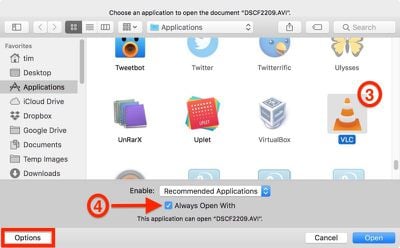
  3. A new navigation window will appear for you to select an alternative app to open the selected file. In our example, we're selecting the VLC media player app.
    change a files default app macos 2

  4. Tick the checkbox next to Always Open With to ensure your selection applies in future to all files with the same extension (AVI files, in our case). If you don't see the checkbox, click the Options button at the lower left of the window and it should appear.

  5. Click Open.

If the app that you want to use to open the file type is greyed out, it's because macOS doesn't think there's a valid association between the two. In most cases this is correct, but you can still override it by changing the Recommended Applications view to All Applications using the Enable: dropdown menu.

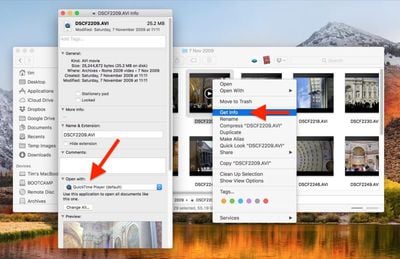
There's another way you can change a file type's associated app in macOS: Right-click (or Ctrl-click) on the file in a Finder window and select Get Info.
change a files default app macos1
In the information dialog that appears, you should see the Open with: section immediately below the Comments: section (click the chevron buttons to expand individual sections). Select Other... in the drop-down menu of apps to select one not already in the list, and then click Change All... to apply the association to all files with the same extension.


Top Rated Comments

103 months ago
How do you do this in iOS? Joke and jokes and jokes
Score: 4 Votes (Like | Disagree)
fairuz Avatar
103 months ago
How do you do this in iOS? Joke and jokes and jokes
The equivalent is when you press the share button to open something in another app, in which case it gives you the list.
[doublepost=1529430019][/doublepost]There's always that one app that has the audacity to change itself to the default for a ton of common extensions like mp4 and jpeg. macOS should really ask first before overriding those.
Score: 3 Votes (Like | Disagree)
nvmls Avatar
103 months ago
Funny you say MR, although these tips are appreciated, this particular functionality has been bugged for decades.
Score: 3 Votes (Like | Disagree)
Centris 650 Avatar
103 months ago
Is there really anyone who didn't know this already?
There’s always a newbie.
Score: 3 Votes (Like | Disagree)
103 months ago
Is there really anyone who didn't know this already?
Plenty of people don't know about plenty of things that plenty others know about.
Score: 2 Votes (Like | Disagree)
H3LL5P4WN Avatar
103 months ago
Easy, if you have an iPhone switch to Android, if you have an iPad switch to Windows 10.
Why would you downgrade?
Score: 2 Votes (Like | Disagree)

Popular Stories

Apple Event Logo

Apple's Next Era Begins September 1

Thursday May 7, 2026 10:36 am PDT by
Apple recently announced that Tim Cook will be stepping down as CEO later this year, after 15 years of leading the company. Effective September 1, Apple's hardware engineering chief John Ternus will become the company's next CEO, while Cook will become executive chairman of Apple's board of directors. In his new role, Apple said Cook will assist with "certain aspects" of the company,...
Instagram Feature 2

PSA: Instagram Encrypted Messaging Ends on Friday, May 8

Tuesday May 5, 2026 8:24 am PDT by
Instagram will remove end-to-end encryption for direct messages between users from May 8, 2026. When the date comes around, Meta will potentially be able to see the contents of all messages between users on the social media platform. Encrypting messages has been an optional feature in Instagram since 2023, but in March of this year the social media platform quietly updated a help page to say ...
macbook neo launch day

Apple May Drop Base $599 MacBook Neo as Chip, DRAM Costs Climb

Thursday May 7, 2026 4:55 am PDT by
Apple is considering dropping the cheapest MacBook Neo configuration as one possible response to the rising cost of building the popular laptop, according to Taiwan-based tech columnist and former Bloomberg reporter Tim Culpan. The Neo currently starts at $599 for a 256GB model, with a 512GB version at $699. Writing in his latest Culpium newsletter, Culpan says cutting the entry-level...