

On all iPhone 15 models, Apple has made it possible to check the number of completed battery cycles, which is a valuable metric to determine your device's battery condition.

Previously, finding out an iPhone's battery cycle count was not an option in Apple's mobile operating system, and curious users had to resort either to unofficial methods (via third-party apps like CoconutBattery, for example) or copy-pasting analytics into Notes and searching for "last_value_CycleCount."
While it has been possible to ascertain iPhone battery health for several years via the "Maximum Capacity" percentage (Settings -> Battery -> Battery Health & Charging), a charge count is a valuable additional metric to determine battery health. A charge cycle is registered every time you deplete all of the battery's capacity, which degrades over time. From Apple's battery information webpage:
Apple lithium-ion batteries work in charge cycles. You complete one charge cycle when you've used (discharged) an amount that equals 100% of your battery's capacity — but not necessarily all from one charge. For instance, you might use 75% of your battery's capacity one day, then recharge it fully overnight. If you use 25% the next day, you will have discharged a total of 100%, and the two days will add up to one charge cycle. It could take several days to complete a cycle. The capacity of any type of battery will diminish after a certain amount of recharging. With lithium-ion batteries, the capacity diminishes slightly with each complete charge cycle.
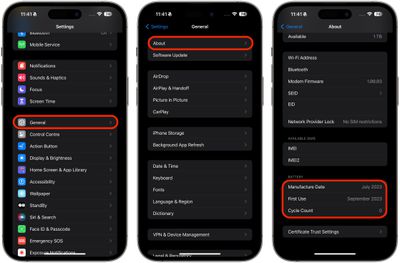
Checking iPhone 15 Battery Cycle Count
- Open the Settings app.
- Tap General -> About.
- Scroll down to the "Battery" section and check the number next to Cycle Count.
On iPhone 15, you can also set a hard 80% limit on battery charging, which can improve battery lifespan by reducing the time that the battery is fully charged. Be sure to check out our dedicated how-to article to learn how.




















