

Apple in May 2020 introduced an Exposure Notification System, which lets public health authorities and governments worldwide help people figure out if they've been exposed to COVID-19, and if so, what steps to take next to minimize the spread of the virus.
Apple and Google developed the underlying APIs and Bluetooth functionality, and that technology has been incorporated into apps designed by public health authorities worldwide, which can use the tracking information to send notifications on exposure and follow up with recommended next steps.
The exposure notification feature is designed to automatically send you a notification if you've been in proximity to a person who is diagnosed with COVID-19. But if you're concerned that you've missed a notification or should have had one, you can manually check for them on your iPhone by following these steps.
- Open the Settings app.
- Scroll down and tap Exposure Notifications.
- Tap View Exposures in App at the top.

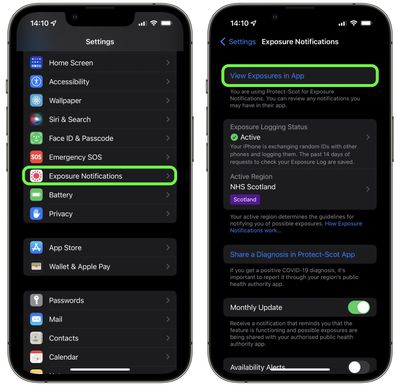
This will send you to the app that is using Exposure Notifications. Depending on your local health authority, these apps have different interfaces and the information is organized differently, but whichever app it is you're using, any exposure logs should be highlighted pretty prominently so that you don't miss them.
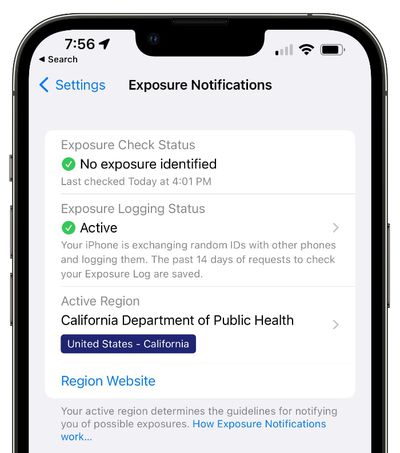
Some states and countries use an Exposure Notification "Express" system that does not rely on an app. In these cases, you won't be directed to an app, but will instead see an "Exposure Check Status" that will let you know if you've been exposed. To check the status, follow the first two steps listed above.
You can allay any concerns you may have in future by going into the Settings app on your iPhone and turning on Exposure Notifications -> Monthly Update. With the option enabled, you'll receive a monthly notification that reminds you that the feature is functioning and possible exposures are being shared with your authorized public health authority app.


















