

Rosetta 2 is the translation layer that enables a Mac with Apple silicon to use apps built for an Intel-based Mac. It works in the background whenever you use an app built only for Mac computers with an Intel processor, and automatically translates the app for use with Apple silicon the first time the app is run.
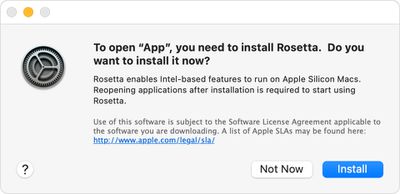
Rosetta 2 isn't included with a standard macOS installation, and has to be installed separately. On the plus side, you don't have to go searching for it to download, because macOS asks you if you want to install it on the first occasion that you attempt to launch an app with Intel-based features.
Simply double-click an app built for an Intel-based Mac and then click Install at the dialog prompt that appears on the screen. Enter your username and password to allow the Rosetta 2 installation to proceed, and once installation is complete, Rosetta will be available for any older apps that need it.
The translation process runs the first time the app is opened, and may cause the app's icon to bounce for a few seconds before it launches, but after that you likely won't see any performance hit. Indeed, in some cases, apps built with x86-64 will even run faster in Rosetta than they do on Intel Macs.
To learn which Mac apps are already optimized for Apple silicon, check out our dedicated how-to article.
























![Apple Pulls Keynote, Pages and Numbers From App Store [Update: Back]](https://images.macrumors.com/t/Okb7kitB_gNr6qe5Pex9nQIysD8=/112x112/article-new/2026/01/Apple-Creator-Studio-iWork-suite.jpg)





















