
How to Check AirPods Battery Life - GeekWebGuides
Skip to Content

How to Check AirPods Battery Life

by

Apple AirPods offer around five hours of listening time and two hours of talk time (or with second-generation AirPods, three hours of talk time) on a single charge. And if you pop your AirPods for 15 minutes in their case, you can get up to three hours of listening time or over an hour of talk time.

airpods
During use, you'll hear a tone when your AirPods' batteries are low, and another tone just before they run out. But you don't have to wait for these tones to know how much charge they have remaining. Here are a few other ways that you can keep a closer eye on your AirPods' battery life.

On iPhone

If you're not using your AirPods, open the charging case lid with the AirPods inside and hold the case close to your iPhone. The charge status of your AirPods and their case should appear on the device's screen, and if you take out an AirPod, you'll see individual percentages for the two earpieces.

You can also check the charge status of your AirPods using the Batteries widget in your iPhone's Today View, accessed by swiping right on the Lock screen or on your Home screen's first screen of apps.
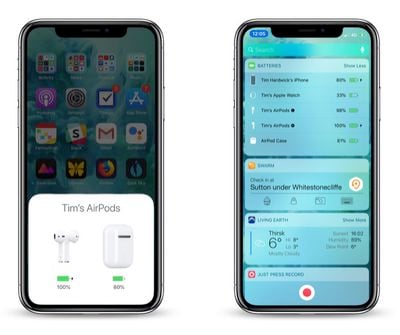
how to check AirPods battery life on iPhone
If you're wearing both AirPods, the Batteries widget will show a single percentage for the two of them that's rounded down to the earpiece with the lowest battery. If you place one of the AirPods in your charging case, the widget will show you individual percentages, as well as the current charge level of the charging case itself.

If you don't have it installed already, you can add the Batteries widget manually. To do so, enter the Today view, scroll to the bottom of the column of widgets and press the Edit button. Then simply tap the green plus button in the list next to Batteries and tap Done in the upper right of the screen.
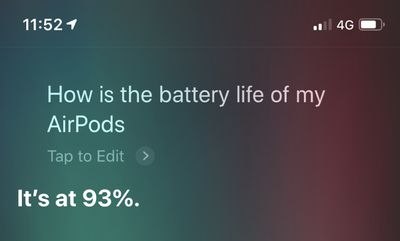
how to check AirPods battery
If you're a fan of Siri and you're wearing your AirPods, you can always ask the virtual assistant "How is the battery life of my AirPods?" and you should get an answer.

On Apple Watch

You can check the battery level of your AirPods from your wrist, whether they're paired with your iPhone or directly with your Apple Watch.

To do so, bring up the Control Center on your Apple Watch: Swipe up on a watch face, or when in an app, press the bottom edge of the screen then drag up the Control Center. Then tap the Apple Watch battery icon, indicated by a percentage.
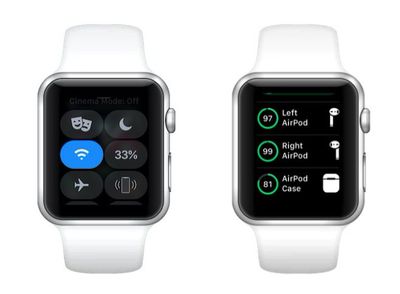
how to check AirPods battery on Apple Watch
Your AirPods' battery level will be displayed as a ring below the Apple Watch battery percentage, and if you place a pod in its charging case, you'll see individual percentage charges for the lot.

On the Charging Case

If your AirPods are in their case, the light inside the case shows the charge status of your AirPods. (On second-generation AirPods, this light is located on the front of the case.)

airpodslight
If not, the light shows the status of the case. Green means charged, and amber indicates less than one full charge remains.

Related Roundup: AirPods 5
Buyer's Guide: AirPods (Buy Now)
Related Forum: AirPods

Top Rated Comments

oneMadRssn Avatar
102 months ago
Same here. I got mine on release day. I tried to go through Apple Support numerous times about it, and they said it's normal degredation of the battery. You can pay to get a battery replacement ($49 for each airpod and $49 for the charging case), so you're basically better off just buying new airpods.

I've admittedly used the **** out of mine, so I ended up caving and buying a new pair. That tiny lithium ion battery can't last forever I guess...
A decent single lithium cell will hold close to its original charge for about 300 cycles, and it will become pretty bad after around 500-600 cycles. The reason Apple is able to say their iPhone, iPad, and Macbook batteries hold a decent charge for 1000 cycles is because those devices have numerous cells and Apple's battery controller distributes the load and usage as evenly as possible. Whereas in the past, the first cell would get hit the most and the last cell would almost never see a single cycle; and thus the cells would "age" unevenly.

The Airpod batteries are just so small that there is just a single cell in each one. So there is no usage balancing that can be done by a controller. It's therefore expected that you would see some degradation appear after about 300 cycles, where it becomes quite noticeable after 600 cycles.

Totally off-topic, but the battery controller is one of the things that makes Tesla's battery tech so amazing. It's one thing to have a controller manage a few dozen cells in a stable environment as Apple does with Macbooks. It is entirely another thing to have a controller managing many thousands of lithium cells in a variety of harsh environments. Making a good controller is of that scale is a hard science.
Score: 8 Votes (Like | Disagree)
102 months ago
Never knew you could see battery % of AirPods on watch !

I’ve only had AirPods & Watch combo for 18 months !!
Score: 3 Votes (Like | Disagree)
Kanyay Avatar
102 months ago
on the real tho. who else hates the sound the airpods make when low battery? it scares me every damn time. too loud.
Score: 2 Votes (Like | Disagree)
wwooden Avatar
102 months ago
I would think it should be simple for Apple to add a feature where you tap one of the AirPods a certain number of times for it to tell you what percentage remains, e.g. 5 taps = battery percentage announcement.

Personally I wouldn't ever buy earphones you had to recharge within 5 hours' use of charging the last time... seems like a fairly glaring flaw in the product to me. I guess it works for lots of people though, so good luck to all those they work for.
I've never had an issue with the 4-5 hour time limit on the battery. I would imagine anyone takes a break during that time to....go to the bathroom, get a drink, get food, really anything. During that break just put the Airpods back in their case and they gain another 3 hours of running time in 15 minutes. I've never had my Airpods run out of battery on me during any use situations. I never worry or think about battery life with the Airpods, it's very liberating really.
Score: 2 Votes (Like | Disagree)
racerhomie Avatar
102 months ago
3 batteries to manage! I'll stick with my single battery Bose headphones thanks.
You don’t have to manage anything. I just plug in my case once a week.
Score: 2 Votes (Like | Disagree)
BearsFan34 Avatar
74 months ago
?? I suppose this is true if you have the original AirPods and if you turned off automatic source switching…but this is not an issue. My APP switch between devices automatically.
Then after that initial pairing with the watch, battery levels show up more consistently.
If they don’t, a reboot of the watch/phone brings the functionality back.
Score: 1 Votes (Like | Disagree)

Popular Stories

AirPods Pro Beta Firmware 2

Apple Releases New AirPods Beta Firmware

Tuesday September 29, 2026 11:38 am PDT by
Apple today released new beta firmware for the AirPods Pro 2, AirPods Pro 3, AirPods 4, AirPods 5, and AirPods Max 2. The firmware has a build number of 9B5042a and is rolling out for developers and public beta testers. There's no word on what's included in the firmware update because Apple doesn't offer notes for AirPods beta releases. When the AirPods are connected to an iPhone, iPad,...
AirPods Pro Beta Firmware 2

Apple Releases New AirPods Beta Firmware

Tuesday October 13, 2026 11:28 am PDT by
Apple today released new beta firmware for the AirPods Pro 2, AirPods Pro 3, AirPods 4, AirPods 5, and AirPods Max 2. The firmware has a build number of 9B5043a and is rolling out for developers and public beta testers. There's no word on what's included in the firmware update because Apple doesn't offer notes for AirPods beta releases. When the AirPods are connected to an iPhone, iPad,...
ifixit airpods 5

AirPods 5 Teardown: Batteries Removable, Case Still Tough

Tuesday September 29, 2026 2:38 pm PDT by
Repair site iFixit today took apart Apple's AirPods 5 for one of its traditional teardown videos. It turns out the new AirPods are slightly more repairable than prior models, but it's still not a simple home fix. The AirPods 5 use pronged batteries that Apple previously used in the AirPods 3, but not the AirPods 4. The battery can be removed with a "nifty pair of tongs," and iFixit says the...
Latest Stories
iPhone Duo Launch Begins as First Orders Reach Customers
5 hours ago
1Password for Agents Keeps Your Passwords Hidden From AI
6 hours ago
iPhone Duo 24 Hours Later: Your Questions Answered
7 hours ago
Apple's iWork Apps Get 'Intelligent Assistant' and iPhone Duo Support
8 hours ago
Apple is Apparently Considering a Slightly Larger iPhone Duo
8 hours ago
Giant iPhone Duo Displays Coming to Four Apple Stores
9 hours ago
Apple Pulls Keynote, Pages and Numbers From App Store [Update: Back]
10 hours ago
Apple Updates More Apps With iPhone Duo Support
10 hours ago
Apple Will Label Apps 'Made for iPhone Duo' in App Store
13 hours ago
Amazon Takes $49 Off iPad With Prices Starting at $399.99
14 hours ago
F1 on Apple TV Now Available in Dolby Atmos
14 hours ago
Apple Reveals More Than 50 Apps That Will Be Updated for iPhone Duo
15 hours ago
Apple Blocks Certificates That Could Help Attackers Fake Websites
16 hours ago
Giant iPhone Duo Installations Spotted at Apple Fifth Avenue
17 hours ago
iPhone Duo 2 Prototypes Include Under-Display Face ID
17 hours ago
Tesla App Gains iPad and iPhone Duo Support
21 hours ago
Apple Reportedly Boosts iPhone Duo Orders by 44%
21 hours ago
Fortnite Returning to Australian App Store After Court Ruling
22 hours ago
Apple Ordered to Open iPhone to Rival App Stores in Australia
22 hours ago
Apple Suppliers Face Hurdles Cutting Circuit Board Emissions
22 hours ago
Things Updated for iPhone Duo With Adaptive Layout
23 hours ago
Simplicity and Siri AI Are HomeView's Killer Features, Apple Says
23 hours ago
iPhone Duo Reviewers Really Miss Face ID
1 day ago
Does the iPhone Duo Run Hot? Here's What Reviews Found
1 day ago
Apple Music's New Look is Now Live on Apple's Website
1 day ago
Anthropic Launches Claude Duet, a Proactive AI Agent
1 day ago
What 32,000 Folds Did to the iPhone Duo's Hinge
1 day ago
iPhone Duo's Hidden FaceTime Camera Takes 'Trash' Photos
1 day ago
iPhone Duo Has 'Edge Light' Feature That Debuted on Macs Last Year
1 day ago
Apple Support App Updated for iPhone Duo's Larger Display
1 day ago








































