How to Perform a Clean Installation of macOS 10.14 Mojave - GeekWebGuides
Skip to Content

How to Perform a Clean Installation of macOS 10.14 Mojave

by

This article guides you through the process of performing a clean installation of macOS 10.14 Mojave using the bootable USB drive method, rather than upgrading your Mac using Apple's standard installation package, which retains existing user data and any user-installed apps.
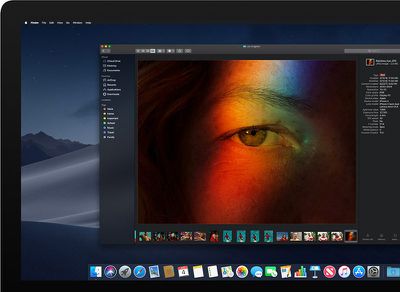
macosmojavedarkmode
Creating a bootable USB drive provides you with a convenient way to install a fresh copy of macOS Mojave on multiple Macs. Performing a clean install can also remove annoying quirks and strange behaviors that your Mac may have inherited over time, and often helps to reclaim disk space caused by junk files left by third-party apps.

The following procedure works with the latest public beta of macOS Mojave, which you can download by enrolling in the Apple Beta Software Program. It will also work with the final version of Mojave, once it's released in the fall. To follow the steps, you'll need an empty 8GB or larger USB thumb drive (USB-C or USB-A, depending on your Mac) and an hour or two of downtime while the installation procedure completes.

Also, be sure to perform a full backup of your Mac beforehand using Time Machine, so that you can restore your original system from the Recovery partition if something goes wrong.

Compatibility Check

macOS Mojave is a major update that introduces a range of new features like a Dark Mode, Desktop and Finder improvements, new apps, and a revamped Mac App Store, but not every Mac that can run macOS High Sierra will run macOS Mojave. The full list of compatible Mac models is as follows:

  • MacBook (Early 2015 or newer)
  • MacBook Air (Mid 2012 or newer)
  • MacBook Pro (Mid 2012 or newer)
  • Mac mini (Late 2012 or newer)
  • iMac (Late 2012 or newer)
  • iMac Pro (2017)
  • Mac Pro (Late 2013, plus mid 2010 and mid 2012 models with recommended Metal-capable GPU)

To check if your Mac is compatible, open the Apple () menu in the upper left corner of your Mac's screen and select About This Mac. Look just below the OS X version number in the Overview tab – if the Mac model name is the same or a later model year than the one shown in the compatibility list above, your Mac is compatible with macOS Mojave.

How to Perform a Clean Install of macOS Mojave

  1. Download macOS Mojave, either via Apple's Public Beta Program or from the Mac App Store (once it's available).
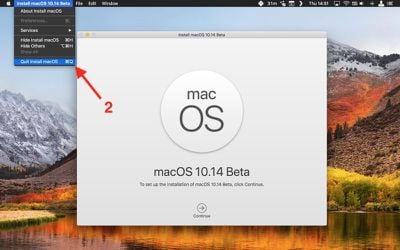
  2. Once the download is complete, close the installer window by selecting the Quit Install macOS option in the menu bar or using the keyboard shortcut Command (⌘) + Q.
    mojave clean install 1

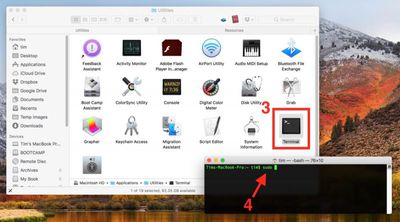
  3. Launch the Terminal app (found in Applications/Utilities/Terminal).
  4. At the Terminal command prompt, type sudo followed by a space.
    mojave clean install 2

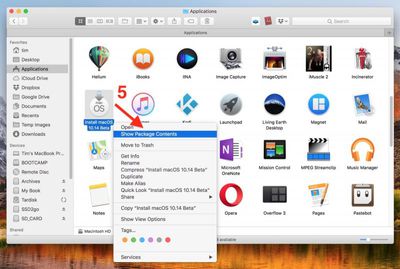
  5. Next, open a Finder window, navigate to your Applications folder, right-click (or Ctrl-click) on the macOS 10.14 installer, and select Show Package Contents from the contextual dropdown menu.
    mojave clean install 3

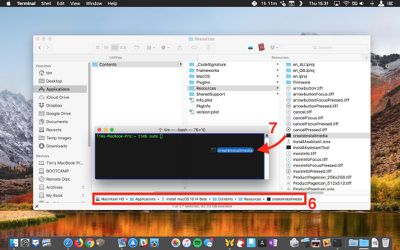
  6. Navigate to Contents -> Resources within the installer package.
  7. Drag the createinstallmedia file into the Terminal window.
    mojave clean install 4

  8. Still in the Terminal window, type --volume followed by a space.
    mojave clean install 5

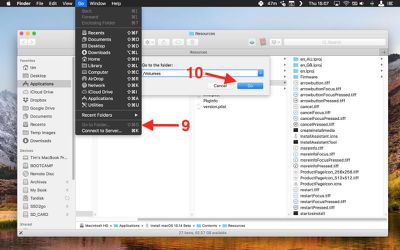
  9. Click the open Finder window to bring it to the front, and in the Finder menu bar select Go -> Go To Folder....
  10. In the Go to the folder input box, type /Volumes and click Go.
    mojave clean install 6

  11. Connect your USB thumbnail drive to your Mac.
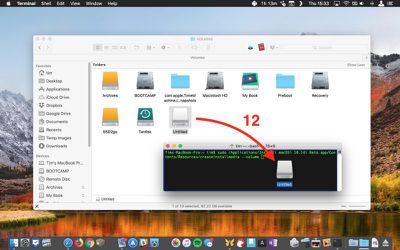
  12. Drag the USB drive's icon from Finder into the Terminal window.
    mojave clean install 7 1

  13. Press the Enter key on your keyboard to run the completed Terminal command.
  14. Enter your administrator password when prompted.
    mojave clean install 8

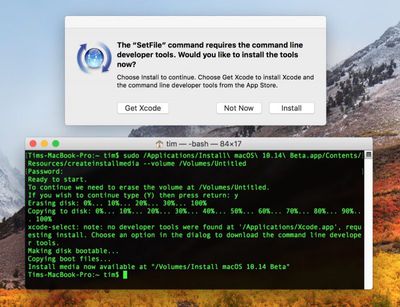
  15. Type Y and press Enter when prompted, and the command will create your bootable Mojave installer on the USB drive. This will take a few minutes to complete, so leave it running. Note that if you're asked whether you want to install Xcode during this time, you can safely click Not Now and the process will complete successfully regardless.
Restart and Install

Once the USB installer has been created, restart your Mac and hold down the Option (⌥) key as soon as you hear the reboot tone. Then follow these steps:

  1. Use the mouse pointer or the arrow keys on your keyboard to select the disk called Install macOS Mojave in the drive list that appears on the screen.
  2. Once the USB drive has booted, select Disk Utility from the Utilities window, choose your Mac's startup drive from the list, and click Erase.
  3. When your Mac's startup disk is formatted, return to the Utilities window and select Install macOS, choose your freshly erased startup drive when asked where to install the OS, and follow the onscreen prompts to complete the installation.

Related Forum: macOS Mojave

Top Rated Comments

Urbanpixels Avatar
106 months ago
Step 4 - Scream profanities when half your software doesn't work or you need to buy the yearly new version
Score: 16 Votes (Like | Disagree)
106 months ago
I've come to realize clean installs are just pedantic, a rudiment of the Windows era.

Goes in the same bin as memory cleaners, defragmentation etc.

Unless you have a serious problem, just upgrade.
Score: 11 Votes (Like | Disagree)
chucker23n1 Avatar
106 months ago
If you’re on APFS, none of this is necessary. Just create an additional APFS volume in Disk Utility (it won’t take up its own space), then install to that destination.
Score: 5 Votes (Like | Disagree)
106 months ago
Won't ⌘⌥R do the same? Just launch disk utility in Recovery mode to erase the drive, then let it install.
Score: 5 Votes (Like | Disagree)
wesley96 Avatar
106 months ago
Saying iMacs can’t use APFS is a misnomer. The culprit is the Fusion Drive, not any particular style of Mac. There are plenty of non-Fusion Drive iMacs out there. My 2017 iMac is running on APFS, too, and no, it does not use a Fusion Drive.
Score: 4 Votes (Like | Disagree)
EdT Avatar
106 months ago
If you're using an iMac or a fusion drive, then you can't use APFS
I thought that this OS would allow APFS with Fusion Drives/iMacs.
Score: 4 Votes (Like | Disagree)

Popular Stories

M5 MacBook Pro

RIP, MacBook Ultra

Monday October 19, 2026 9:37 am PDT by
Apple today sent out invites for an experience in Los Angeles on Wednesday, October 28, and the "Pro and tell" tagline on the invitation likely means that the rumored MacBook models with touch-enabled OLED displays will stick with MacBook Pro branding instead of the once-rumored "MacBook Ultra" name. The long-rumored "iPhone Ultra" ended up being named iPhone Duo, so speculation that Apple...
iPhone Duo Trio

Here's What Apple's Apps Look Like on the iPhone Duo

Tuesday October 20, 2026 11:12 am PDT by
With just three days to go until the iPhone Duo is released, Apple is getting ready for the launch. Behind the scenes, the App Store now has screenshots of Apple's built-in apps running on the Duo. We've seen some apps in marketing materials, but images of the ones we haven't seen give us an idea of what it will be like using the iPhone Duo day to day. Many apps are shown in landscape...
apple pro tell logo

Apple Announcing New Products Next Week: 'Pro and Tell'

Monday October 19, 2026 9:05 am PDT by
Apple's Greg Joswiak today hinted at new product announcements coming next week, sharing a social media post that says "Can't wait to pro and tell next week." Rumors suggest Apple is planning to debut the new MacBook Pro with an OLED touchscreen display, an M6 entry-level MacBook Pro, an M6 iMac, an iPad mini with an OLED display. Can't wait to pro and tell next week....
Latest Stories
iPhone Duo Launch Begins as First Orders Reach Customers
2 hours ago
1Password for Agents Keeps Your Passwords Hidden From AI
2 hours ago
iPhone Duo 24 Hours Later: Your Questions Answered
3 hours ago
Apple's iWork Apps Get 'Intelligent Assistant' and iPhone Duo Support
4 hours ago
Apple is Apparently Considering a Slightly Larger iPhone Duo
4 hours ago
Giant iPhone Duo Displays Coming to Four Apple Stores
5 hours ago
Apple Pulls Keynote, Pages and Numbers From App Store [Update: Back]
6 hours ago
Apple Updates More Apps With iPhone Duo Support
6 hours ago
Apple Will Label Apps 'Made for iPhone Duo' in App Store
9 hours ago
Amazon Takes $49 Off iPad With Prices Starting at $399.99
10 hours ago
F1 on Apple TV Now Available in Dolby Atmos
10 hours ago
Apple Reveals More Than 50 Apps That Will Be Updated for iPhone Duo
11 hours ago
Apple Blocks Certificates That Could Help Attackers Fake Websites
12 hours ago
Giant iPhone Duo Installations Spotted at Apple Fifth Avenue
13 hours ago
iPhone Duo 2 Prototypes Include Under-Display Face ID
13 hours ago
Tesla App Gains iPad and iPhone Duo Support
17 hours ago
Apple Reportedly Boosts iPhone Duo Orders by 44%
17 hours ago
Fortnite Returning to Australian App Store After Court Ruling
18 hours ago
Apple Ordered to Open iPhone to Rival App Stores in Australia
18 hours ago
Apple Suppliers Face Hurdles Cutting Circuit Board Emissions
19 hours ago
Things Updated for iPhone Duo With Adaptive Layout
19 hours ago
Simplicity and Siri AI Are HomeView's Killer Features, Apple Says
19 hours ago
iPhone Duo Reviewers Really Miss Face ID
1 day ago
Does the iPhone Duo Run Hot? Here's What Reviews Found
1 day ago
Apple Music's New Look is Now Live on Apple's Website
1 day ago
Anthropic Launches Claude Duet, a Proactive AI Agent
1 day ago
What 32,000 Folds Did to the iPhone Duo's Hinge
1 day ago
iPhone Duo's Hidden FaceTime Camera Takes 'Trash' Photos
1 day ago
iPhone Duo Has 'Edge Light' Feature That Debuted on Macs Last Year
1 day ago
Apple Support App Updated for iPhone Duo's Larger Display
1 day ago