
How to Clear Cache on iPhone and iPad - GeekWebGuides
Skip to Content

How to Clear Cache on iPhone and iPad

by

If your iPhone or iPad storage space is dwindling at an alarming rate or your device feels like it's getting slower, then you could benefit from clearing the cache that apps use.
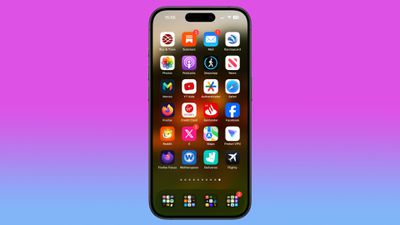
siri suggested apps iphone home screen
Cached data includes all the files and images that are kept in your device's memory, which is meant to help apps avoid having to request the same data repeatedly and thereby keep things speedy – in theory.

In fact, it's possible for an overzealous app to fill up your iPhone's cache to the point where overall performance takes a hit. So it's good practice to spring-clean the cache now and again to ensure your device isn't bogged down unnecessarily. Here's how.

How to Clear iPhone and iPad Cache

The following steps clear all cookies and web data cached on your device by Safari, although AutoFill information remains unchanged. Note that when you clear Safari browsing history, the same logs are cleared on any other devices signed into the same iCloud account.

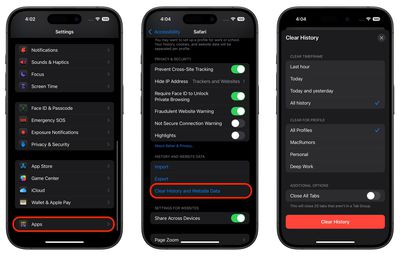
  1. Open the Settings app on your iPhone or iPad, scroll to the bottom of the list, then tap Apps.
  2. Select Safari in the list, either by scrolling through the alphabetical list or by typing "Safari" into the search field at the top.
  3. Scroll to the "History and Website Data" section and tap the blue Clear History and Website Data option near the bottom of the menu. (Note that this setting might be grayed out if there's already no history to clear or if parental controls are set for websites.)
  4. Choose a "Clear Timeframe," then select a profile to clear from or choose All Profiles.

  5. Tap Clear History at the bottom, then confirm your choice if prompted.
settings

How to Clear iPhone Cache for Third-Party Apps

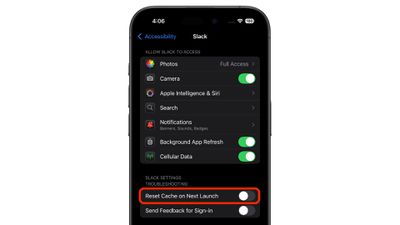
The way to clear the cache used by third-party apps on your iPhone varies from app to app. For example, there's a cache reset option for Slack in the main Settings app (Settings -> Apps -> Slack -> Reset cache on next launch), while you can control the storage that individual WhatsApp conversations use from within the chat app (Settings -> Data and Storage Usage -> Storage Usage).
slack
If there's an app that you suspect is unnecessarily hoarding data on your iPhone but you can't find an equivalent option to clear its cache, then the best alternative is to check the iOS iPhone Storage screen.

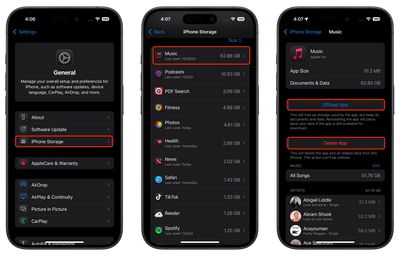
  1. Launch the Settings app on your iPhone or iPad.

  2. Tap General.

  3. Tap iPhone Storage.

  4. A list of all the apps (including stock apps) on your iOS device will load in order of size, with the largest apps listed first. Tap an app in the list that is taking up an unnecessary amount of space.
  5. Two uninstall options are presented on this screen. Tap Offload App to unload the app but preserve any documents and data (these are reinstated if you later reinstall the app) or tap Delete App to remove the app and all related data from your device.
settings

It's worth scrolling down the iPhone Storage list and looking at the Last Used: date underneath the title of each app. If it's been several weeks or months since you opened an app, or it says Never Used, then consider uninstalling it.

If you tend to download a lot of apps that often get left unused, consider enabling the iPhone Storage menu recommendation to automatically Offload Unused Apps when you're low on storage. If you uninstall a purchased app but later decide that you want to use it (and it's still available in the App Store) simply follow the steps below.

How to Reinstall Deleted Apps

If you uninstall an app but later decide that you want to use it (and it's still available in the App Store) simply follow the steps below to reinstate it.

  1. Swipe down on your Home Screen to invoke search.
  2. Type in the name of the app you're looking for.
  3. Tap the Redownload button (the cloud icon with the arrow pointing out of it) to download the app once again.
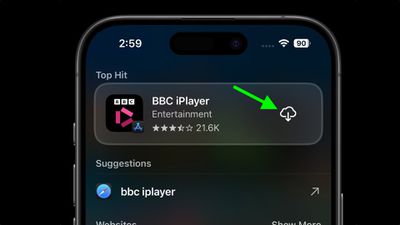
  4. search

Need to free up more storage? Check out our dedicated iPhone storage saving guide for more tips.


Popular Stories

iPhone Duo Trio

Here's What Apple's Apps Look Like on the iPhone Duo

Tuesday October 20, 2026 11:12 am PDT by
With just three days to go until the iPhone Duo is released, Apple is getting ready for the launch. Behind the scenes, the App Store now has screenshots of Apple's built-in apps running on the Duo. We've seen some apps in marketing materials, but images of the ones we haven't seen give us an idea of what it will be like using the iPhone Duo day to day. Many apps are shown in landscape...
Apple Creator Studio iWork suite

Apple Pulls Keynote, Pages and Numbers From App Store [Update: Back]

Thursday October 22, 2026 11:01 am PDT by
Apple has temporarily removed Keynote, Pages, and Numbers from the App Store, just after releasing an update that added iPhone Duo support and a new Intelligent Assistant. It is not clear if the apps were removed intentionally, or if it is a bug. Apple has not said when the apps will be reinstated, but if it was in error, they should return soon. Update: The Mac versions are back without...
M5 MacBook Pro

RIP, MacBook Ultra

Monday October 19, 2026 9:37 am PDT by
Apple today sent out invites for an experience in Los Angeles on Wednesday, October 28, and the "Pro and tell" tagline on the invitation likely means that the rumored MacBook models with touch-enabled OLED displays will stick with MacBook Pro branding instead of the once-rumored "MacBook Ultra" name. The long-rumored "iPhone Ultra" ended up being named iPhone Duo, so speculation that Apple...
Latest Stories
iPhone Duo Launch Begins as First Orders Reach Customers
5 hours ago
1Password for Agents Keeps Your Passwords Hidden From AI
6 hours ago
iPhone Duo 24 Hours Later: Your Questions Answered
7 hours ago
Apple's iWork Apps Get 'Intelligent Assistant' and iPhone Duo Support
8 hours ago
Apple is Apparently Considering a Slightly Larger iPhone Duo
8 hours ago
Giant iPhone Duo Displays Coming to Four Apple Stores
9 hours ago
Apple Pulls Keynote, Pages and Numbers From App Store [Update: Back]
10 hours ago
Apple Updates More Apps With iPhone Duo Support
10 hours ago
Apple Will Label Apps 'Made for iPhone Duo' in App Store
13 hours ago
Amazon Takes $49 Off iPad With Prices Starting at $399.99
14 hours ago
F1 on Apple TV Now Available in Dolby Atmos
14 hours ago
Apple Reveals More Than 50 Apps That Will Be Updated for iPhone Duo
15 hours ago
Apple Blocks Certificates That Could Help Attackers Fake Websites
16 hours ago
Giant iPhone Duo Installations Spotted at Apple Fifth Avenue
17 hours ago
iPhone Duo 2 Prototypes Include Under-Display Face ID
17 hours ago
Tesla App Gains iPad and iPhone Duo Support
21 hours ago
Apple Reportedly Boosts iPhone Duo Orders by 44%
21 hours ago
Fortnite Returning to Australian App Store After Court Ruling
22 hours ago
Apple Ordered to Open iPhone to Rival App Stores in Australia
22 hours ago
Apple Suppliers Face Hurdles Cutting Circuit Board Emissions
22 hours ago
Things Updated for iPhone Duo With Adaptive Layout
23 hours ago
Simplicity and Siri AI Are HomeView's Killer Features, Apple Says
23 hours ago
iPhone Duo Reviewers Really Miss Face ID
1 day ago
Does the iPhone Duo Run Hot? Here's What Reviews Found
1 day ago
Apple Music's New Look is Now Live on Apple's Website
1 day ago
Anthropic Launches Claude Duet, a Proactive AI Agent
1 day ago
What 32,000 Folds Did to the iPhone Duo's Hinge
1 day ago
iPhone Duo's Hidden FaceTime Camera Takes 'Trash' Photos
1 day ago
iPhone Duo Has 'Edge Light' Feature That Debuted on Macs Last Year
1 day ago
Apple Support App Updated for iPhone Duo's Larger Display
1 day ago









































