
How to Control the Transparency Feature on AirPods Max - GeekWebGuides
Skip to Content

How to Control the Transparency Feature on AirPods Max

by

This article explains how to control the Transparency feature on Apple's AirPods Max headphones. Bear in mind that iOS devices need to be running iOS 14.3 or later in order to support ‌AirPods Max. You can check that your device is updated by launching the Settings app and going to General -> Software Update.
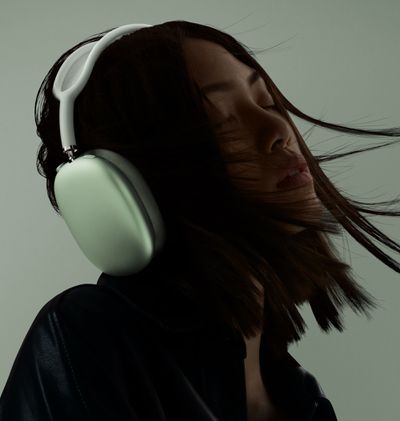
airpods max on head

What is the Transparency Feature on AirPods Max?

‌AirPods Max are Apple's first own-brand over-ear headphones with Active Noise Cancellation (ANC), which is designed to block out the outside world so you can focus on what you're listening to. Several microphones on the outside of the headphone listen to the noise around you and then create an inverse wave to reduce the volume of the incoming sound.

In contrast, Transparency mode allows you to simultaneously listen to music while still hearing the environment around you – whether that's to hear traffic during a walk or an important train announcement during the morning commute. It uses the same external microphones as ANC to monitor the sound, but that sound is then passed through the headphones just like any other audio, while advanced software ensures that your own voice sounds natural as your audio continues to play perfectly.

How to Control Transparency Mode on AirPods Max

There are three ways of controlling Transparency mode on ‌AirPods Max. The first method involves using a physical button on the ‌headphones themselves that offers default settings, while the second and third methods are accessed via onscreen menus on the connected iOS device.

Method 1:

  1. Allow your ‌AirPods‌ Max to connect to your iPhone or iPad in the usual way, by taking them out of the Smart Case and putting them over your ears.
  2. Press the noise control button on the top of the right ear cup to cycle between Noise Cancellation and Transparency, depending on your preference.
    airpods max digital crown

  3. You'll hear a tone when switching between the two functions.
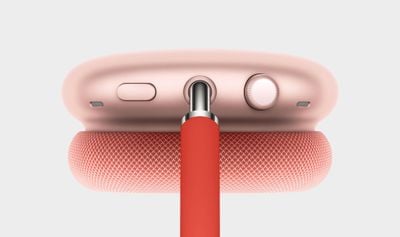
If you want, you can customize the noise control button on the ‌AirPods Max, and even use it to turn off the noise control features completely.

Method 2:

  1. Allow your ‌AirPods‌ Max to connect to your iPhone or ‌iPad‌ in the usual way, by taking them out of the Smart Case and putting them over your ears.
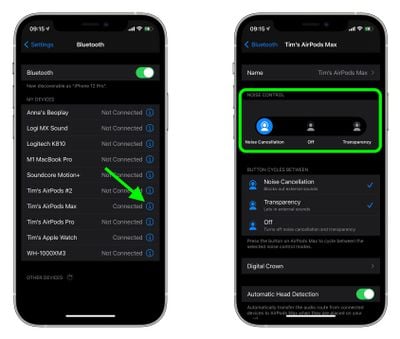
  2. Launch the Settings app on your iOS device.
  3. Tap Bluetooth.
    settings

  4. Under My Devices, tap the information icon (the circled "i") next to AirPods Max in the list.
  5. Under Noise Control, tap Noise Cancellation, Off, or Transparency, depending on your preference.
Method 3:

  1. Allow your AirPods Max to connect to your iPhone or ‌iPad‌ in the usual way, by taking them out of the Smart Case and putting them over your ears.
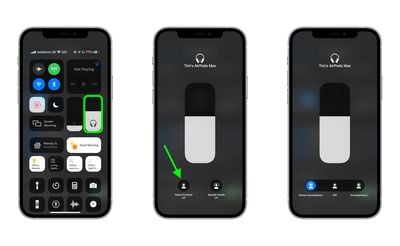
  2. Open Control Center on your iOS device: On an ‌iPad‌ with a Home button, double-tap the Home button; on iPhone 8 or earlier, swipe up from the bottom of the screen; and on a 2018 iPad Pro or iPhone X and later, swipe down from the upper right of the screen.

  3. Press and hold the Control Center volume bar (pair of earbuds will be visible inside of it to indicate the AirPods Max are connected.)
  4. Tap the Noise Control button.
    control center

  5. Use the strip of buttons to switch between Noise Cancellation, Off, or Transparency, depending on your preference.
How to Control Transparency Mode on Mac

If you've got your AirPods Max connected to a Mac running macOS Catalina or later, you can also control Transparency mode from the volume icon in the menu bar. Simply hover over your AirPods Max in the Output Device list to reveal a submenu, where you can click Transparency, Noise Cancellation, and Off.


Related Roundup: AirPods Max 2
Buyer's Guide: AirPods Max (Buy Now)
Related Forum: AirPods

Popular Stories

iPhone Duo Trio

Here's What Apple's Apps Look Like on the iPhone Duo

Tuesday October 20, 2026 11:12 am PDT by
With just three days to go until the iPhone Duo is released, Apple is getting ready for the launch. Behind the scenes, the App Store now has screenshots of Apple's built-in apps running on the Duo. We've seen some apps in marketing materials, but images of the ones we haven't seen give us an idea of what it will be like using the iPhone Duo day to day. Many apps are shown in landscape...
Apple Creator Studio iWork suite

Apple Pulls Keynote, Pages and Numbers From App Store [Update: Back]

Thursday October 22, 2026 11:01 am PDT by
Apple has temporarily removed Keynote, Pages, and Numbers from the App Store, just after releasing an update that added iPhone Duo support and a new Intelligent Assistant. It is not clear if the apps were removed intentionally, or if it is a bug. Apple has not said when the apps will be reinstated, but if it was in error, they should return soon. Update: The Mac versions are back without...
M5 MacBook Pro

RIP, MacBook Ultra

Monday October 19, 2026 9:37 am PDT by
Apple today sent out invites for an experience in Los Angeles on Wednesday, October 28, and the "Pro and tell" tagline on the invitation likely means that the rumored MacBook models with touch-enabled OLED displays will stick with MacBook Pro branding instead of the once-rumored "MacBook Ultra" name. The long-rumored "iPhone Ultra" ended up being named iPhone Duo, so speculation that Apple...
Latest Stories
iPhone Duo Launch Begins as First Orders Reach Customers
4 hours ago
1Password for Agents Keeps Your Passwords Hidden From AI
4 hours ago
iPhone Duo 24 Hours Later: Your Questions Answered
5 hours ago
Apple's iWork Apps Get 'Intelligent Assistant' and iPhone Duo Support
6 hours ago
Apple is Apparently Considering a Slightly Larger iPhone Duo
6 hours ago
Giant iPhone Duo Displays Coming to Four Apple Stores
7 hours ago
Apple Pulls Keynote, Pages and Numbers From App Store [Update: Back]
8 hours ago
Apple Updates More Apps With iPhone Duo Support
8 hours ago
Apple Will Label Apps 'Made for iPhone Duo' in App Store
11 hours ago
Amazon Takes $49 Off iPad With Prices Starting at $399.99
12 hours ago
F1 on Apple TV Now Available in Dolby Atmos
12 hours ago
Apple Reveals More Than 50 Apps That Will Be Updated for iPhone Duo
13 hours ago
Apple Blocks Certificates That Could Help Attackers Fake Websites
14 hours ago
Giant iPhone Duo Installations Spotted at Apple Fifth Avenue
15 hours ago
iPhone Duo 2 Prototypes Include Under-Display Face ID
15 hours ago
Tesla App Gains iPad and iPhone Duo Support
19 hours ago
Apple Reportedly Boosts iPhone Duo Orders by 44%
20 hours ago
Fortnite Returning to Australian App Store After Court Ruling
20 hours ago
Apple Ordered to Open iPhone to Rival App Stores in Australia
20 hours ago
Apple Suppliers Face Hurdles Cutting Circuit Board Emissions
21 hours ago
Things Updated for iPhone Duo With Adaptive Layout
21 hours ago
Simplicity and Siri AI Are HomeView's Killer Features, Apple Says
21 hours ago
iPhone Duo Reviewers Really Miss Face ID
1 day ago
Does the iPhone Duo Run Hot? Here's What Reviews Found
1 day ago
Apple Music's New Look is Now Live on Apple's Website
1 day ago
Anthropic Launches Claude Duet, a Proactive AI Agent
1 day ago
What 32,000 Folds Did to the iPhone Duo's Hinge
1 day ago
iPhone Duo's Hidden FaceTime Camera Takes 'Trash' Photos
1 day ago
iPhone Duo Has 'Edge Light' Feature That Debuted on Macs Last Year
1 day ago
Apple Support App Updated for iPhone Duo's Larger Display
1 day ago









































