Preview appOver the years, Adobe's PDF file type has become a universally accepted method for sharing digital documents. The format's cross-platform adoption means the documents can be viewed on almost any mobile device or computer, so it's no surprise to find that macOS includes native support for viewing and creating PDF files.

In the Preview app, for example, it's possible to create a single multi-page PDF document out of several separate image files. The feature is particularly useful if you need to share a number of scanned documents over email or digitize something for reference. Keep reading to learn how it's done.

How to Convert Several Images into a Single PDF

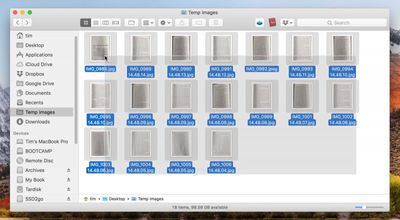
  1. In Finder, select all the images you want to include in the PDF. To do this, drag a box over several images files using your mouse cursor, or select them individually by holding the Command key and clicking them one by one.
    1 select images to pdf

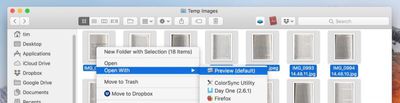
  2. Right-click (or Ctrl-click) one of the highlighted files and select Open With -> Preview in the contextual dropdown menu.
    2 open images in preview to pdf

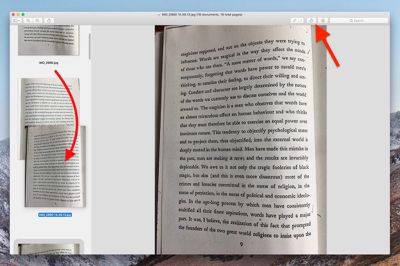
  3. In Preview's sidebar, drag the thumbnail images into the order that you want them to appear in the PDF document. Use the Rotate button in Preview's toolbar to change the orientation of individual pages (drag a selection over multiple pages to rotate several at once).
    3 rearrange images to pdf

  4. In the Preview menu bar, select File -> Print..., or use the Command+P keyboard shortcut to bring up the Print dialog.

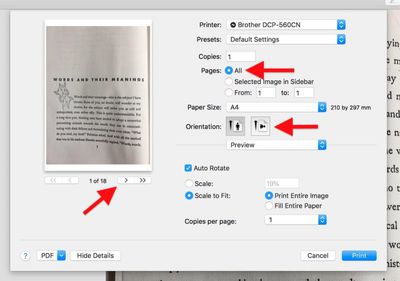
  5. Click Show Details to expand the Print dialog and browse the full set of options. Make sure the All button is selected in the Pages options. Note that you can double-check the orientation of each image by clicking the arrows below the print preview, and use the Orientation buttons to correct any if required.
    4 print options to pdf

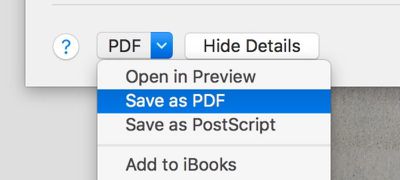
  6. Select Save as PDF from the PDF dropdown menu in the lower left of the Print dialog.
    5 save as pdf

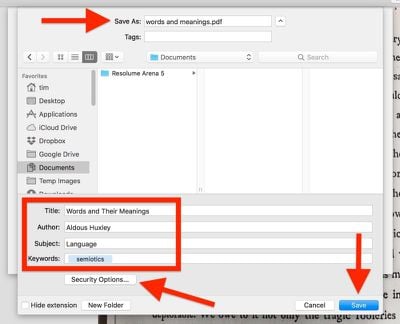
  7. The Save dialog will appear. Give your new PDF a name and choose a save location. Fill in the Title, Author, Subject, and Keywords fields if desired (these details are searchable in Spotlight). The Security Options... button also lets you optionally set a password to open the document, copy from it, and/or print it.
    6 name saved pdf

  8. Click Save when you're done.

Note that the Save as PDF option can be accessed from the Print dialog window within a number of macOS apps, not just Preview. You can use it to create PDFs of web pages viewed in Safari, or Word documents opened in Pages, for example.

Tag: Preview

Top Rated Comments

martyjmclean Avatar
101 months ago
you guys ever get 2 preview windows when opening a bunch of .jpgs for example? i dont get why that happens to me sometimes. All images could be taken from same camera in same session too
Preferences > Images > Open all files in one window.
Score: 9 Votes (Like | Disagree)
philosopherdog Avatar
101 months ago
Preview is one of the most powerful apps that comes with MacOS. So many people who started on Windows think they need adobe PDF reader. Preview will do it all without opening your Mac to adobes insecure reader.
Score: 7 Votes (Like | Disagree)
Xavier Avatar
101 months ago
That sounds handy, mind sharing how you did it?
Sure. And you can change the values to what you'd like.

Attachment Image
Score: 5 Votes (Like | Disagree)
Solomani Avatar
101 months ago
Very useful tip, thanks MR. IMHO, this one single tip is more valuable than the last 50 rumor articles on this website.
Score: 3 Votes (Like | Disagree)
martyjmclean Avatar
101 months ago
Neat tip! Reorganising and merging pages in Preview needs to be advertised more. So many people think you need Adobe Acrobat.
Score: 3 Votes (Like | Disagree)
MauiPa Avatar
101 months ago
I agreed with that statement until High Sierra. Several features are broken and PDF scaling is a blurry mess. There have been countless bug reports but no fixes. The majority of Apple's development resources have been reassigned to iOS and it is starting to show.
I'm not sure about that. This went around the Trolliverse awhile back, and came back as not true. Many people are using Preview with no problems at all.

So, unless you can more clearly state the problem as you see it and provide some way of duplicating it, I am going to have to say that I do not believe this statement.
[doublepost=1526751694][/doublepost]
Another thought about PDF on the Mac. It is not (as intimated by the article) merely a file format supported by Preview that was added because it is useful across platforms. The integration of PDF into the Mac is much deeper than that. One of the best design decisions Apple made with the development of OS X was creating Quartz as a display technology. Quartz is essentially Apple's implementation of PDF. Native outputting of virtually any document to PDF has been a feature of OS X from day one because it's integrated into the OS. At one point early in the OS X development process Apple even demonstrated a PDF editing tool. That app disappeared pretty quickly though. I suspect they ran into trouble with Adobe.
Copyright lawyers rule the world!
[doublepost=1526752307][/doublepost]
Very nice tip. Not around my Mac so can't test. Does it tip only work for images? I would like to combine some pdf files. And can it delete pdf pages? That's the only feature I miss when I stop using adobe acrobat.
its easy to combine pdf files in Preview. One way is to have both files open in separate windows, display the thumbnails in the sidebar, and drag or copy and paste from one to the other. you can also change the order of pages and and delete pages fro thumbnails. You can even create an automator workflow to select the pdfs and then combine them into one.
[doublepost=1526752361][/doublepost]
Neat. How do you get it to arrange the order of images in the pdf?
view thumbnails, and drag
[doublepost=1526753307][/doublepost]
Anyone know of a way to create the PDF in B&W so the size isn't gargantuan?
you can file print, then select pdf, this "flattens" the file and makes it very small. but not in black and white.

if you really want that, select file Export, use "quartz filter" to select Black and White
[doublepost=1526753610][/doublepost]
I wrote a native MacOS app in Swift that does the same! Was a fun project. Workflow is much simpler if all you want to do it convert images to a PDF.

Search Concat in Mac App Store (sorry on phone and cannot provide link)
Sounds fun. I wrote an Automator Action, that I also save as a service to Preview. This program annotates widgets (example was forms using fillable fields). It has multiple modes. Reset to clear widgets, index to number the widgets, import to load widgets from csv, and paste to paste widgets from Numbers (I guess could also be Excel or others too). Very fun, contact me if you want code, I also aim to post on GitHub. Love to see someone pick it up and go commercial
[doublepost=1526754694][/doublepost]
Very timely for me. I have been trying to do this from my Win machine, but the resulting PDF is too large for email. Does anyone know if Preview will compress the images or resulting PDF to a manageable size?

Also, is there an equivalent workflow in iOS? My source images are all pictures taken from my iPhone. Would be a huge timesaver to dump them into a single PDF for sharing by email on my iPhone.
Many ways to compress pdfs. "Flatten", by file print, then select PDF. file Export, choose format, save as images. Automator to compress images.

iOS: https://thesweetsetup.com/apps/best-pdf-manager-editor-ipad/. this reviews many PDF editor apps. I personally used PDF Expert by Readle - excellent app.
Score: 2 Votes (Like | Disagree)

Popular Stories

maxresdefault

Apple Shows Off a Key Reason to Upgrade to the iPhone 17

Saturday February 7, 2026 9:26 am PST by
Apple today shared an ad that shows how the upgraded Center Stage front camera on the latest iPhones improves the process of taking a group selfie. "Watch how the new front facing camera on iPhone 17 Pro takes group selfies that automatically expand and rotate as more people come into frame," says Apple. While the ad is focused on the iPhone 17 Pro and iPhone 17 Pro Max, the regular iPhone...
Finder Siri Feature

Why Apple's iOS 26.4 Siri Upgrade Will Be Bigger Than Originally Promised

Friday February 6, 2026 3:06 pm PST by
In the iOS 26.4 update that's coming this spring, Apple will introduce a new version of Siri that's going to overhaul how we interact with the personal assistant and what it's able to do. The iOS 26.4 version of Siri won't work like ChatGPT or Claude, but it will rely on large language models (LLMs) and has been updated from the ground up. Upgraded Architecture The next-generation...
wwdc sans text feature

Apple Rumored to Announce New Product on February 19

Thursday February 5, 2026 12:22 pm PST by
Apple plans to announce the iPhone 17e on Thursday, February 19, according to Macwelt, the German equivalent of Macworld. The report, citing industry sources, is available in English on Macworld. Apple announced the iPhone 16e on Wednesday, February 19 last year, so the iPhone 17e would be unveiled exactly one year later if this rumor is accurate. It is quite uncommon for Apple to unveil...
apple wallet drivers license feature iPhone 15 pro

Apple Says These 7 U.S. States Plan to Offer iPhone Driver's Licenses

Monday February 9, 2026 6:24 am PST by
In select U.S. states, residents can add their driver's license or state ID to the Apple Wallet app on the iPhone and Apple Watch, and then use it to display proof of identity or age at select airports and businesses, and in select apps. The feature is currently available in 13 U.S. states and Puerto Rico, and it is expected to launch in at least seven more in the future. To set up the...
14 inch MacBook Pro Keyboard

New MacBook Pros Could Now Arrive in March

Sunday February 8, 2026 6:02 am PST by
New MacBook Pro models with the M5 Pro and M5 Max chips could arrive as soon as Monday, March 2, according to Bloomberg's Mark Gurman. In today's "Power On" newsletter, Gurman said that the release of new MacBook Pro models is tied to the release of macOS Tahoe 26.3. The launch is said to be slated for as early as the week of March 2. He added that the M4 Pro and M4 Max models on sale today...