

 Following Apple's revamp to its stock Reminders mobile app in iOS 13, you can now group together separate reminders lists under a single heading to keep the My Lists section more compact and tidy.
Not only do reminder groups keep the app neat, they also make it easier for you to organize related lists. For example, if you have several lists for different work projects, you can aggregate them all into a "Work" group.
The following steps show you how to group several reminder lists under one heading.
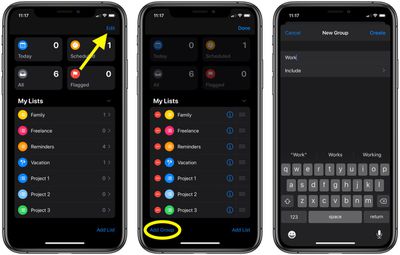
- Launch the Reminders app on your iPhone or iPad and navigate to the top of the app.
- Tap Edit in the top-right corner of the screen.
- Tap Add Group at the bottom-left corner of the screen.

- Give your group a name.
- Tap Include, then select the reminder lists that you want to group together by tapping the green plus button beside each one.
- Tap New Group to return to the previous screen, then tap Create.
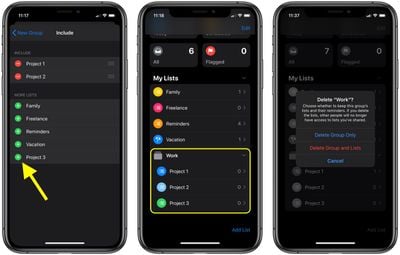
When a group is collapsed under the My Lists section of the app, the number of reminders it collectively contains is shown to its right. Simply tap a group to expand it and reveal the individual reminder lists.
If you swipe leftwards across a group in My Lists and tap the delete button, you'll be asked whether you want to delete the group but keep the group's lists and their reminders, or delete both the group and its lists.


















