Create Custom Emoji in Messages With Genmoji - MacRumors
Skip to Content

Create Custom Emoji in Messages With Genmoji

by

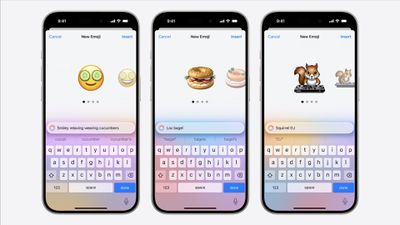
In iOS 18.2 and later, Apple's Genmoji feature lets you create personalized emoji that aim to perfectly match what you want to express, going far beyond the limitations of standard Unicode emoji. Want an emoji of a break-dancing astronaut or a dog playing bagpipes? With Genmoji, you can make it happen.

Genmoji Feature 1
Unlike standard emoji that are fixed Unicode characters, Genmoji are dynamically generated using on-device AI. They work seamlessly in text, appearing as inline emoji characters in supported apps like Messages and Notes. You can even create Genmoji based on people in your Photos app, making them more personal and expressive.

Requirements and Availability

Genmoji is available in iOS 18.2 and later. The feature requires Apple Intelligence, which is limited to iPhone 15 Pro/Pro Max and iPhone 16 series models. Note that Apple Intelligence (enabled in Settings ➝ Apple Intelligence & Siri) is only available when your iPhone and Siri are set to the same language.
iOS 18 Genmoji WWDC

Compatibility

While Genmoji work best between iOS 18.2 and later devices, they're also viewable on devices running iOS/iPadOS 18.1 and later, as well as Macs running macOS Sequoia 15.1 and later.

On older Apple devices or Android phones, Genmoji appear as regular images rather than inline emoji characters. Third-party apps need to specifically add Genmoji support to enable creation and proper display of these custom emoji.

Creating Custom Emoji in Messages

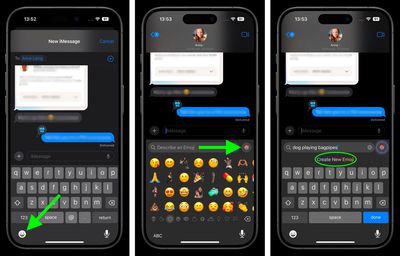
  1. In Messages, start a conversation or choose an existing one.
  2. Tap the emoji symbol in the bottom-left corner of the keyboard.
  3. In the emoji search field, describe your desired emoji (alternatively, tap the colored smiling emoji at the far right, then enter your description).
  4. Tap Create New Emoji.
    messages

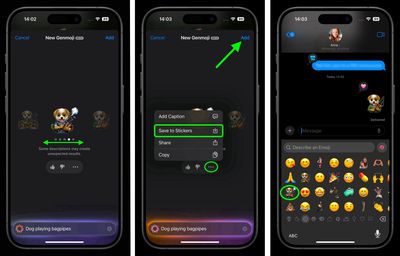
  5. On the New Genmoji screen, wait a moment for the amorphous blob to transform into your new emoji.
  6. When the navigational symbols appear below the emoji, swipe left to preview alternative versions of your creation.
  7. Tap the ellipsis button to add a caption to your emoji or save it as a sticker. You can also provide feedback to Apple using the thumbs up/down buttons.
  8. Tap Add when you're happy with your selection, then tap the blue arrow button to send your new Genmoji.
    messages

With Genmoji, emoji finally become as limitless as your imagination. Having said that, Apple does maintain content restrictions similar to Image Playground to keep things appropriate. Regardless, once you start creating custom emoji, you might find standard emoji feeling a bit limited in comparison.


Popular Stories

Apple Intelligence Comes Under Fire Feature

Mac Users Reclaim 12GB+ of Storage With Apple Intelligence Removal Tool

Monday October 5, 2026 4:12 am PDT by
A new open-source tool is making waves in the Mac community by helping users reclaim valuable storage space taken up by Apple's AI models. Called "RemoveMacAI," the command line tool disables Apple Intelligence on macOS 27, removes its downloaded models, and prevents them from being downloaded again. In macOS 27, Apple removed the toggle to disable Apple Intelligence wholesale, and simply...
apple intelligence black

Apple Intelligence Taking Up 30GB+ on Some Macs Running macOS 27

Wednesday September 23, 2026 3:30 am PDT by
After you install macOS 27 Golden Gate, Apple automatically downloads a multi-gigabyte AI model to your Mac the next time it's connected to the internet. Unlike previous versions of macOS, you can't prevent it. Siri AI, and by extension Apple Intelligence, are now a mandatory part of your system. For macOS 27 Golden Gate, Apple says the latest Apple Intelligence features require up to 14GB...
Apple TV Sans Remote Feature

tvOS 27.2 Code Hints at Apple Intelligence for New Apple TV

Monday October 5, 2026 1:45 pm PDT by
Apple's latest tvOS 27.2 beta adds weight to rumors that the next Apple TV will have Siri AI and Apple Intelligence support. Code suggests Apple is adding an Improve Siri & Apple Intelligence toggle to the tvOS Settings app. "Help improve foundation models and Siri by allowing Apple to collect and use your text and audio interactions with Siri, Dictation, and Translate," the text reads....
Latest Stories
iPhone Duo Launch Begins as First Orders Reach Customers
17 minutes ago
1Password for Agents Keeps Your Passwords Hidden From AI
1 hour ago
iPhone Duo 24 Hours Later: Your Questions Answered
2 hours ago
Apple's iWork Apps Get 'Intelligent Assistant' and iPhone Duo Support
2 hours ago
Apple is Apparently Considering a Slightly Larger iPhone Duo
3 hours ago
Giant iPhone Duo Displays Coming to Four Apple Stores
4 hours ago
Apple Pulls Keynote, Pages and Numbers From App Store [Update: Back]
4 hours ago
Apple Updates More Apps With iPhone Duo Support
5 hours ago
Apple Will Label Apps 'Made for iPhone Duo' in App Store
8 hours ago
Amazon Takes $49 Off iPad With Prices Starting at $399.99
8 hours ago
F1 on Apple TV Now Available in Dolby Atmos
9 hours ago
Apple Reveals More Than 50 Apps That Will Be Updated for iPhone Duo
9 hours ago
Apple Blocks Certificates That Could Help Attackers Fake Websites
11 hours ago
Giant iPhone Duo Installations Spotted at Apple Fifth Avenue
11 hours ago
iPhone Duo 2 Prototypes Include Under-Display Face ID
12 hours ago
Tesla App Gains iPad and iPhone Duo Support
16 hours ago
Apple Reportedly Boosts iPhone Duo Orders by 44%
16 hours ago
Fortnite Returning to Australian App Store After Court Ruling
17 hours ago
Apple Ordered to Open iPhone to Rival App Stores in Australia
17 hours ago
Apple Suppliers Face Hurdles Cutting Circuit Board Emissions
17 hours ago
Things Updated for iPhone Duo With Adaptive Layout
18 hours ago
Simplicity and Siri AI Are HomeView's Killer Features, Apple Says
18 hours ago
iPhone Duo Reviewers Really Miss Face ID
23 hours ago
Does the iPhone Duo Run Hot? Here's What Reviews Found
1 day ago
Apple Music's New Look is Now Live on Apple's Website
1 day ago
Anthropic Launches Claude Duet, a Proactive AI Agent
1 day ago
What 32,000 Folds Did to the iPhone Duo's Hinge
1 day ago
iPhone Duo's Hidden FaceTime Camera Takes 'Trash' Photos
1 day ago
iPhone Duo Has 'Edge Light' Feature That Debuted on Macs Last Year
1 day ago
Apple Support App Updated for iPhone Duo's Larger Display
1 day ago