How to Create Your Own GIFs in the Twitter iOS App - MacRumors
Skip to Content

How to Create Your Own GIFs in the Twitter iOS App

by

Twitter has updated its iOS app with a new in-app camera feature that lets users create their own animated GIFs for posting to the social media platform. The following steps show you how it's done.

Twitter Feature

  1. In Twitter, hit the big blue plus button to start composing a tweet.
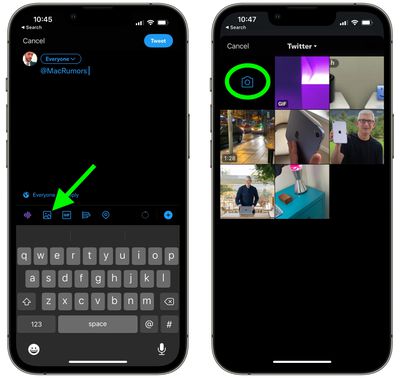
  2. Tap the picture icon in the compose window, just above the virtual keyboard.
  3. Tap the camera icon.
    twitter

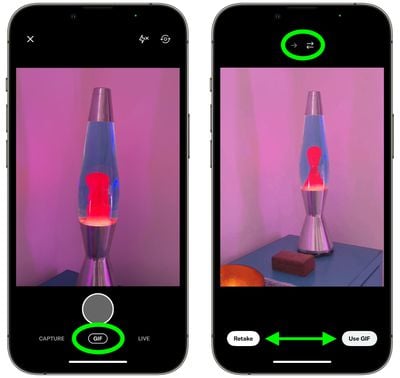
  4. Make sure GIF is selected below the shutter button.
  5. Tap the shutter button to create a short GIF or long press the button to record a longer one.
  6. Use the arrow icons above the viewfinder to set the GIF to repeat from the start or to continually invert the direction of playback for a "boomerang" effect.
  7. If you're happy with the outcome, tap Use GIF and then tweet your creation. If you'd like to start over, tap Retake.
    twitter

Note that the feature is iOS-only as of writing, and GIFs created in this way can't be saved to your iPhone – they can only be tweeted.

Tag: Twitter

Popular Stories

X twitter logo

XChat App Now Available

Friday April 24, 2026 1:46 pm PDT by
X today launched XChat, a standalone messaging app for the iPhone and iPad, available now on the App Store. XChat allows users to chat with anyone on X in a private, focused space separate from the main X app. At launch, the app supports direct messaging and group chats, audio and video calls, and file sharing. X claims all messages are end-to-end encrypted and PIN protected, with no ads or...
Apple Event Logo

Apple's Next Era Begins September 1

Thursday May 7, 2026 10:36 am PDT by
Apple recently announced that Tim Cook will be stepping down as CEO later this year, after 15 years of leading the company. Effective September 1, Apple's hardware engineering chief John Ternus will become the company's next CEO, while Cook will become executive chairman of Apple's board of directors. In his new role, Apple said Cook will assist with "certain aspects" of the company,...
Instagram Feature 2

PSA: Instagram Encrypted Messaging Ends on Friday, May 8

Tuesday May 5, 2026 8:24 am PDT by
Instagram will remove end-to-end encryption for direct messages between users from May 8, 2026. When the date comes around, Meta will potentially be able to see the contents of all messages between users on the social media platform. Encrypting messages has been an optional feature in Instagram since 2023, but in March of this year the social media platform quietly updated a help page to say ...