

With iOS 15 and Hide My Email, you can create unique, random email addresses that forward to your personal inbox whenever you want to keep your personal email address private.
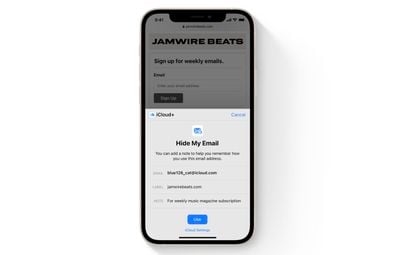
This is especially useful if you think that a business or website is likely to share your email address with ad agencies or other third-parties for marketing purposes. Providing them with a dummy address means you can delete the address at any time, ensuring any unsolicited emails don't reach your inbox.
How to Create an Email Address Using Hide My Email
The following steps show you how to create a new dummy email address with Hide My Email, for use in Safari and Mail. Make sure your iOS device is running iOS 15 or later.
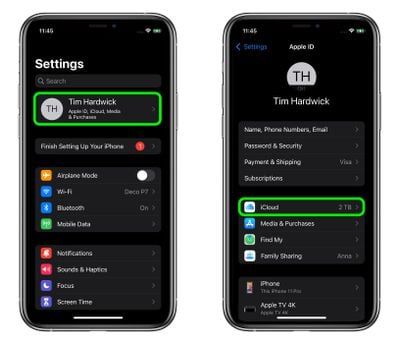
- Launch the Settings app on your iPhone or iPad
- Tap your Apple ID name at the top of the main settings menu.
- Tap iCloud.

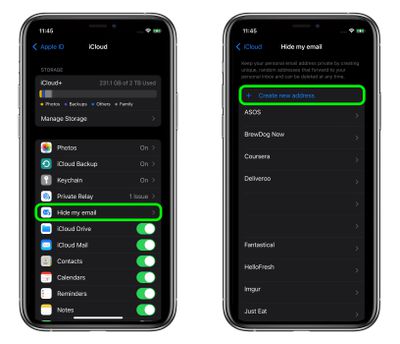
- Tap Hide My Email.
- Tap Create new address.
- Tap Continue, then give your address an identifying label. You can also optionally make a note about it.
- Tap Next, then tap Done.
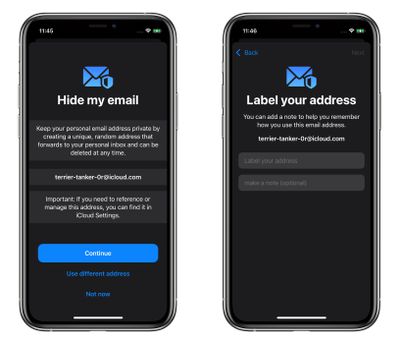
You can now use the random email address when you send emails in Mail, or when you're asked to enter your email address on a website in Safari.
You can also deactivate or delete addresses generated by Hide My Email, and change your forwarding address at a later date. See the links for details.


























![Apple Pulls Keynote, Pages and Numbers From App Store [Update: Back]](https://images.macrumors.com/t/Okb7kitB_gNr6qe5Pex9nQIysD8=/112x112/article-new/2026/01/Apple-Creator-Studio-iWork-suite.jpg)

















