

In iOS 16.2, Apple allows iPhone 14 owners to customize certain elements of the always on display mode. Keep reading to learn how it's done.
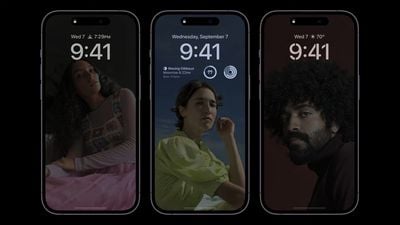
The iPhone 14 Pro and iPhone 14 Pro Max come with some advanced features not included in the rest of the iPhone 14 series. One of these features is the always on display, which is made possible by a more power-efficient OLED panel that can drop its refresh rate to as low as 1Hz, thereby preserving battery life.
When the iPhone 14 Pro originally launched with iOS 16 installed, the always on display showed a dimmed version of the iPhone's Lock Screen wallpaper behind any widgets and notifications, but there were no customization options.
This gave an idle iPhone 14 Pro a standardized yet unique look compared to other devices with always on displays, but some users wished that they could change certain elements for a more subtle or veiled look.
For example, some users said it would be desirable to hide their notifications when the always on display is active for security purposes. Other users wished the wallpaper was hidden in the always on display mode, because its visibility can make an iPhone appear as though the screen is active when it's not, which can provoke anxiety or confusion.
Thankfully, Apple listened to user feedback, and in iOS 16.2, it added new customization options that allow users to hide notifications and the Lock Screen wallpaper from the always on display mode. The following steps show you how it's done.
- Launch the Settings app on your iPhone.
- Tap Display & Brightness.
- Tap Always On Display.
- Toggle off the switch next to Show Wallpaper.
- Toggle off the switch next to Show Notifications.
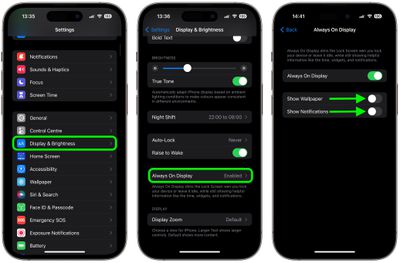
That's all there is to it. The next time you put down your locked iPhone, the always on display will show the time and any widgets, but either your wallpaper or your notifications, or both, will remain hidden depending on your settings.
























![Apple Pulls Keynote, Pages and Numbers From App Store [Update: Back]](https://images.macrumors.com/t/Okb7kitB_gNr6qe5Pex9nQIysD8=/112x112/article-new/2026/01/Apple-Creator-Studio-iWork-suite.jpg)





















