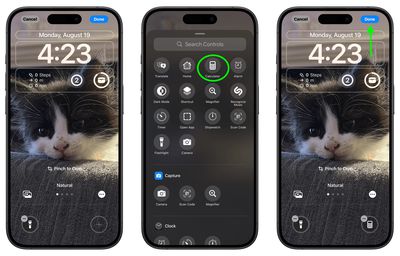
iOS 18: Replace or Remove Lock Screen Camera and Flashlight Icons - MacRumors
Skip to Content

iOS 18: Replace or Remove Lock Screen Camera and Flashlight Icons

by

In iOS 18, currently in beta, Apple is allowing iPhone users to replace the flashlight and camera buttons on the Lock Screen with something more useful, or to make them disappear entirely.
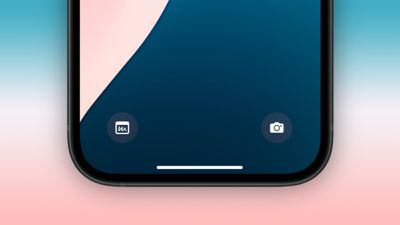
ios 18 lock screen buttons
The dedicated flashlight and camera shortcuts you see at the bottom of your iPhone's Lock Screen were introduced in their current form with the release of iOS 11 alongside the iPhone X in 2018, and the two icons have since been a staple, non-customizable feature.

But that's all set to change this September with the launch of iOS 18. The Lock Screen buttons on your iPhone can now be replaced with any Control Center option. This includes system features like Dark Mode, Airplane Mode, Accessibility options, Calculator, and Translate, as well as Shortcuts – making the functional possibilities endless.

The change in iOS 18 is part of a broader Control Center redesign, significantly expanding the quick access potential from the Lock Screen. Apple has also opened up this functionality to third-party apps, allowing their icons to be added to the Control Center and, by extension, the Lock Screen buttons.

To maintain user privacy and data security, certain options may require Face ID or Touch ID authentication before granting access from the Lock Screen. This ensures that sensitive information remains protected even with this increased accessibility.

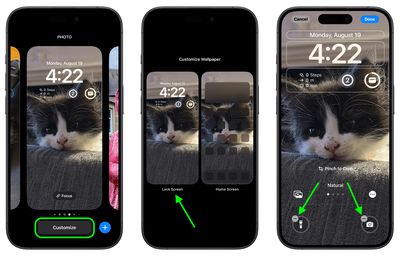
The following steps explain how to switch up your Lock Screen buttons in iOS 18:

  1. Press and hold on the Lock Screen after authenticating.
  2. Tap Customize.
  3. Tap Lock Screen.
  4. From there, tap the "-" icon to remove apps that are assigned to those buttons. The Flashlight and Camera apps are the default, so they will need to be removed.
    Lock Screen

  5. Next, tap the "+" button and choose a new control to add from the scrolling menu of options.
  6. Repeat for the second Lock Screen button if desired.
  7. Tap Done in the top-right corner to finish.
    Lock Screen

Don't forget that if you replace the camera button or remove it completely, you can still easily access the Camera app from the Lock Screen by swiping left across the screen.


Top Rated Comments

DonutHands Avatar
23 months ago
I don't need a 'clean' lock screen, let me add more than 2 buttons.
Score: 15 Votes (Like | Disagree)
WarmWinterHat Avatar
23 months ago
Finally! I can remove both! I've never wanted any icons on my Lock Screen.

Now let me disable swipe for the camera. I don't want anything accessible on my device while locked.
Score: 14 Votes (Like | Disagree)
klasma Avatar
23 months ago

you can still easily access the Camera app from the Lock Screen by swiping left across the screen.

I might prefer disabling the swiping and keeping the button.
Score: 13 Votes (Like | Disagree)
Avenged110 Avatar
23 months ago
Yet you still can’t disable that infuriating swipe-left-for-camera gesture that I never intentionally use and is always getting in the way when I try to clear notifications.
Score: 12 Votes (Like | Disagree)
MacManiac76 Avatar
23 months ago
The swipe left to access the camera app is my most hated "feature" of iOS. I have accidentally activated it too many times to count while trying to dismiss notifications that I swear that the developer that implemented this is laughing behind my back when I do it. 😂
Score: 6 Votes (Like | Disagree)
ProbablyDylan Avatar
23 months ago
I just removed both shortcuts. I have flashlight on the action button and can swipe over to the camera. Lock screen looks much cleaner.
Score: 6 Votes (Like | Disagree)

Popular Stories

Apple Event Logo

Apple's Next Era Begins September 1

Thursday May 7, 2026 10:36 am PDT by
Apple recently announced that Tim Cook will be stepping down as CEO later this year, after 15 years of leading the company. Effective September 1, Apple's hardware engineering chief John Ternus will become the company's next CEO, while Cook will become executive chairman of Apple's board of directors. In his new role, Apple said Cook will assist with "certain aspects" of the company,...
Instagram Feature 2

PSA: Instagram Encrypted Messaging Ends on Friday, May 8

Tuesday May 5, 2026 8:24 am PDT by
Instagram will remove end-to-end encryption for direct messages between users from May 8, 2026. When the date comes around, Meta will potentially be able to see the contents of all messages between users on the social media platform. Encrypting messages has been an optional feature in Instagram since 2023, but in March of this year the social media platform quietly updated a help page to say ...
macbook neo launch day

Apple May Drop Base $599 MacBook Neo as Chip, DRAM Costs Climb

Thursday May 7, 2026 4:55 am PDT by
Apple is considering dropping the cheapest MacBook Neo configuration as one possible response to the rising cost of building the popular laptop, according to Taiwan-based tech columnist and former Bloomberg reporter Tim Culpan. The Neo currently starts at $599 for a 256GB model, with a 512GB version at $699. Writing in his latest Culpium newsletter, Culpan says cutting the entry-level...